


In this project, we will be creating an Android Digi Locker app that allows users to securely save their documents and files on Firebase storage and download them when needed.
With the increasing need for secure digital storage, a digital locker app can come in handy for individuals, students, and businesses alike. We will be using Android Studio and Firebase to build this app.
About Android Digi Locker
The objective of Android Digi Locker Project is to help you build your own digital locker app and understand the basics of Firebase storage integration in Android apps.
By the end of this project, you will have a functioning app that allows users to upload and download files securely to and from Firebase storage.
Prerequisites for Digi Locker using Android
Before we begin, you will need to have some basic knowledge of Android app development and Java programming. You should also have Android Studio installed on your computer and a Firebase account set up.
Download Android Digi Locker Project
Please download the source code of Android Digi Locker Project from the following link: Android Digi Locker Project Code
Steps to Create Digi Locker Project using Android
Following are the steps for developing the Android Digi Locker Project:
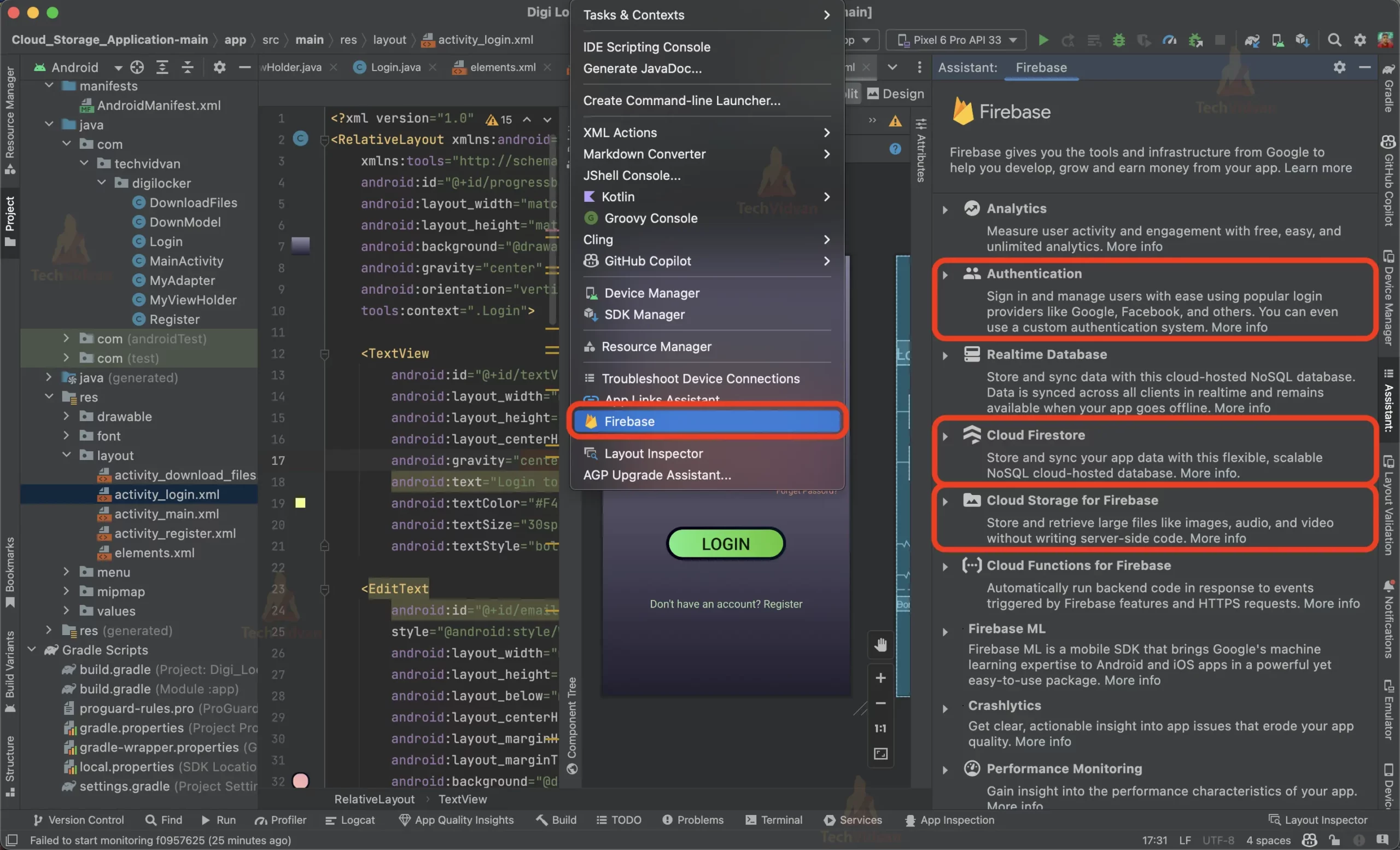
Step 1: Creating the android project using java as the language and adding the firebase library using the inbuilt firebase library assistant in the Android Studio.

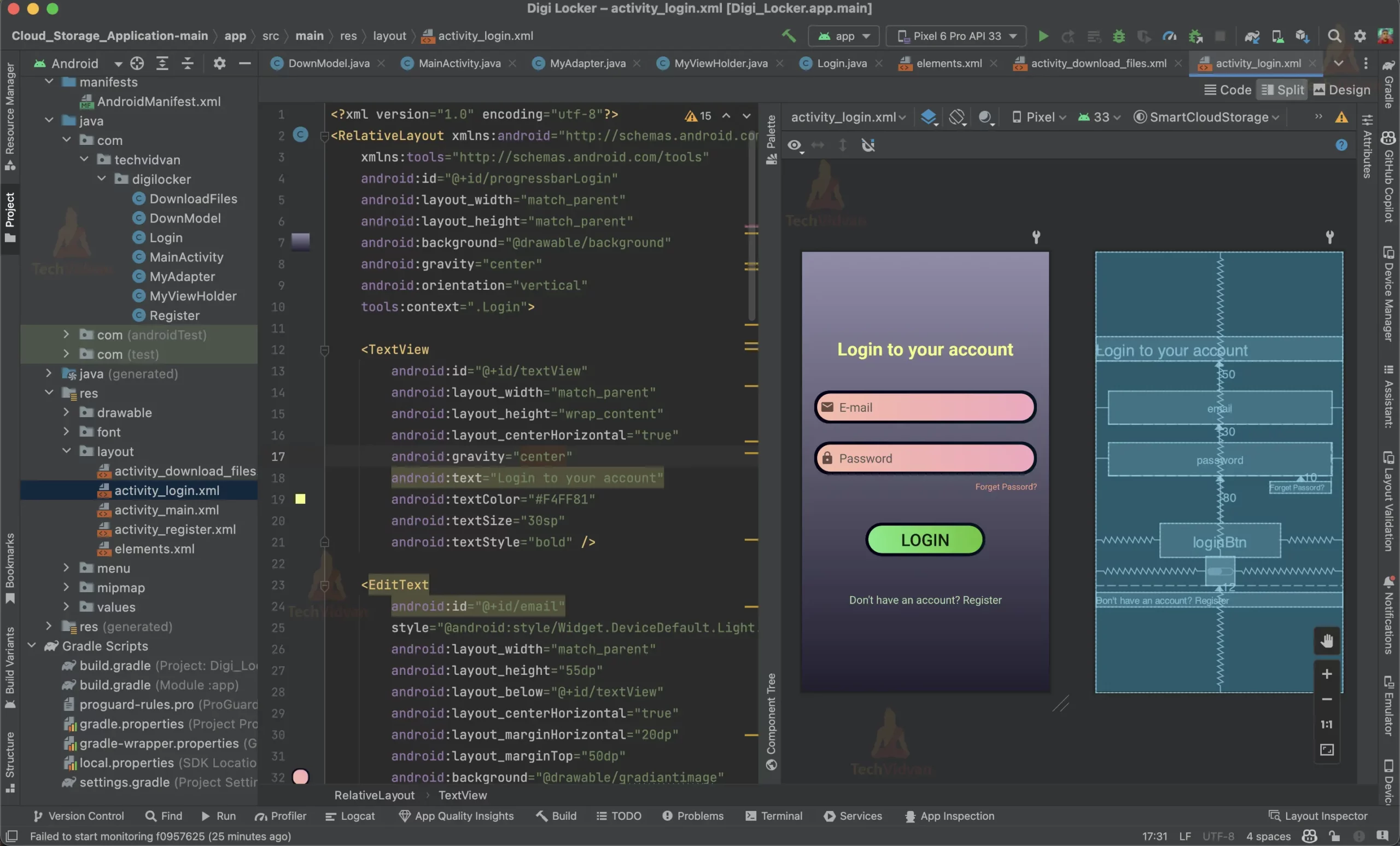
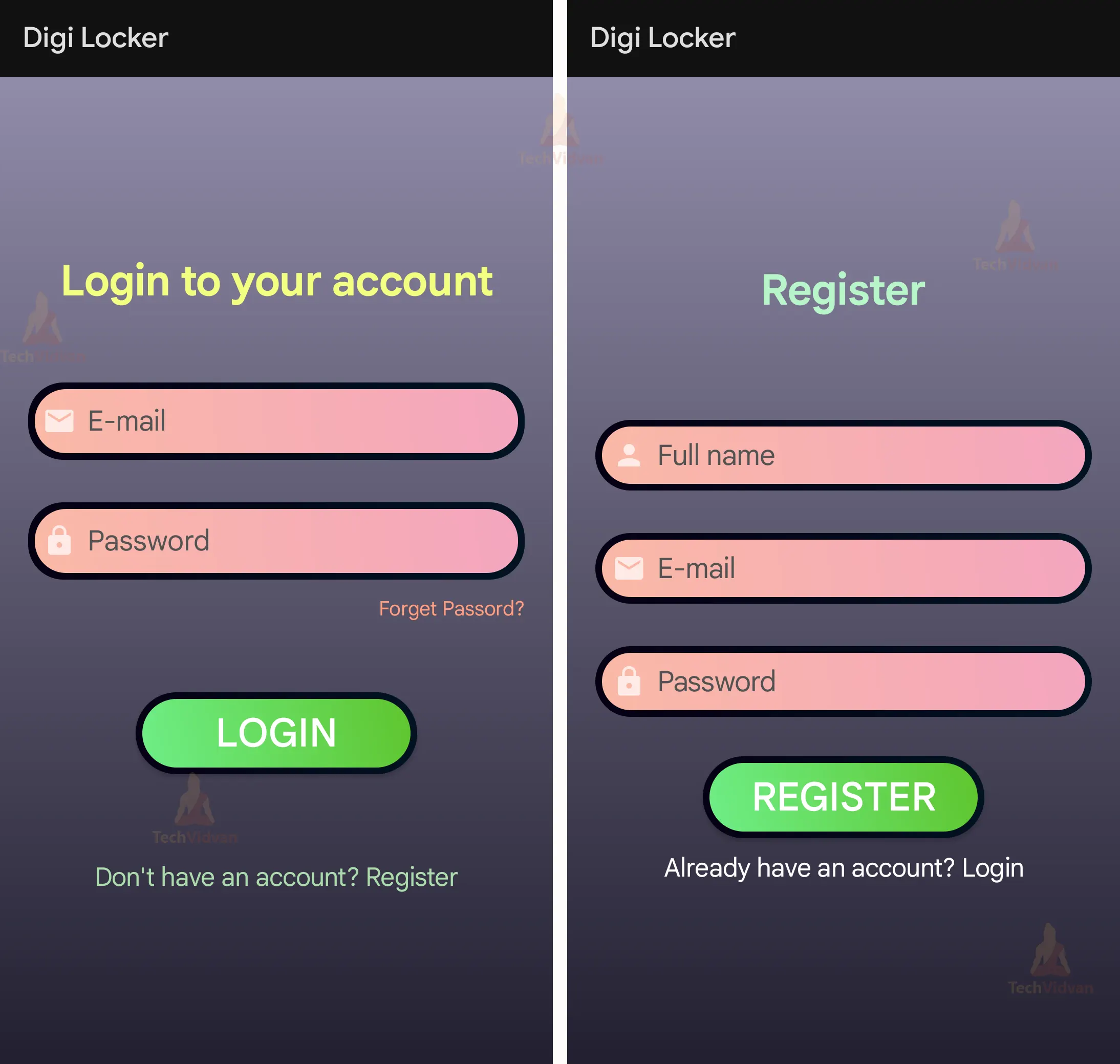
Step 2: Creating Login layout: This layout will help the users to login into the Digi locker. It will also allow users to reset their password if they forget their password.
activity_login.xml
<?xml version="1.0" encoding="utf-8"?>
<RelativeLayout xmlns:android="http://schemas.android.com/apk/res/android"
   xmlns:tools="http://schemas.android.com/tools"
   android:id="@+id/progressbarLogin"
   android:layout_width="match_parent"
   android:layout_height="match_parent"
   android:background="@drawable/background"
   android:gravity="center"
   android:orientation="vertical"
   tools:context=".Login">

   <TextView
       android:id="@+id/textView"
       android:layout_width="match_parent"
       android:layout_height="wrap_content"
       android:layout_centerHorizontal="true"
       android:gravity="center"
       android:text="Login to your account"
       android:textColor="#F4FF81"
       android:textSize="30sp"
       android:textStyle="bold" />

   <EditText
       android:id="@+id/email"
       style="@android:style/Widget.DeviceDefault.Light.AutoCompleteTextView"
       android:layout_width="match_parent"
       android:layout_height="55dp"
       android:layout_below="@+id/textView"
       android:layout_centerHorizontal="true"
       android:layout_marginHorizontal="20dp"
       android:layout_marginTop="50dp"
       android:background="@drawable/gradiantimage"
       android:drawableLeft="@drawable/custom_email_icon"
       android:drawablePadding="8dp"
       android:ems="10"
       android:hint="E-mail"
       android:inputType="textPersonName"
       android:padding="10dp"
       android:textColor="@color/black"
       android:textColorHint="#535353"
       android:textSize="20sp" />

   <EditText
       android:id="@+id/password"
       android:layout_width="match_parent"
       android:layout_height="55dp"
       android:layout_below="@+id/email"
       android:layout_centerHorizontal="true"
       android:layout_marginHorizontal="20dp"
       android:layout_marginTop="30dp"
       android:background="@drawable/gradiantimage"
       android:drawableLeft="@drawable/custom_lock_icon"
       android:drawablePadding="8dp"
       android:hint="Password"
       android:inputType="textPassword"
       android:padding="10dp"
       android:textColorHint="#535353"
       android:textSize="20sp" />

   <androidx.appcompat.widget.AppCompatButton
       android:id="@+id/loginBtn"
       android:layout_width="200dp"
       android:layout_height="wrap_content"
       android:layout_below="@+id/password"
       android:layout_centerHorizontal="true"
       android:layout_marginTop="80dp"
       android:background="@drawable/gradiant4"
       android:text="Login"
       android:textSize="28sp" />

   <TextView
       android:id="@+id/registerDirect"
       android:layout_width="match_parent"
       android:layout_height="wrap_content"
       android:layout_below="@+id/progressBar"
       android:layout_centerHorizontal="true"
       android:layout_marginTop="12dp"
       android:gravity="center"
       android:text="Don't have an account? Register"
       android:textColor="@color/apk_view_background"
       android:textSize="18sp" />

   <ProgressBar
       android:id="@+id/progressBar"
       style="?android:attr/progressBarStyle"
       android:layout_width="wrap_content"
       android:layout_height="wrap_content"
       android:layout_below="@+id/loginBtn"
       android:layout_centerInParent="true"
       android:visibility="invisible" />

   <TextView
       android:id="@+id/forgetPassword"
       android:layout_width="wrap_content"
       android:layout_height="wrap_content"
       android:layout_below="@+id/password"
       android:layout_alignEnd="@id/password"
       android:layout_alignRight="@id/password"
       android:layout_marginTop="10dp"
       android:text="Forget Passord?"
       android:textColor="#FF9E80" />
</RelativeLayout>
Login.java
// Importing all the required packages
package com.techvidvan.digilocker;

import androidx.annotation.NonNull;
import androidx.appcompat.app.AppCompatActivity;

import android.content.Intent;
import android.os.Bundle;
import android.text.TextUtils;
import android.view.View;
import android.widget.Button;
import android.widget.EditText;
import android.widget.ProgressBar;
import android.widget.TextView;
import android.widget.Toast;

import com.google.android.gms.tasks.OnCompleteListener;
import com.google.android.gms.tasks.Task;
import com.google.firebase.auth.AuthResult;
import com.google.firebase.auth.FirebaseAuth;

// Creating a class for Login
public class Login extends AppCompatActivity {

   // Declaring all the variables
   EditText mEmail,mPassword;
   Button mLoginBtn;
   TextView mCreateBtn,forpass;
   ProgressBar progressBar;

   // Creating an object for FirebaseAuth
   FirebaseAuth fAuth;


   @Override
   protected void onCreate(Bundle savedInstanceState) {
       super.onCreate(savedInstanceState);
       setContentView(R.layout.activity_login);

       // Assigning the variables to the respective views
       mEmail = findViewById(R.id.email);
       mPassword = findViewById(R.id.password);
       progressBar = findViewById(R.id.progressBar);
       fAuth = FirebaseAuth.getInstance();
       mLoginBtn = findViewById(R.id.loginBtn);
       mCreateBtn = findViewById(R.id.registerDirect);
       forpass = findViewById(R.id.forgetPassword);

       // Setting an onclick listener for the login button
       mLoginBtn.setOnClickListener(new View.OnClickListener() {
           @Override
           public void onClick(View view) {

               // Getting the values from the edit text
               String email = mEmail.getText().toString().trim();
               String password = mPassword.getText().toString().trim();

               // Checking if the email and password fields are empty
               // If empty, then display an error message
               if(TextUtils.isEmpty(email)) {
                   mEmail.setError("Email is Required.");
                   return;
               }
               if(TextUtils.isEmpty(password)) {
                   mPassword.setError("Password is Required.");
                   return;
               }
               if(password.length() < 8) {
                   mPassword.setError("Password Must have 8 Characters");
                   return;
               }

               // Setting the progress bar to visible
               progressBar.setVisibility(View.VISIBLE);

               // Authenticating the user using the email and password
               fAuth.signInWithEmailAndPassword(email, password).addOnCompleteListener(new OnCompleteListener<AuthResult>() {
                   @Override
                   public void onComplete(@NonNull Task<AuthResult> task) {

                       // Checking if the task is successful
                       if(task.isSuccessful()) {

                           // Checking if the user has verified the email
                           if(fAuth.getCurrentUser().isEmailVerified()){
                               Toast.makeText(Login.this, "Logged in Successfully", Toast.LENGTH_SHORT).show();
                               startActivity(new Intent(getApplicationContext(), MainActivity.class));
                               finish();
                           }else{
                               Toast.makeText(Login.this, "Verify E-Mail first", Toast.LENGTH_SHORT).show();

                           }

                       } else{
                           // Displaying an error message if the task is not successful
                           Toast.makeText(Login.this, "Please first Sign-Up"+task.getException().getMessage(), Toast.LENGTH_SHORT).show();

                       }
                       progressBar.setVisibility(View.INVISIBLE);
                   }
               });


           }
       });

       // Setting an onclick listener for the forget password text view
       forpass.setOnClickListener(new View.OnClickListener() {
           @Override
           public void onClick(View view) {

               // Getting the value from the email edit text
               String email = mEmail.getText().toString().trim();
               if(email.isEmpty()){

                   // Displaying an error message if the email field is empty
                   mEmail.setError("Email Required");
               }
               else {

                   // Sending the password reset link to the email
                   fAuth.sendPasswordResetEmail(email).addOnCompleteListener(new OnCompleteListener<Void>() {
                       @Override
                       public void onComplete(@NonNull Task<Void> task) {
                           if (task.isSuccessful()) {
                               Toast.makeText(Login.this, "Password reset link send", Toast.LENGTH_SHORT).show();
                           } else {
                               Toast.makeText(Login.this, "Password reset fails", Toast.LENGTH_SHORT).show();
                           }
                       }
                   });
               }

           }
       });

       // Setting an onclick listener for the create account text view
       // If the user clicks on the text view, then the user will be redirected to the Register activity
       mCreateBtn.setOnClickListener(new View.OnClickListener() {
           @Override
           public void onClick(View v) {

               startActivity(new Intent(getApplicationContext(),Register.class));
           }
       });

   }

}

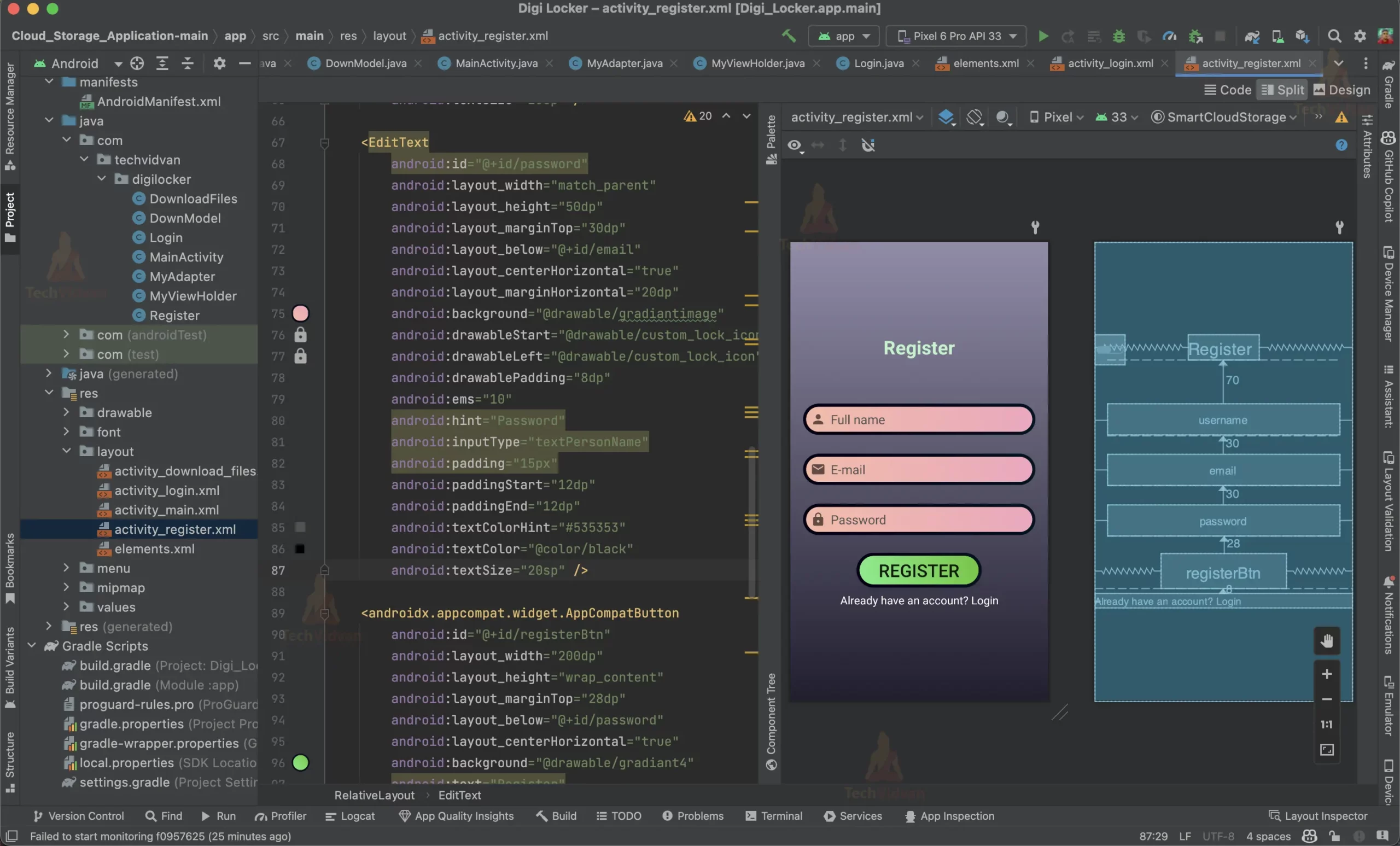
Step 3: Creating Registration Form Layout to register new users to the Digi locker. It will also verify user accounts through OTP.
activity_register.xml
<?xml version="1.0" encoding="utf-8"?>
<RelativeLayout xmlns:android="http://schemas.android.com/apk/res/android"
   xmlns:app="http://schemas.android.com/apk/res-auto"
   xmlns:tools="http://schemas.android.com/tools"
   android:layout_width="match_parent"
   android:layout_height="match_parent"
   android:orientation="vertical"
   android:gravity="center"
   android:background="@drawable/background"
   tools:context=".Register">

   <TextView
       android:id="@+id/register"
       android:layout_width="wrap_content"
       android:layout_height="wrap_content"
       android:text="Register"
       android:layout_centerHorizontal="true"
       android:textAppearance="@style/TextAppearance.AppCompat.Display2"
       android:textColor="#B9F6CA"
       android:textStyle="bold"
       android:textSize="30sp" />
   <EditText
       android:id="@+id/username"
       android:layout_width="match_parent"
       android:layout_height="50dp"
       android:layout_marginTop="70dp"
       android:layout_below="@+id/register"
       android:layout_marginHorizontal="20dp"
       android:layout_centerHorizontal="true"
       android:background="@drawable/gradiantimage"
       android:drawableStart="@drawable/custom_user_icon"
       android:drawableLeft="@drawable/custom_user_icon"
       android:drawablePadding="8dp"
       android:ems="10"
       android:hint="Full name"
       android:inputType="textPersonName"
       android:padding="15px"
       android:paddingStart="12dp"
       android:paddingEnd="12dp"
       android:textColorHint="#535353"
       android:textColor="@color/black"
       android:textSize="20sp" />

   <EditText
       android:id="@+id/email"
       android:layout_width="match_parent"
       android:layout_height="50dp"
       android:layout_marginTop="30dp"
       android:layout_below="@+id/username"
       android:layout_centerHorizontal="true"
       android:layout_marginHorizontal="20dp"
       android:background="@drawable/gradiantimage"
       android:drawableStart="@drawable/custom_email_icon"
       android:drawableLeft="@drawable/custom_email_icon"
       android:drawablePadding="8dp"
       android:ems="10"
       android:fontFamily="sans-serif"
       android:hint="E-mail"
       android:inputType="textPersonName"
       android:padding="15px"
       android:paddingStart="12dp"
       android:paddingEnd="12dp"
       android:textColorHint="#535353"
       android:textColor="@color/black"
       android:textSize="20sp" />

   <EditText
       android:id="@+id/password"
       android:layout_width="match_parent"
       android:layout_height="50dp"
       android:layout_marginTop="30dp"
       android:layout_below="@+id/email"
       android:layout_centerHorizontal="true"
       android:layout_marginHorizontal="20dp"
       android:background="@drawable/gradiantimage"
       android:drawableStart="@drawable/custom_lock_icon"
       android:drawableLeft="@drawable/custom_lock_icon"
       android:drawablePadding="8dp"
       android:ems="10"
       android:hint="Password"
       android:inputType="textPersonName"
       android:padding="15px"
       android:paddingStart="12dp"
       android:paddingEnd="12dp"
       android:textColorHint="#535353"
       android:textColor="@color/black"
       android:textSize="20sp" />

   <androidx.appcompat.widget.AppCompatButton
       android:id="@+id/registerBtn"
       android:layout_width="200dp"
       android:layout_height="wrap_content"
       android:layout_marginTop="28dp"
       android:layout_below="@+id/password"
       android:layout_centerHorizontal="true"
       android:background="@drawable/gradiant4"
       android:text="Register"
       android:textSize="28sp" />

   <TextView
       android:id="@+id/loginDirect"
       android:layout_width="match_parent"
       android:layout_height="wrap_content"
       android:layout_marginTop="8dp"
       android:layout_below="@+id/registerBtn"
       android:layout_centerHorizontal="true"
       android:gravity="center"
       android:text="Already have an account? Login"
       android:textColor="@color/white"
       android:textSize="18sp"
       app:layout_constraintEnd_toEndOf="parent"
       app:layout_constraintStart_toStartOf="parent"
       app:layout_constraintTop_toBottomOf="@+id/registerBtn" />


   <ProgressBar
       android:id="@+id/progressBar"
       style="?android:attr/progressBarStyle"
       android:layout_width="wrap_content"
       android:layout_height="wrap_content"
       android:visibility="invisible"
       app:layout_constraintBottom_toBottomOf="parent"
       app:layout_constraintEnd_toEndOf="parent"
       app:layout_constraintHorizontal_bias="0.465"
       app:layout_constraintStart_toStartOf="parent"
       app:layout_constraintTop_toBottomOf="@+id/loginDirect"
       app:layout_constraintVertical_bias="0.12" />
</RelativeLayout>
RegisterActivity.java
// Importing all the required libraries
package com.techvidvan.digilocker;

import androidx.annotation.NonNull;
import androidx.appcompat.app.AppCompatActivity;

import android.content.Intent;
import android.os.Bundle;
import android.text.TextUtils;
import android.util.Log;
import android.view.View;
import android.widget.Button;
import android.widget.EditText;
import android.widget.ProgressBar;
import android.widget.TextView;
import android.widget.Toast;

import com.google.android.gms.tasks.OnCompleteListener;
import com.google.android.gms.tasks.OnFailureListener;
import com.google.android.gms.tasks.OnSuccessListener;
import com.google.android.gms.tasks.Task;
import com.google.firebase.auth.AuthResult;
import com.google.firebase.auth.FirebaseAuth;
import com.google.firebase.auth.FirebaseUser;
import com.google.firebase.firestore.DocumentReference;
import com.google.firebase.firestore.FirebaseFirestore;

import java.util.HashMap;
import java.util.Map;

// Creating a class for Register
public class Register extends AppCompatActivity {

   // Declaring all the variables
   EditText mFullname, mEmail, mPassword;
   Button mRegistrationBtn;
   TextView mLoginBtn;

   // Creating an object for FirebaseAuth
   FirebaseAuth fAuth;
   ProgressBar progressBar;

   // Creating an object for FirebaseFirestore
   FirebaseFirestore db;

   @Override
   protected void onCreate(Bundle savedInstanceState) {
       super.onCreate(savedInstanceState);
       setContentView(R.layout.activity_register);

       // Assigning the variables to the respective views
       mFullname = findViewById(R.id.username);
       mEmail = findViewById(R.id.email);
       mPassword = findViewById(R.id.password);
       mRegistrationBtn = findViewById(R.id.registerBtn);
       mLoginBtn = findViewById(R.id.loginDirect);
       progressBar = findViewById(R.id.progressBar);

       // Creating an instance for FirebaseAuth
       fAuth = FirebaseAuth.getInstance();
       db = FirebaseFirestore.getInstance();

       // Setting an onclick listener for the register button
       mRegistrationBtn.setOnClickListener(new View.OnClickListener() {
           @Override
           public void onClick(View view) {

               // Getting the values from the edit text
               final String email = mEmail.getText().toString().trim();
               final String password = mPassword.getText().toString().trim();
               final String name = mFullname.getText().toString().trim();

               // Checking if the email and password fields are empty
               if(TextUtils.isEmpty(email)){
                   mEmail.setError("Email is required!");
                   return;
               }
               if(TextUtils.isEmpty(password)){
                   mPassword.setError("Password is required!");
                   return;
               }

               // Check if password is at least 8 characters
               if(password.length()<8){
                   mPassword.setError("Password should be atleast 8 characters");
                   return;
               }


               // Check if email is valid
               if (!email.matches("^[a-zA-Z0-9+_.-]+@[a-zA-Z0-9.-]+$")) {
                   mEmail.setError("Email is invalid!");
                   return;
               }

               // Check if password has at least 8 characters, at least one letter and one number
               if (!password.matches("^(?=.*[A-Za-z])(?=.*\\d)[A-Za-z\\d]{8,}$")) {
                   mPassword.setError("Password is invalid!");
                   return;
               }

               // Setting the progress bar to visible
               progressBar.setVisibility(view.VISIBLE);

               // Creating a user with email and password
               fAuth.createUserWithEmailAndPassword(email,password).addOnCompleteListener(new OnCompleteListener<AuthResult>() {
                   @Override
                   public void onComplete(@NonNull Task<AuthResult> task) {
                       if(task.isSuccessful()){

                           FirebaseUser fuser = fAuth.getCurrentUser();

                           // Sending a verification email to the user if the user is created successfully
                           fuser.sendEmailVerification().addOnSuccessListener(new OnSuccessListener<Void>() {
                               @Override
                               public void onSuccess(Void aVoid) {
                                   Toast.makeText(Register.this, "Verification Email Has been Sent.", Toast.LENGTH_SHORT).show();
                               }
                           }).addOnFailureListener(new OnFailureListener() {
                               @Override
                               public void onFailure(@NonNull Exception e) {
                                   Log.d("TAG", "onFailure: Email not sent " + e.getMessage());
                               }
                           });

                           // Displaying a toast message
                           Toast.makeText(Register.this,"user created",Toast.LENGTH_SHORT).show();

                           // Creating a hashmap for storing the user data
                           Map<String,Object> user = new HashMap<>();
                           user.put("Name",name);
                           user.put("Email",email);
                           user.put("User ID",fAuth.getCurrentUser().getUid());
                           user.put("Password",password);

                           // Creating a document reference for storing the user data in the database
                           DocumentReference documentReference = db.collection("User's Data").document(fAuth.getCurrentUser().getUid());
                           documentReference.set(user).addOnSuccessListener(new OnSuccessListener<Void>() {
                               @Override
                               public void onSuccess(Void aVoid) {
                                   Log.d("TAG","OnSuccess: user Profile is created for "+fAuth.getCurrentUser().getUid());
                               }
                           }).addOnFailureListener(new OnFailureListener() {
                               @Override
                               public void onFailure(@NonNull Exception e) {
                                   Log.w("TAG","Error: user Profile is not created for "+fAuth.getCurrentUser().getUid());
                               }
                           });

                           startActivity(new Intent(getApplicationContext(),Login.class));
                       }
                       else{
                           Toast.makeText(Register.this,"Error! "+task.getException().getMessage(),Toast.LENGTH_SHORT).show();
                       }
                   }
               });

           }
       });

       // Setting an onclick listener for the login button
       // Redirecting the user to the login page
       mLoginBtn.setOnClickListener(new View.OnClickListener() {
           @Override
           public void onClick(View v) {
               startActivity(new Intent(getApplicationContext(),Login.class));
           }
       });


   }
}
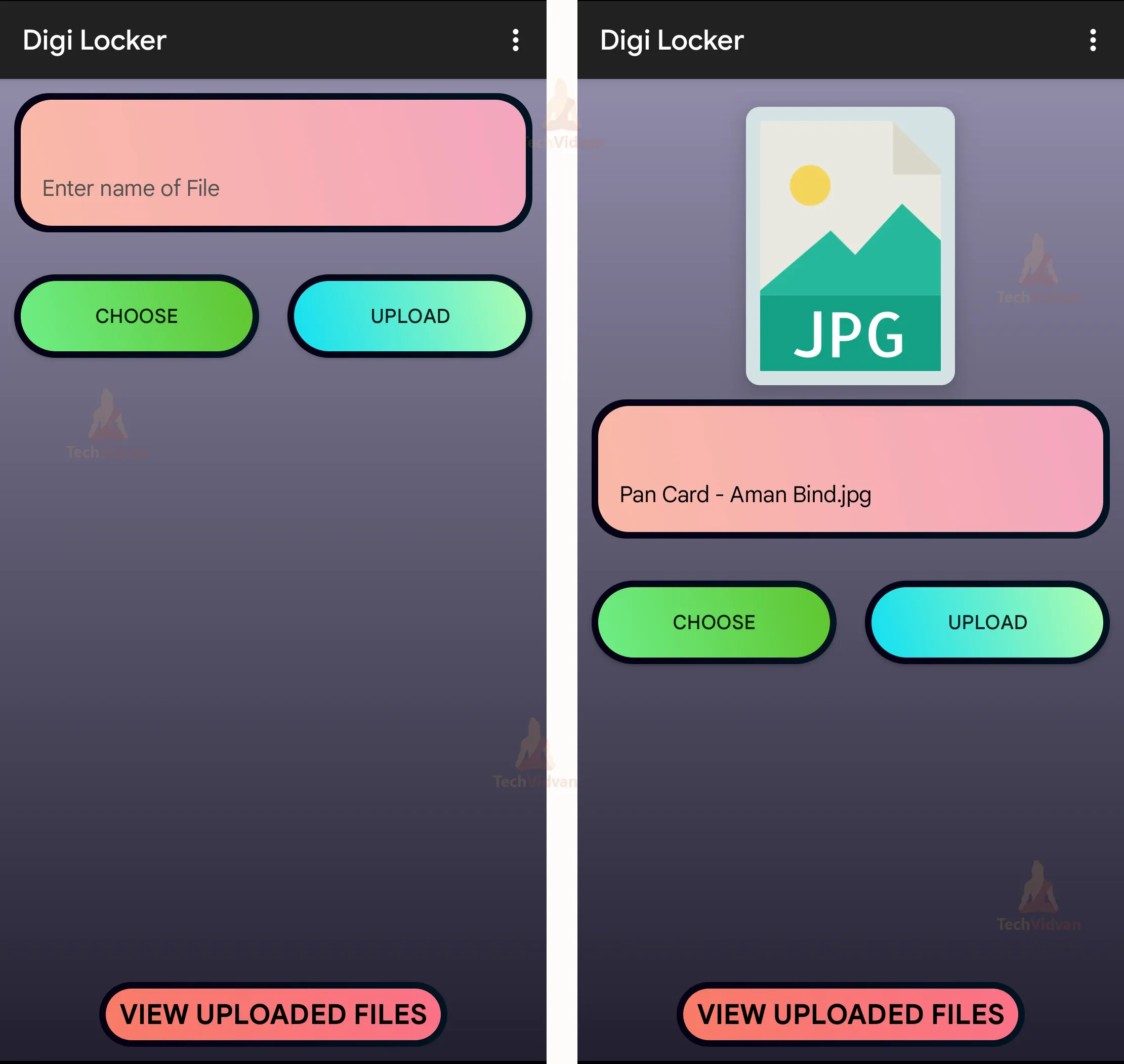
Step 4: Creating Main Page Layout. It will allow the users to upload new documents and files to the firebase. Users can select the file using the file dialog. On the basis of the file type choosen an icon will be displayed on the screen. After selecting the file users can upload the file by clicking on the upload button to upload the file.
activity_main.xml
<?xml version="1.0" encoding="utf-8"?>
<RelativeLayout xmlns:android="http://schemas.android.com/apk/res/android"
   xmlns:app="http://schemas.android.com/apk/res-auto"
   xmlns:tools="http://schemas.android.com/tools"
   android:layout_width="match_parent"
   android:layout_height="match_parent"
   android:layout_gravity="center"
   android:background="@drawable/background"
   android:orientation="vertical"
   android:visibility="visible"
   tools:context=".MainActivity">

   <androidx.cardview.widget.CardView
       android:id="@+id/cardView"
       android:layout_width="150dp"
       android:layout_height="200dp"
       android:layout_centerHorizontal="true"
       android:layout_marginTop="20dp"
       android:background="@color/white"
       android:backgroundTint="@color/cardview3"
       android:visibility="gone"
       app:cardBackgroundColor="@color/cardview3"
       app:cardCornerRadius="10dp"
       app:cardElevation="10dp"
       app:cardMaxElevation="10dp">

       <ImageView
           android:id="@+id/imageView"
           android:layout_width="match_parent"
           android:layout_height="match_parent"
           android:layout_margin="10dp"
           android:contentDescription="@string/image_content"
           android:scaleType="centerCrop"
           android:src="@drawable/pdf"
           android:visibility="invisible" />

   </androidx.cardview.widget.CardView>

   <EditText
       android:id="@+id/fileNameToBeSaved"
       android:layout_width="match_parent"
       android:layout_height="100dp"
       android:layout_below="@+id/cardView"
       android:layout_marginHorizontal="10dp"
       android:layout_marginTop="10dp"
       android:background="@drawable/gradiantimage"
       android:gravity="bottom"
       android:hint="Enter name of File"
       android:lines="5"
       android:padding="20dp"
       android:textColor="@color/black"
       android:textColorHint="#535353"
       android:textSize="16sp" />

   <LinearLayout
       android:layout_width="match_parent"
       android:layout_height="match_parent"
       android:layout_below="@+id/fileNameToBeSaved"
       android:orientation="horizontal"
       android:weightSum="1">

       <Button
           android:id="@+id/buttonChoose"
           android:layout_width="match_parent"
           android:layout_height="60dp"
           android:layout_below="@+id/fileNameToBeSaved"
           android:layout_marginHorizontal="10dp"
           android:layout_marginTop="30dp"
           android:layout_weight="0.5"
           android:background="@drawable/gradiant4"
           android:text="Choose" />

       <Button
           android:id="@+id/buttonUpload"
           android:layout_width="match_parent"
           android:layout_height="60dp"
           android:layout_below="@+id/buttonChoose"
           android:layout_marginHorizontal="10dp"
           android:layout_marginTop="30dp"
           android:layout_weight="0.5"
           android:background="@drawable/gradiant3"
           android:text="Upload" />

   </LinearLayout>

   <TextView
       android:id="@+id/showUploads"
       android:layout_width="250dp"
       android:layout_height="wrap_content"
       android:layout_alignParentBottom="true"
       android:layout_centerHorizontal="true"
       android:layout_marginBottom="10dp"
       android:background="@drawable/gradiant5"
       android:gravity="center"
       android:onClick="showUploads"
       android:text="View Uploaded Files"
       android:textAllCaps="true"
       android:textColor="@color/black"
       android:textSize="20sp"
       android:textStyle="bold" />

</RelativeLayout>
MainActivity.java
// Importing the required packages
package com.techvidvan.digilocker;

import androidx.annotation.NonNull;
import androidx.appcompat.app.AppCompatActivity;
import androidx.cardview.widget.CardView;

import android.Manifest;
import android.app.ProgressDialog;
import android.content.Intent;
import android.graphics.Bitmap;
import android.graphics.drawable.Drawable;
import android.net.Uri;
import android.os.Bundle;
import android.provider.MediaStore;
import android.view.Menu;
import android.view.MenuInflater;
import android.view.MenuItem;
import android.view.View;
import android.widget.Button;
import android.widget.EditText;
import android.widget.ImageView;
import android.widget.Toast;

import com.google.android.gms.tasks.OnFailureListener;
import com.google.android.gms.tasks.OnSuccessListener;
import com.google.android.gms.tasks.Task;
import com.google.firebase.auth.FirebaseAuth;
import com.google.firebase.firestore.DocumentReference;
import com.google.firebase.firestore.FirebaseFirestore;
import com.google.firebase.storage.FirebaseStorage;
import com.google.firebase.storage.OnProgressListener;
import com.google.firebase.storage.StorageReference;
import com.google.firebase.storage.UploadTask;
import com.gun0912.tedpermission.PermissionListener;
import com.gun0912.tedpermission.TedPermission;

import java.io.IOException;
import java.util.HashMap;
import java.util.List;
import java.util.Map;

// Creating a class for MainActivity
public class MainActivity extends AppCompatActivity implements View.OnClickListener {
   // Creating a constant for the image request
   private static final int PICK_IMAGE_REQUEST = 234;

   // Creating variables for the buttons and imageview
   private Button buttonChoose;
   private Button buttonUpload;
   private ImageView imageView;

   // Creating a variable for the Uri and cardview
   private Uri filePath;
   private CardView cardView;

   // Creating a variable for the Firebase Storage Reference and FirebaseAuth
   private StorageReference storageReference = FirebaseStorage.getInstance().getReference();
   private FirebaseAuth fAuth;


   @Override
   protected void onCreate(Bundle savedInstanceState) {
       super.onCreate(savedInstanceState);
       setContentView(R.layout.activity_main);

       // Assigning the variables to the respective views
       buttonChoose = (Button) findViewById(R.id.buttonChoose);
       buttonUpload = (Button) findViewById(R.id.buttonUpload);
       cardView = (CardView) findViewById(R.id.cardView);
       imageView = (ImageView) findViewById(R.id.imageView);

       // Setting the onclick listener for the buttons
       buttonChoose.setOnClickListener(this);
       buttonUpload.setOnClickListener(this);

       // Setting the visibility of the imageview
       imageView.setVisibility(View.VISIBLE);

       // Creating an instance for FirebaseAuth
       fAuth = FirebaseAuth.getInstance();
       Drawable myDrawable = getResources().getDrawable(R.mipmap.file_choose);
       imageView.setImageDrawable(myDrawable);

       // Checking if the user is logged in or not
       // If the user is not logged in then the user will be redirected to the login page
       if (fAuth.getCurrentUser() == null || (!fAuth.getCurrentUser().isEmailVerified())) {
           startActivity(new Intent(getApplicationContext(), Login.class));
           finish();
       } else {

           // If the user is logged and email is verified then it will ask for the permission
           askPermission();
       }


   }

   // Creating a method for the permission
   private void askPermission() {

       // Creating a permission listener
       PermissionListener permissionListener = new PermissionListener() {

           @Override
           public void onPermissionGranted() {
           }

           @Override
           public void onPermissionDenied(List<String> deniedPermissions) {
           }
       };

       // Asking for the permission
       TedPermission.with(MainActivity.this)
               .setPermissionListener(permissionListener)
               .setPermissions(Manifest.permission.READ_EXTERNAL_STORAGE, Manifest.permission.WRITE_EXTERNAL_STORAGE)
               .check();

   }

   // Creating a method for the file chooser
   private void showFileChooser() {
       Intent intent = new Intent();
       intent.setType("*/*");
       intent.setAction(Intent.ACTION_GET_CONTENT);
       startActivityForResult(Intent.createChooser(intent, "Select Picture"), PICK_IMAGE_REQUEST);
   }

   // Handling the image chooser activity result
   @Override
   protected void onActivityResult(int requestCode, int resultCode, Intent data) {
       super.onActivityResult(requestCode, resultCode, data);
       String retrieveFileName = null;

       // Checking if the request code is the same as what is passed here it is 234
       if (requestCode == PICK_IMAGE_REQUEST && resultCode == RESULT_OK && data != null && data.getData() != null) {
           filePath = data.getData();

           retrieveFileName = data.getData().getLastPathSegment().toLowerCase();


           // Setting the image to the imageview based on the file type
           if (retrieveFileName.contains("image")) {
               try {
                   Bitmap bitmap = MediaStore.Images.Media.getBitmap(getContentResolver(), filePath);
                   imageView.setImageBitmap(bitmap);
               } catch (IOException e) {
                   e.printStackTrace();
               }

           } else if (retrieveFileName.contains(".ai")) {
               Drawable myDrawable = getResources().getDrawable(R.drawable.ai);
               imageView.setImageDrawable(myDrawable);
           } else if (retrieveFileName.contains(".apk")) {
               Drawable myDrawable = getResources().getDrawable(R.drawable.apk);
               imageView.setImageDrawable(myDrawable);

           } else if (retrieveFileName.contains(".avi")) {
               Drawable myDrawable = getResources().getDrawable(R.drawable.avi);
               imageView.setImageDrawable(myDrawable);

           } else if (retrieveFileName.contains(".css")) {
               Drawable myDrawable = getResources().getDrawable(R.drawable.css);
               imageView.setImageDrawable(myDrawable);

           } else if (retrieveFileName.contains(".csv")) {
               Drawable myDrawable = getResources().getDrawable(R.drawable.csv);
               imageView.setImageDrawable(myDrawable);

           } else if (retrieveFileName.contains(".dbf")) {
               Drawable myDrawable = getResources().getDrawable(R.drawable.dbf);
               imageView.setImageDrawable(myDrawable);

           } else if (retrieveFileName.contains(".doc")) {
               Drawable myDrawable = getResources().getDrawable(R.drawable.doc);
               imageView.setImageDrawable(myDrawable);

           } else if (retrieveFileName.contains(".exe")) {
               Drawable myDrawable = getResources().getDrawable(R.drawable.exe);
               imageView.setImageDrawable(myDrawable);

           } else if (retrieveFileName.contains(".fla")) {
               Drawable myDrawable = getResources().getDrawable(R.drawable.fla);
               imageView.setImageDrawable(myDrawable);

           } else if (retrieveFileName.contains(".gif")) {
               Drawable myDrawable = getResources().getDrawable(R.drawable.gif);
               imageView.setImageDrawable(myDrawable);

           } else if (retrieveFileName.contains(".htm")) {
               Drawable myDrawable = getResources().getDrawable(R.drawable.html);
               imageView.setImageDrawable(myDrawable);

           } else if (retrieveFileName.contains(".html")) {
               Drawable myDrawable = getResources().getDrawable(R.drawable.html);
               imageView.setImageDrawable(myDrawable);

           } else if (retrieveFileName.contains(".jpg")) {
               Drawable myDrawable = getResources().getDrawable(R.drawable.jpg);
               imageView.setImageDrawable(myDrawable);

           } else if (retrieveFileName.contains(".json")) {
               Drawable myDrawable = getResources().getDrawable(R.drawable.jsn);
               imageView.setImageDrawable(myDrawable);

           } else if (retrieveFileName.contains(".htm")) {
               Drawable myDrawable = getResources().getDrawable(R.drawable.html);
               imageView.setImageDrawable(myDrawable);

           } else if (retrieveFileName.contains(".mp3")) {
               Drawable myDrawable = getResources().getDrawable(R.drawable.mp3);
               imageView.setImageDrawable(myDrawable);

           } else if (retrieveFileName.contains(".mp4")) {
               Drawable myDrawable = getResources().getDrawable(R.drawable.mp4);
               imageView.setImageDrawable(myDrawable);

           } else if (retrieveFileName.contains(".ods")) {
               Drawable myDrawable = getResources().getDrawable(R.drawable.ods);
               imageView.setImageDrawable(myDrawable);

           } else if (retrieveFileName.contains(".odt")) {
               Drawable myDrawable = getResources().getDrawable(R.drawable.odt);
               imageView.setImageDrawable(myDrawable);

           } else if (retrieveFileName.contains(".pdf")) {
               Drawable myDrawable = getResources().getDrawable(R.drawable.pdf);
               imageView.setImageDrawable(myDrawable);
           } else if (retrieveFileName.contains(".png")) {
               Drawable myDrawable = getResources().getDrawable(R.drawable.png);
               imageView.setImageDrawable(myDrawable);

           } else if (retrieveFileName.contains(".ppt")) {
               Drawable myDrawable = getResources().getDrawable(R.drawable.ppt);
               imageView.setImageDrawable(myDrawable);
           } else if (retrieveFileName.contains(".pptx")) {
               Drawable myDrawable = getResources().getDrawable(R.drawable.ppt);
               imageView.setImageDrawable(myDrawable);
           } else if (retrieveFileName.contains(".svg")) {
               Drawable myDrawable = getResources().getDrawable(R.drawable.svg);
               imageView.setImageDrawable(myDrawable);
           } else if (retrieveFileName.contains(".txt")) {
               Drawable myDrawable = getResources().getDrawable(R.drawable.txt);
               imageView.setImageDrawable(myDrawable);
           } else if (retrieveFileName.contains(".xls")) {
               Drawable myDrawable = getResources().getDrawable(R.drawable.xls);
               imageView.setImageDrawable(myDrawable);
           } else if (retrieveFileName.contains(".xlsx")) {
               Drawable myDrawable = getResources().getDrawable(R.drawable.xls);
               imageView.setImageDrawable(myDrawable);
           } else if (retrieveFileName.contains(".xml")) {
               Drawable myDrawable = getResources().getDrawable(R.drawable.xml);
               imageView.setImageDrawable(myDrawable);
           } else if (retrieveFileName.contains(".zip")) {
               Drawable myDrawable = getResources().getDrawable(R.drawable.zip);
               imageView.setImageDrawable(myDrawable);
           }
       } else {
           Drawable myDrawable = getResources().getDrawable(R.drawable.question);
           imageView.setImageDrawable(myDrawable);
       }

       // Setting the visibility of the imageview
       cardView.setVisibility(View.VISIBLE);

       // Setting the name of the file to be saved
       EditText choosenFileName = findViewById(R.id.fileNameToBeSaved);
       if (retrieveFileName.contains("image")) {
           choosenFileName.setText(retrieveFileName + ".jpg");
       } else {
           choosenFileName.setText(retrieveFileName);
       }
   }


   // Creating the method to upload the file
   private void uploadFile() {

       // Getting the name of the file to be saved
       EditText fileName = findViewById(R.id.fileNameToBeSaved);

       // Checking whether the file type is supported or not, depending on the file extension
       if (fileName.getText().toString().contains(".jpg") || fileName.getText().toString().contains(".mp3") || fileName.getText().toString().contains(".mp4")
               || fileName.getText().toString().contains(".pdf") || fileName.getText().toString().contains(".txt") || fileName.getText().toString().contains(".doc")
               || fileName.getText().toString().contains(".docx") || fileName.getText().toString().contains(".ppt") || fileName.getText().toString().contains(".pptx")
               || fileName.getText().toString().contains(".apk") || fileName.getText().toString().contains(".xls") || fileName.getText().toString().contains(".xlsx")
               || fileName.getText().toString().contains(".zip") || fileName.getText().toString().contains(".gif") || fileName.getText().toString().contains(".htm")
               || fileName.getText().toString().contains(".html") || fileName.getText().toString().contains(".jpeg") || fileName.getText().toString().contains(".jpg")
               || fileName.getText().toString().contains(".ods") || fileName.getText().toString().contains(".odt") || fileName.getText().toString().contains(".svg")
               || fileName.getText().toString().contains(".ai") || fileName.getText().toString().contains(".exe") || fileName.getText().toString().contains(".fla")
               || fileName.getText().toString().contains(".json") || fileName.getText().toString().contains(".xml") || fileName.getText().toString().contains(".png")
               || fileName.getText().toString().contains(".exe")) {


           // Checking whether the file is selected or not
           if (filePath != null) {
               // Code for showing progressDialog while uploading
               ProgressDialog progressDialog = new ProgressDialog(this);
               progressDialog.setTitle("Uploading");
               progressDialog.show();

               // Getting the name of the file to be saved
               String name = fileName.getText().toString().trim();
               StorageReference riversRef = storageReference.child(fAuth.getCurrentUser().getEmail()).child(name);

               // Adding addOnSuccessListener to second StorageReference
               riversRef.putFile(filePath)
                       .addOnSuccessListener(new OnSuccessListener<UploadTask.TaskSnapshot>() {
                           @Override
                           public void onSuccess(UploadTask.TaskSnapshot taskSnapshot) {
                               // If the upload is successfull, hiding the progress dialog

                               taskSnapshot.getStorage().getDownloadUrl().addOnSuccessListener(new OnSuccessListener<Uri>() {
                                   @Override
                                   public void onSuccess(Uri uri) {

                                       progressDialog.dismiss();
                                       // Displaying a success toast message
                                       Toast.makeText(getApplicationContext(), "File Uploaded ", Toast.LENGTH_LONG).show();

                                       // Creating a map to store the name and link of the file
                                       Map<String, Object> user = new HashMap<>();
                                       user.put("name", riversRef.getName());
                                       user.put("link", uri.toString());

                                       // Adding the map to the Firestore database
                                       FirebaseFirestore db = FirebaseFirestore.getInstance();
                                       DocumentReference documentReference = db.collection(fAuth.getCurrentUser().getEmail()).document();
                                       documentReference.set(user);
                                   }
                               });

                           }
                       })
                       .addOnFailureListener(new OnFailureListener() {
                           @Override
                           public void onFailure(@NonNull Exception exception) {
                               // If the upload is not successfull, hiding the progress dialog
                               progressDialog.dismiss();

                               // And displaying error message
                               Toast.makeText(getApplicationContext(), exception.getMessage(), Toast.LENGTH_LONG).show();
                           }
                       })
                       .addOnProgressListener(new OnProgressListener<UploadTask.TaskSnapshot>() {
                           @Override
                           public void onProgress(UploadTask.TaskSnapshot taskSnapshot) {
                               // Calculating progress percentage
                               double progress = (100.0 * taskSnapshot.getBytesTransferred()) / taskSnapshot.getTotalByteCount();

                               // Displaying percentage in progress dialog
                               progressDialog.setMessage("Uploaded " + ((int) progress) + "%...");
                           }
                       });
           }
           // If the file is not selected
           else {
               // Displaying an error toast
               Toast.makeText(getApplicationContext(), "File not Selected", Toast.LENGTH_SHORT).show();
           }
       } else {
           fileName.setError("File Extension required!");
           return;
       }
   }

   // Creating the method for choose the file and uploading button
   @Override
   public void onClick(View view) {
       // If the clicked button is choose
       if (view == buttonChoose) {
           showFileChooser();
       }
       // If the clicked button is upload
       else if (view == buttonUpload) {
           uploadFile();
       } else {
           return;
       }
   }

   // Creating the Menu for the activity
   @Override
   public boolean onCreateOptionsMenu(Menu menu) {
       MenuInflater inflater = getMenuInflater();
       inflater.inflate(R.menu.main_menu, menu);
       return true;
   }

   @Override
   public boolean onOptionsItemSelected(@NonNull MenuItem item) {

       // Creating the switch case for the menu items
       switch (item.getItemId()) {

           // If the item is logout, then sign out the user and redirect to the login page
           case R.id.logout_id:
               fAuth.signOut();
               startActivity(new Intent(getApplicationContext(), Login.class));
               finish();
               break;
           default:
               Toast.makeText(MainActivity.this, "Error", Toast.LENGTH_SHORT).show();
               break;
       }

       return true;
   }

   // If user clicks on the View Uploads button, then redirect to the DownloadFiles activity
   public void showUploads(View view) {
       startActivity(new Intent(getApplicationContext(), DownloadFiles.class));
       finish();
   }

}
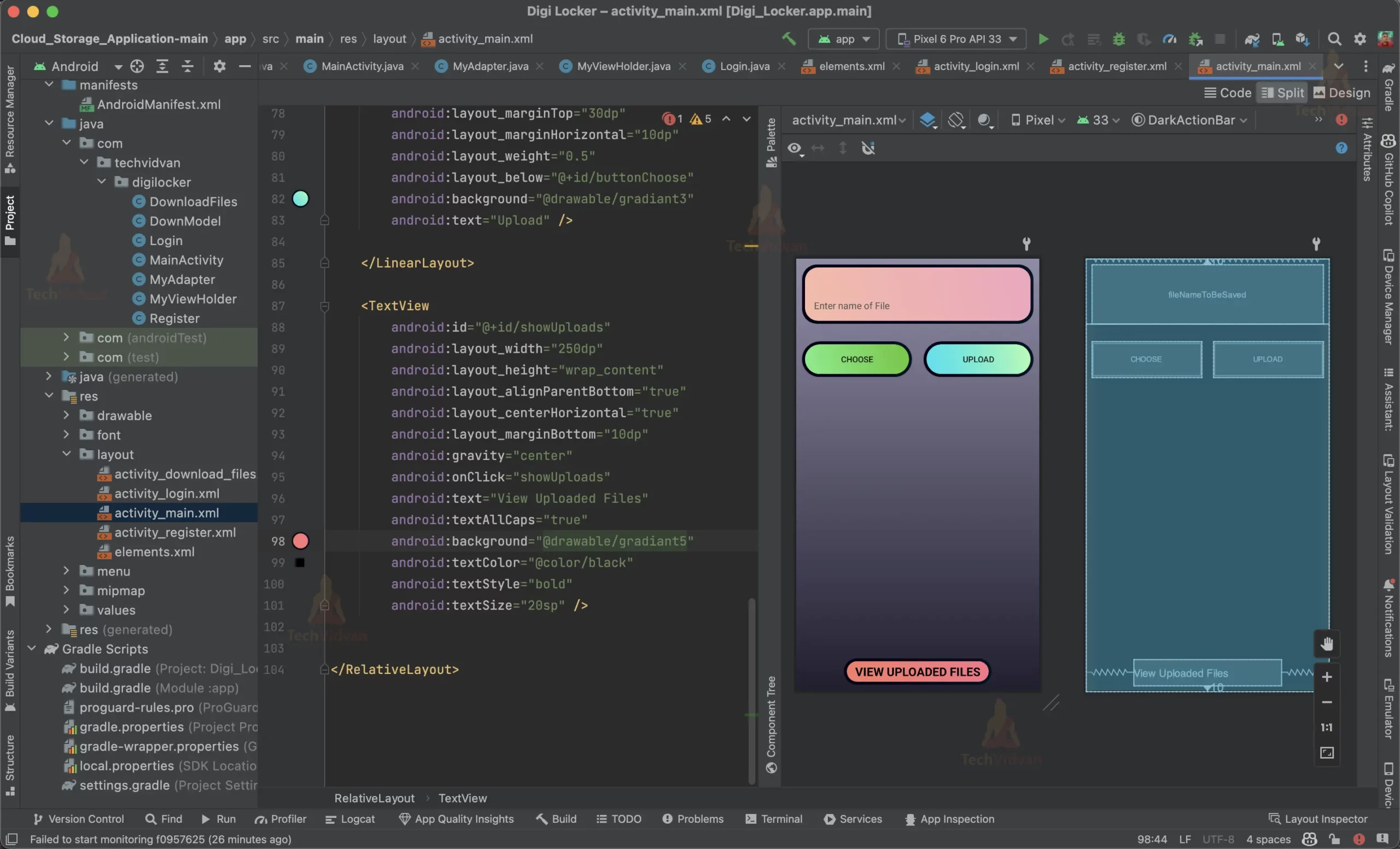

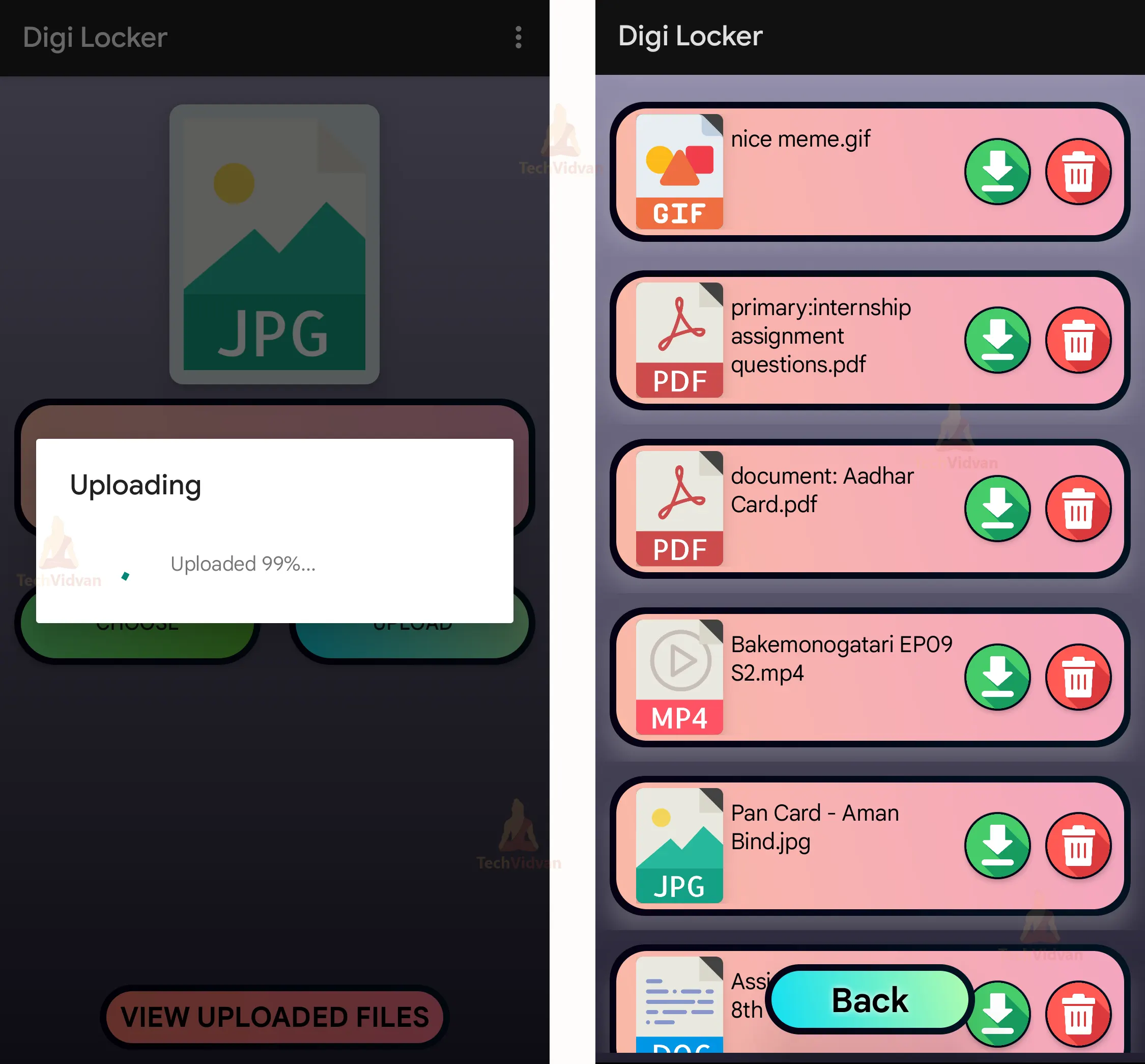
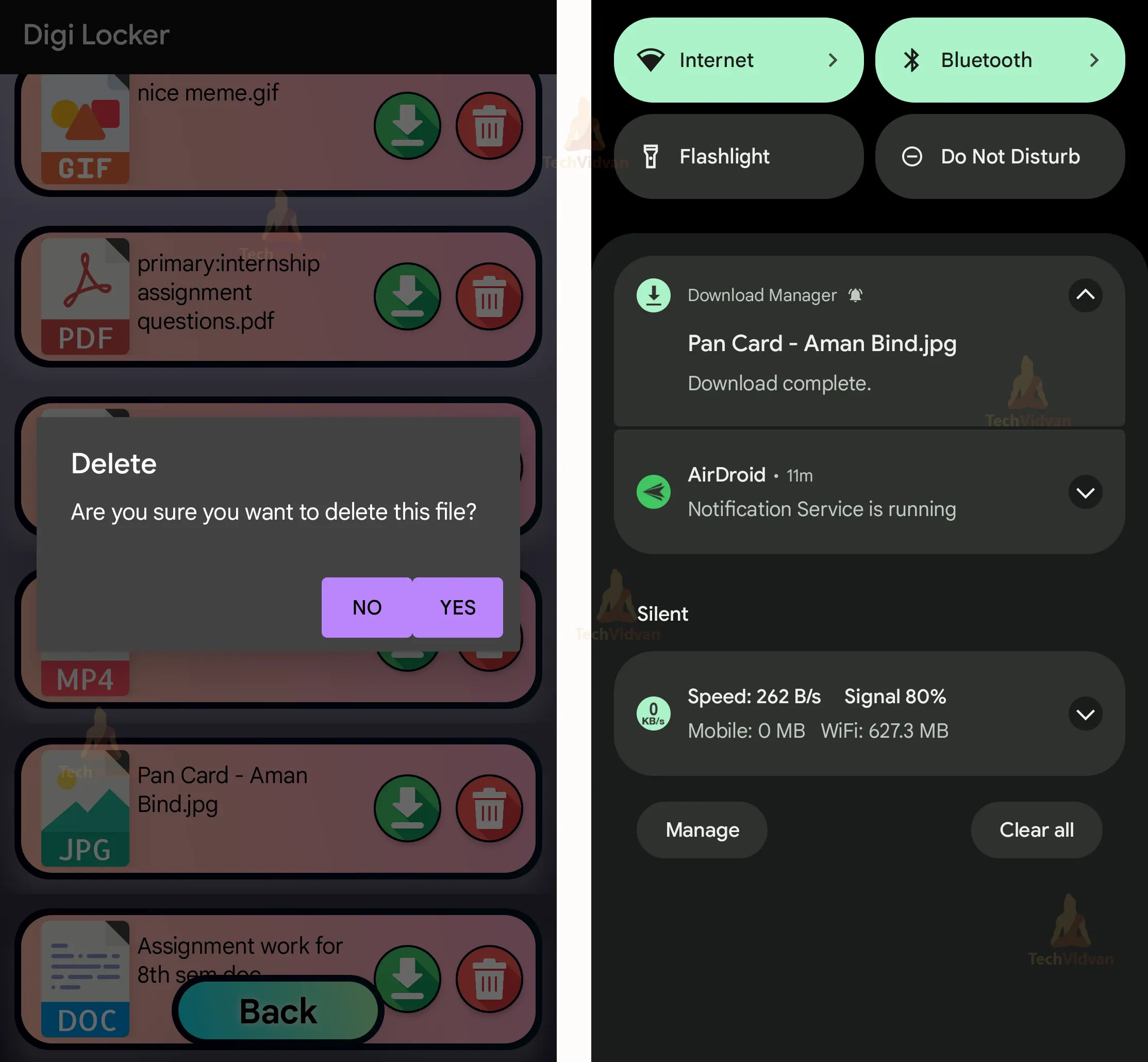
Step 5: Creating Download files Page Layout to view list of files uploaded by the user. It will show the name of the file and an icon, based on file type. From this page users can download and delete the uploaded files.
activity_download_files.xml
<?xml version="1.0" encoding="utf-8"?>
<RelativeLayout xmlns:android="http://schemas.android.com/apk/res/android"
   xmlns:app="http://schemas.android.com/apk/res-auto"
   xmlns:tools="http://schemas.android.com/tools"
   android:layout_width="match_parent"
   android:layout_height="match_parent"
   android:background="@drawable/background"
   android:orientation="vertical"
   android:layout_gravity="center"
   tools:context=".DownloadFiles">

   <androidx.recyclerview.widget.RecyclerView
       android:id="@+id/recycle"
       android:layout_width="match_parent"
       android:layout_height="match_parent"
       android:layout_marginBottom="7dp" />

   <TextView
       android:id="@+id/textView2"
       android:layout_width="150dp"
       android:layout_height="50dp"
       android:layout_alignParentBottom="true"
       android:layout_centerHorizontal="true"
       android:layout_marginBottom="20dp"
       android:background="@drawable/gradiant3"
       android:elevation="30dp"
       android:shadowColor="@color/white"
       android:shadowDx="0"
       android:shadowDy="0"
       android:shadowRadius="10"

       android:onClick="goToDownloads"
       android:gravity="center"
       android:text="Back"
       android:textStyle="bold"
       android:textColor="@color/black"
       android:textSize="24sp" />

</RelativeLayout>
DownloadFiles.java
// Importing the required libraries
package com.techvidvan.digilocker;

import androidx.annotation.NonNull;
import androidx.appcompat.app.AppCompatActivity;
import androidx.recyclerview.widget.LinearLayoutManager;
import androidx.recyclerview.widget.RecyclerView;

import android.content.Intent;
import android.os.Bundle;
import android.view.View;
import android.widget.Toast;

import com.google.android.gms.tasks.OnCompleteListener;
import com.google.android.gms.tasks.OnFailureListener;
import com.google.android.gms.tasks.Task;
import com.google.firebase.auth.FirebaseAuth;
import com.google.firebase.firestore.DocumentSnapshot;
import com.google.firebase.firestore.FirebaseFirestore;
import com.google.firebase.firestore.QuerySnapshot;

import java.util.ArrayList;

// Creating a class for DownloadFiles
public class DownloadFiles extends AppCompatActivity {

   // Creating an object for FirebaseFirestore
   FirebaseFirestore db;

   // Declaring all the variables
   RecyclerView mRecyclerView;
   ArrayList<DownModel> downModelArrayList = new ArrayList<>();
   MyAdapter myAdapter;
   private FirebaseAuth fAuth = FirebaseAuth.getInstance();


   @Override
   protected void onCreate(Bundle savedInstanceState) {
       super.onCreate(savedInstanceState);
       setContentView(R.layout.activity_download_files);

       // Calling the methods to set up the RecyclerView and Firebase
       setUpRV();
       setUpFB();

       // Calling the method to get the data from Firebase
       dataFromFirebase();

   }

   // Creating a method to get the data from Firebase
   private void dataFromFirebase() {

       // Checking if the ArrayList is empty or not
       if(downModelArrayList.size()>0)
           downModelArrayList.clear();

       // Getting the data from Firebase
       // If the data is retrieved successfully, then the data is added to the ArrayList
       db.collection(fAuth.getCurrentUser().getEmail())
               .get()
               .addOnCompleteListener(new OnCompleteListener<QuerySnapshot>() {

                   @Override
                   public void onComplete(@NonNull Task<QuerySnapshot> task) {

                       for(DocumentSnapshot documentSnapshot: task.getResult()) {

                           DownModel downModel= new DownModel(documentSnapshot.getString("name"),
                                   documentSnapshot.getString("link"));
                           downModelArrayList.add(downModel);

                       }

                       // Setting the adapter to the RecyclerView
                       myAdapter= new MyAdapter(DownloadFiles.this,downModelArrayList);
                       mRecyclerView.setAdapter(myAdapter);
                   }
               })

               .addOnFailureListener(new OnFailureListener() {
                   @Override
                   public void onFailure(@NonNull Exception e) {
                       Toast.makeText(DownloadFiles.this, "Error ;-.-;", Toast.LENGTH_SHORT).show();
                   }
               });


   }

   // Creating a method to set up the Firebase
   private void setUpFB(){
       db=FirebaseFirestore.getInstance();
   }

   // Creating a method to set up the RecyclerView
   private void setUpRV(){
       mRecyclerView= findViewById(R.id.recycle);
       mRecyclerView.setHasFixedSize(true);
       mRecyclerView.setLayoutManager(new LinearLayoutManager(this));
   }

   // Creating a method to go to the Downloads page
   public void goToDownloads(View view){
       startActivity(new Intent(getApplicationContext(),MainActivity.class));
       finish();
   }


}
DownModel.java
// This is the model class for the download list
package com.techvidvan.digilocker;

// Creating a class for DownModel
public class DownModel {

   // Declaring all the variables
   String Name,Link;


   // Creating a getter and setter for each variable
   public String getName() {
       return Name;
   }

   public void setName(String name) {
       Name = name;
   }

   public String getLink() {
       return Link;
   }

   public void setLink(String link) {
       Link = link;
   }

   // Creating a constructor for the DownModel class
   public DownModel(String Name, String Link){
       this.Link=Link;
       this.Name=Name;

   }

}
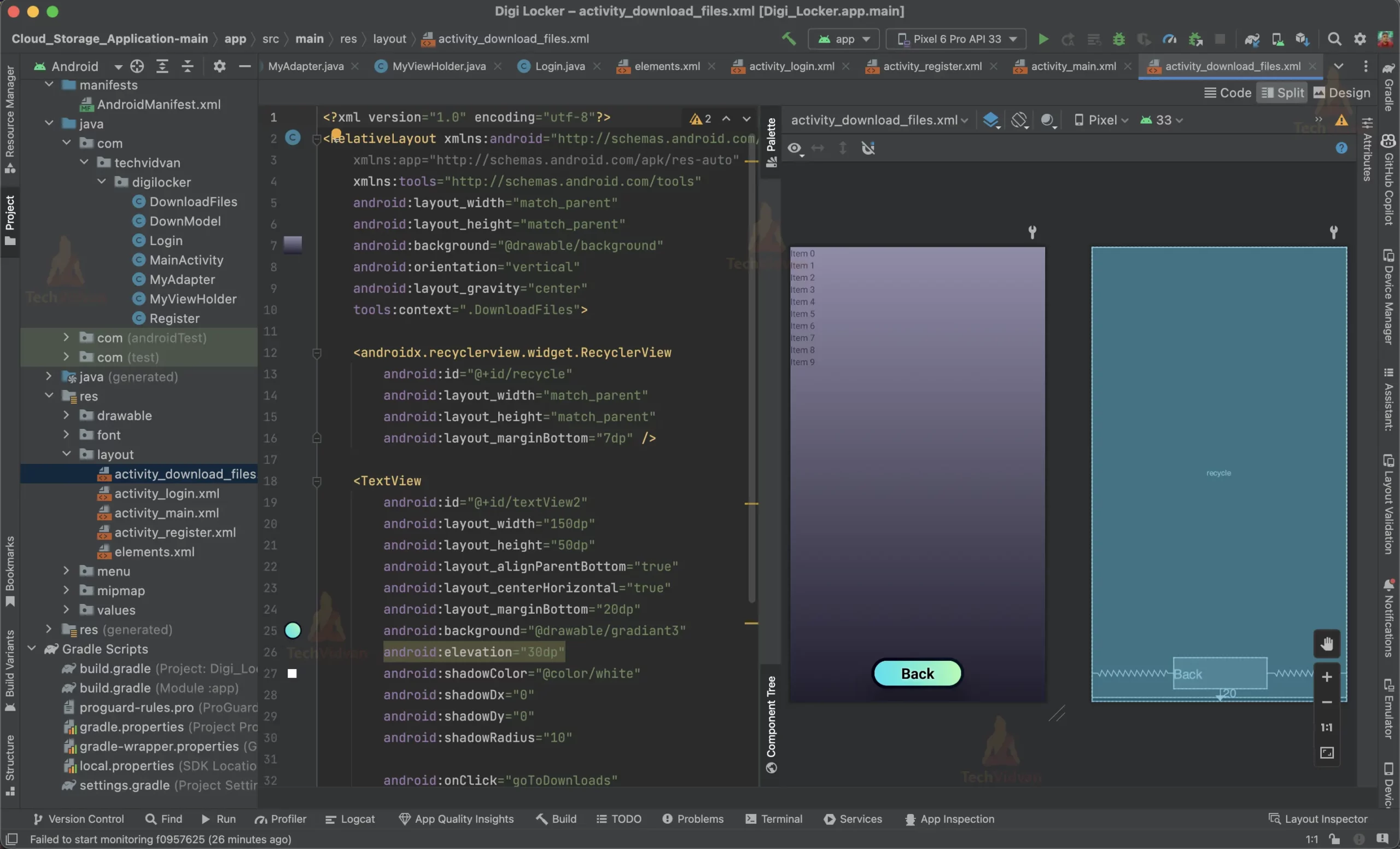
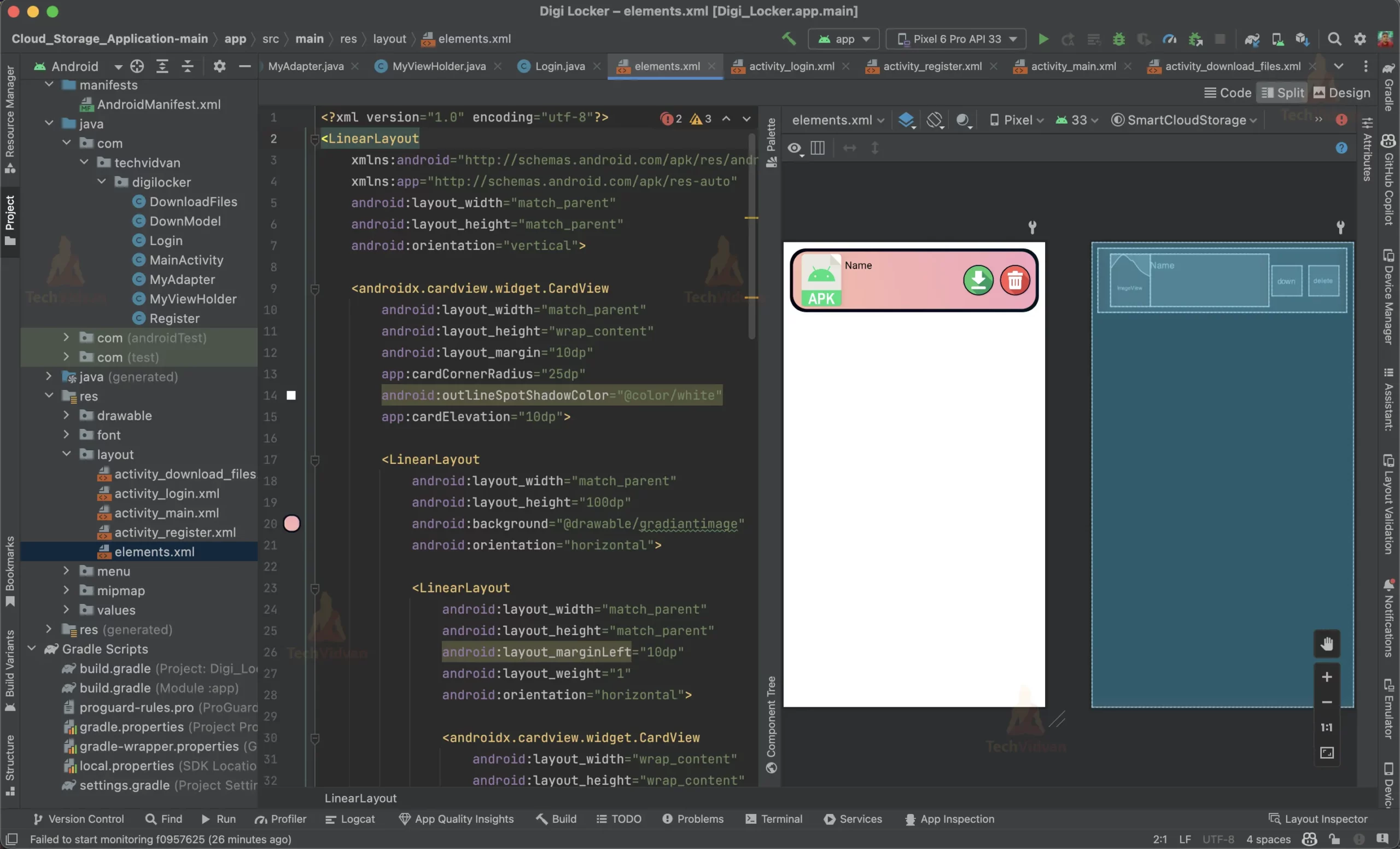
Step 6: Creating layout for the list in the Download Files page layout.
elements.xml
<?xml version="1.0" encoding="utf-8"?>
<LinearLayout xmlns:android="http://schemas.android.com/apk/res/android"
   xmlns:app="http://schemas.android.com/apk/res-auto"
   android:layout_width="match_parent"
   android:layout_height="match_parent"
   android:orientation="vertical">

   <androidx.cardview.widget.CardView
       android:layout_width="match_parent"
       android:layout_height="wrap_content"
       android:layout_margin="10dp"
       android:outlineSpotShadowColor="@color/white"
       app:cardCornerRadius="25dp"
       app:cardElevation="10dp">

       <LinearLayout
           android:layout_width="match_parent"
           android:layout_height="100dp"
           android:background="@drawable/gradiantimage"
           android:orientation="horizontal">

           <LinearLayout
               android:layout_width="match_parent"
               android:layout_height="match_parent"
               android:layout_marginLeft="10dp"
               android:layout_weight="1"
               android:orientation="horizontal">

               <androidx.cardview.widget.CardView
                   android:layout_width="wrap_content"
                   android:layout_height="wrap_content"
                   app:cardCornerRadius="5dp"
                   app:cardElevation="10dp">


                   <ImageView
                       android:id="@+id/image"
                       android:layout_width="62dp"
                       android:layout_height="82dp"
                       android:contentDescription="@string/image_content"
                       android:scaleType="centerCrop"
                       android:src="@drawable/apk" />

               </androidx.cardview.widget.CardView>

               <TextView
                   android:id="@+id/name"
                   android:layout_width="match_parent"
                   android:layout_height="match_parent"
                   android:paddingLeft="15px"
                   android:paddingTop="6dp"
                   android:paddingBottom="6dp"
                   android:text="Name"
                   android:textColor="@color/black"
                   android:textSize="16sp" />

               <TextView
                   android:id="@+id/link"
                   android:layout_width="match_parent"
                   android:layout_height="match_parent"
                   android:text="Download Link"
                   android:textSize="8sp"
                   android:visibility="gone" />

           </LinearLayout>

           <androidx.appcompat.widget.AppCompatButton
               android:id="@+id/down"
               android:layout_width="wrap_content"
               android:layout_height="wrap_content"
               android:layout_gravity="center"
               android:layout_margin="5dp"
               android:layout_weight=".350"
               android:background="@drawable/gradiant4"
               android:elevation="7dp"
               android:foreground="@drawable/download" />

           <androidx.appcompat.widget.AppCompatButton
               android:id="@+id/delete"
               style="@style/Widget.AppCompat.Button"
               android:layout_width="wrap_content"
               android:layout_height="wrap_content"
               android:layout_gravity="center"
               android:layout_margin="5dp"
               android:layout_weight=".350"
               android:background="@drawable/gradiant4"
               android:elevation="7dp"
               android:foreground="@drawable/delete" />

       </LinearLayout>

   </androidx.cardview.widget.CardView>
</LinearLayout>
MyViewholder.java
// This class is used to hold the view of the recycler view item.

// Importing all the required packages
package com.techvidvan.digilocker;

import android.view.View;
import android.widget.Button;
import android.widget.ImageView;
import android.widget.TextView;

import androidx.annotation.NonNull;
import androidx.recyclerview.widget.RecyclerView;

// Creating a class for MyViewHolder
public class MyViewHolder extends RecyclerView.ViewHolder {

   // Declaring all the variables
   TextView mName;
   TextView mLink;
   ImageView mImage;
   Button mDownload;
   Button mDelete;

   // Creating a constructor for MyViewHolder
   public MyViewHolder(@NonNull View itemView) {
       super(itemView);

       // Assigning the variables to the respective views
       mName=itemView.findViewById(R.id.name);
       mLink=itemView.findViewById(R.id.link);
       mDownload=itemView.findViewById(R.id.down);
       mDelete=itemView.findViewById(R.id.delete);
       mImage=itemView.findViewById(R.id.image);


   }
}
MyAdapter:java
// This is the adapter class for the recycler view
// It is used to set the data to the recycler view

// Importing the required packages
package com.techvidvan.digilocker;

import android.annotation.SuppressLint;
import android.app.AlertDialog;
import android.app.DownloadManager;
import android.content.Context;
import android.content.DialogInterface;
import android.graphics.drawable.Drawable;
import android.net.Uri;
import android.os.Environment;
import android.util.Log;
import android.view.LayoutInflater;
import android.view.View;
import android.view.ViewGroup;
import android.widget.Toast;

import androidx.annotation.NonNull;
import androidx.recyclerview.widget.RecyclerView;

import com.google.android.gms.tasks.OnFailureListener;
import com.google.android.gms.tasks.OnSuccessListener;
import com.google.android.gms.tasks.Task;
import com.google.firebase.auth.FirebaseAuth;
import com.google.firebase.firestore.DocumentSnapshot;
import com.google.firebase.firestore.FirebaseFirestore;
import com.google.firebase.firestore.QuerySnapshot;
import com.google.firebase.storage.FirebaseStorage;
import com.google.firebase.storage.StorageReference;
import com.squareup.picasso.Picasso;

import java.io.File;
import java.util.ArrayList;
import java.util.List;

import static android.os.Environment.DIRECTORY_DOWNLOADS;

// Creating a class for MyAdapter
public class MyAdapter extends RecyclerView.Adapter<MyViewHolder> {

   // Declaring all the variables
   DownloadFiles downloadFiles;
   ArrayList<DownModel> downModels;
   private StorageReference storageReference = FirebaseStorage.getInstance().getReference();
   private FirebaseAuth fAuth = FirebaseAuth.getInstance();


   // Creating a constructor for the MyAdapter class
   public MyAdapter(DownloadFiles downloadFiles, ArrayList<DownModel> downModels) {
       this.downloadFiles = downloadFiles;
       this.downModels = downModels;
   }

   @NonNull
   @Override
   public MyViewHolder onCreateViewHolder(@NonNull ViewGroup viewGroup, int i) {

       // Setting the layout for the recycler view
       LayoutInflater layoutInflater = LayoutInflater.from(downloadFiles.getBaseContext());
       View view = layoutInflater.inflate(R.layout.elements, null, false);

       return new MyViewHolder(view);
   }


   @Override
   public void onBindViewHolder(@NonNull final MyViewHolder myViewHolder, @SuppressLint("RecyclerView") final int i) {

       // Setting the data to the recycler view
       myViewHolder.mName.setText(downModels.get(i).getName());
       myViewHolder.mLink.setText(downModels.get(i).getLink());

       // Checking the file extension and setting the image accordingly
       if (downModels.get(i).getName().endsWith(".ai") ){
           myViewHolder.mImage.setImageResource(R.drawable.ai);
       } else if (downModels.get(i).getName().endsWith(".apk")) {
           myViewHolder.mImage.setImageResource(R.drawable.apk);
       } else if (downModels.get(i).getName().endsWith(".avi")) {
           myViewHolder.mImage.setImageResource(R.drawable.avi);
       }  else if (downModels.get(i).getName().endsWith(".css")) {
           myViewHolder.mImage.setImageResource(R.drawable.css);
       } else if (downModels.get(i).getName().endsWith(".csv")) {
           myViewHolder.mImage.setImageResource(R.drawable.csv);
       } else if (downModels.get(i).getName().endsWith(".dbf")) {
           myViewHolder.mImage.setImageResource(R.drawable.dbf);
       } else if (downModels.get(i).getName().endsWith(".doc")) {
           myViewHolder.mImage.setImageResource(R.drawable.doc);
       } else if (downModels.get(i).getName().endsWith(".docx")) {
           myViewHolder.mImage.setImageResource(R.drawable.doc);
       } else if (downModels.get(i).getName().endsWith(".exe")) {
           myViewHolder.mImage.setImageResource(R.drawable.exe);
       } else if (downModels.get(i).getName().endsWith(".fla")) {
           myViewHolder.mImage.setImageResource(R.drawable.fla);
       } else if (downModels.get(i).getName().endsWith(".gif")) {
           myViewHolder.mImage.setImageResource(R.drawable.gif);
       } else if (downModels.get(i).getName().endsWith(".html")) {
           myViewHolder.mImage.setImageResource(R.drawable.html);
       } else if (downModels.get(i).getName().endsWith(".htm")) {
           myViewHolder.mImage.setImageResource(R.drawable.html);
       } else if (downModels.get(i).getName().endsWith(".jpeg")) {
           myViewHolder.mImage.setImageResource(R.drawable.jpg);
       } else if (downModels.get(i).getName().endsWith(".jpg")) {
           myViewHolder.mImage.setImageResource(R.drawable.jpg);
       } else if (downModels.get(i).getName().endsWith(".mp3")) {
           myViewHolder.mImage.setImageResource(R.drawable.mp3);
       } else if (downModels.get(i).getName().endsWith(".mp4")) {
           myViewHolder.mImage.setImageResource(R.drawable.mp4);
       } else if (downModels.get(i).getName().endsWith(".pdf")) {
           myViewHolder.mImage.setImageResource(R.drawable.pdf);
       } else if (downModels.get(i).getName().endsWith(".png")) {
           myViewHolder.mImage.setImageResource(R.drawable.png);
       } else if (downModels.get(i).getName().endsWith(".ppt")) {
           myViewHolder.mImage.setImageResource(R.drawable.ppt);
       } else if (downModels.get(i).getName().endsWith(".pptx")) {
           myViewHolder.mImage.setImageResource(R.drawable.ppt);
       } else if (downModels.get(i).getName().endsWith(".ods")) {
           myViewHolder.mImage.setImageResource(R.drawable.ods);
       } else if (downModels.get(i).getName().endsWith(".odt")) {
           myViewHolder.mImage.setImageResource(R.drawable.odt);
       } else if (downModels.get(i).getName().endsWith(".svg")) {
           myViewHolder.mImage.setImageResource(R.drawable.svg);
       } else if (downModels.get(i).getName().endsWith(".txt")) {
           myViewHolder.mImage.setImageResource(R.drawable.txt);
       } else if (downModels.get(i).getName().endsWith(".xls")) {
           myViewHolder.mImage.setImageResource(R.drawable.xls);
       } else if (downModels.get(i).getName().endsWith(".xlsx")) {
           myViewHolder.mImage.setImageResource(R.drawable.xls);
       } else if (downModels.get(i).getName().endsWith(".xml")) {
           myViewHolder.mImage.setImageResource(R.drawable.xml);
       } else if (downModels.get(i).getName().endsWith(".zip")) {
           myViewHolder.mImage.setImageResource(R.drawable.zip);
       } else {
           myViewHolder.mImage.setImageResource(R.drawable.question);
       }

       // Setting the click listener for the download button
       myViewHolder.mDownload.setOnClickListener(new View.OnClickListener() {
           @Override
           public void onClick(View v) {
               StorageReference riversRef = storageReference.child(fAuth.getCurrentUser().getEmail()).child(downModels.get(i).getName());

               Task<Uri> url = riversRef.getDownloadUrl().addOnSuccessListener(new OnSuccessListener<Uri>() {

                   public void onSuccess(Uri uri) {

                       // Downloading the file
                       DownloadManager.Request request = new DownloadManager.Request(uri);
                       request.setAllowedNetworkTypes(DownloadManager.Request.NETWORK_WIFI | DownloadManager.Request.NETWORK_MOBILE);
                       request.setTitle(downModels.get(i).getName());
                       request.setDescription("Downloading file...");

                       request.allowScanningByMediaScanner();
                       request.setNotificationVisibility(DownloadManager.Request.VISIBILITY_VISIBLE_NOTIFY_COMPLETED);
                       request.setDestinationInExternalPublicDir(Environment.DIRECTORY_DOWNLOADS, downModels.get(i).getName());

                       DownloadManager manager = (DownloadManager) downloadFiles.getSystemService(Context.DOWNLOAD_SERVICE);
                       manager.enqueue(request);

                       return;

                   }
               });

           }
       });

       myViewHolder.mDelete.setOnClickListener(new View.OnClickListener() {

           @Override
           public void onClick(View view) {
               //Create a dialog box to confirm the deletion

               Log.d("TAG", "Delete");

               AlertDialog.Builder builder = new AlertDialog.Builder(downloadFiles);
               builder.setTitle("Delete");
               builder.setMessage("Are you sure you want to delete this file?");

               builder.setPositiveButton("Yes", new DialogInterface.OnClickListener() {
                   @Override
                   public void onClick(DialogInterface dialog, int which) {
                       StorageReference riversRef = storageReference.child(fAuth.getCurrentUser().getEmail()).child(downModels.get(i).getName());
                       riversRef.delete();

                       FirebaseFirestore.getInstance().collection(fAuth.getCurrentUser().getEmail())
                               .whereEqualTo("name", downModels.get(i).getName())
                               .get()
                               .addOnSuccessListener(new OnSuccessListener<QuerySnapshot>() {
                                   @Override
                                   public void onSuccess(QuerySnapshot queryDocumentSnapshots) {


                                       List<DocumentSnapshot> snapshotList = queryDocumentSnapshots.getDocuments();
                                       for (DocumentSnapshot snapshot : snapshotList) {
                                           FirebaseFirestore.getInstance().collection(fAuth.getCurrentUser().getEmail()).document(snapshot.getId()).delete();
                                       }

                                   }
                               }).addOnFailureListener(new OnFailureListener() {
                                   @Override
                                   public void onFailure(@NonNull Exception e) {
                                       Toast.makeText(downloadFiles, "Error!", Toast.LENGTH_SHORT).show();
                                   }
                               });

                       myViewHolder.itemView.setVisibility(View.INVISIBLE);


                   }
               });


               builder.setNegativeButton("No", new DialogInterface.OnClickListener() {
                   @Override
                   public void onClick(DialogInterface dialog, int which) {
                       dialog.dismiss();

                   }

               });

               AlertDialog dialog = builder.create();
               dialog.show();

           }
       });

   }


//                Log.d("TAG","Delete");
//
//                StorageReference riversRef = storageReference.child(fAuth.getCurrentUser().getEmail()).child(downModels.get(i).getName());
//                riversRef.delete();
//
//                FirebaseFirestore.getInstance().collection(fAuth.getCurrentUser().getEmail())
//                        .whereEqualTo("name",downModels.get(i).getName())
//                        .get()
//                        .addOnSuccessListener(new OnSuccessListener<QuerySnapshot>() {
//                            @Override
//                            public void onSuccess(QuerySnapshot queryDocumentSnapshots) {
//
//
//                                List<DocumentSnapshot> snapshotList = queryDocumentSnapshots.getDocuments();
//                                for(DocumentSnapshot snapshot: snapshotList){
//                                    FirebaseFirestore.getInstance().collection(fAuth.getCurrentUser().getEmail()).document(snapshot.getId()).delete();
//                                }
//
//                            }
//                        }).addOnFailureListener(new OnFailureListener() {
//                            @Override
//                            public void onFailure(@NonNull Exception e) {
//
//                            }
//                        });
//
//                myViewHolder.itemView.setVisibility(View.INVISIBLE);
//
//            }
//        });
//
//
//    }

   public void downloadFile(Context context, String fileName,String destinationDirectory, String url) {

       File file = new File(Environment.getExternalStorageDirectory(),"Download/"+fileName);
       DownloadManager downloadmanager = (DownloadManager) context.
               getSystemService(Context.DOWNLOAD_SERVICE);
       Uri uri = Uri.parse(url);
       DownloadManager.Request request = new DownloadManager.Request(uri)

       .setNotificationVisibility(DownloadManager.Request.VISIBILITY_VISIBLE_NOTIFY_COMPLETED)
       .setDestinationUri(Uri.fromFile(file));
       downloadmanager.enqueue(request);
   }


   @Override
   public int getItemCount() {
       return downModels.size();
   }
}
Now the app is complete and ready to be used
Android Digi Locker Output




Summary
Congratulations, you have successfully created a digital locker Android app that allows users to securely upload and download files to and from Firebase storage. You can now customize the app to add more features according to your needs, such as file sharing, file encryption, and more.
This project has given you a basic understanding of how to integrate Firebase storage in Android apps and build a functional digital locker app.