


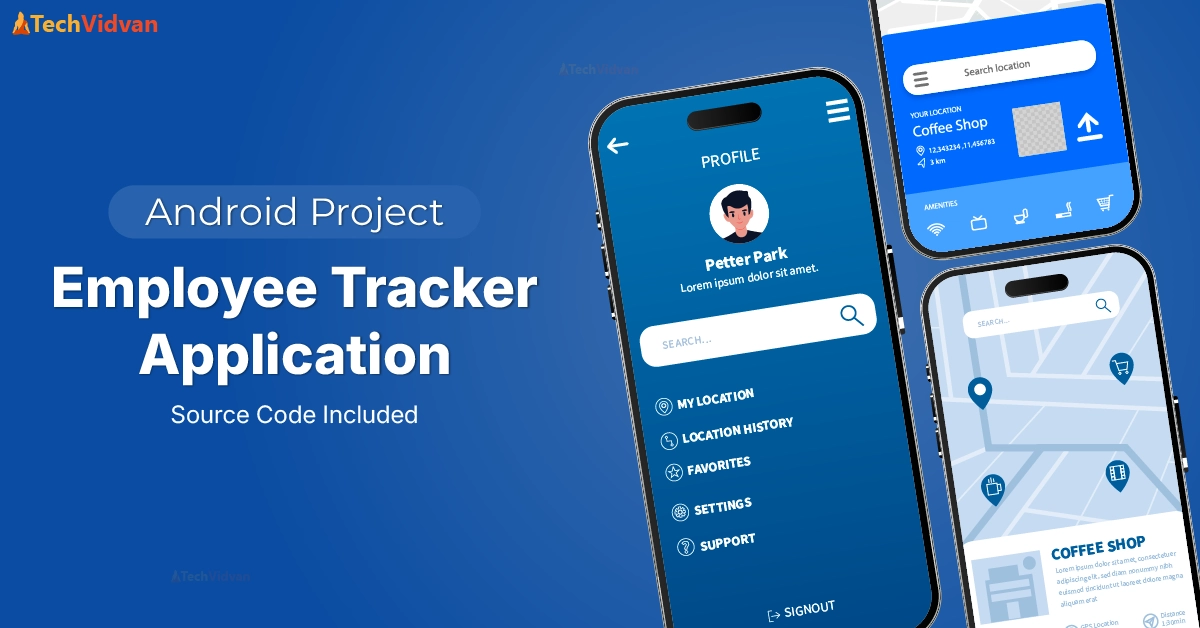
We will try to make a TechVidvan Employee Tracker Application using Android. We will apply our Android knowledge in a simple yet exciting way to create the application.
About Android Employee Tracker Application
An Employee Tracker Application helps organisations in maintaining records of their employees. It provides a simple and easy way to manage and track employee details, attendance, and performance. We can also determine the employee’s location to see if they are working correctly or roaming around.
We will learn to build an Employee Tracker Application using Android Studio (Java and XML). Our application will have the following features:
- You can add as many employee records as needed.
- You can edit the employee records.
- You can view the location of each employee.
Prerequisites for Android Employee Tracker Application
You should know the basics of these to start this project :
1. Android Studio
2. XML Designing and Resource Files
3. Java
4. Location Services
5. Firebase
Download Android Employee Tracker Application Code
Please download the source code of the Android Employee Tracker Application: Android Employee Tracker Application Code
Steps to Implement the Android Employee Tracker Application Project
To run the application on your device, you need to follow these steps :
1. Download the source code of the Employee Tracker App from above. Now, locate the file on your system and unzip it.
2. Open Android Studio and click on Open an Existing Project.
3. The Project will be opened in Android Studio, and you will be able to see the files mentioned above.
4. Make sure to check the versions mentioned in the build.gradle file and those which are present in your System.
5. Run the App now. It will install the application on your emulator or device.
Step-by-Step Code Explanation of Android Employee Tracker Application
1. LandingScreenActivity.java
package com.example.employeetrackerapplication;

import android.Manifest;
import android.content.Intent;
import android.content.pm.PackageManager;
import android.os.Bundle;
import android.view.View;

import androidx.annotation.NonNull;
import androidx.appcompat.app.AppCompatActivity;
import androidx.core.app.ActivityCompat;
import androidx.core.content.ContextCompat;

import com.google.android.gms.location.FusedLocationProviderClient;
import com.google.android.gms.location.LocationServices;
import com.google.android.gms.tasks.OnSuccessListener;
import com.google.android.gms.tasks.Task;
import com.google.android.material.button.MaterialButton;

public class LandingScreenActivity extends BaseActivity {
   MaterialButton btnEmployer;
   MaterialButton btnEmployee;

   private FusedLocationProviderClient fusedLocationClient;
   private static final int LOCATION_PERMISSION_REQUEST_CODE = 1;

   @Override
   public void onCreate(Bundle savedInstanceState) {
       super.onCreate(savedInstanceState);
       setContentView(R.layout.landing_screen);

       // Initialize class-level variables
       btnEmployer = findViewById(R.id.landingEmployerButton);
       btnEmployee = findViewById(R.id.landingEmployeeButton);

       fusedLocationClient = LocationServices.getFusedLocationProviderClient(this);

       requestLocationPermission();
       changeLayout();
   }

   public void changeLayout() {
       View.OnClickListener handler = new View.OnClickListener() {
           public void onClick(View v) {
               if (v == btnEmployer) {
                   Intent intentMain = new Intent(LandingScreenActivity.this, EmployerViewActivity.class);
                   LandingScreenActivity.this.startActivity(intentMain);
               }
               if (v == btnEmployee) {
                   Intent intentMain = new Intent(LandingScreenActivity.this, EmployeeViewActivity.class);
                   LandingScreenActivity.this.startActivity(intentMain);
               }
           }
       };

       btnEmployee.setOnClickListener(handler);
       btnEmployer.setOnClickListener(handler);
   }

   private void requestLocationPermission() {
       if (ContextCompat.checkSelfPermission(this, Manifest.permission.ACCESS_FINE_LOCATION) != PackageManager.PERMISSION_GRANTED) {
           ActivityCompat.requestPermissions(this, new String[]{Manifest.permission.ACCESS_FINE_LOCATION}, LOCATION_PERMISSION_REQUEST_CODE);
       } else {
           getLocation();
       }
   }

   private void getLocation() {
       if (ActivityCompat.checkSelfPermission(this, Manifest.permission.ACCESS_FINE_LOCATION) != PackageManager.PERMISSION_GRANTED && ActivityCompat.checkSelfPermission(this, Manifest.permission.ACCESS_COARSE_LOCATION) != PackageManager.PERMISSION_GRANTED) {
           return;
       }
       Task<android.location.Location> locationResult = fusedLocationClient.getLastLocation();
       locationResult.addOnSuccessListener(this, new OnSuccessListener<android.location.Location>() {
           @Override
           public void onSuccess(android.location.Location location) {
               if (location != null) {

               }
           }
       });
   }

   @Override
   public void onRequestPermissionsResult(int requestCode, @NonNull String[] permissions, @NonNull int[] grantResults) {
       super.onRequestPermissionsResult(requestCode, permissions, grantResults);
       if (requestCode == LOCATION_PERMISSION_REQUEST_CODE) {
           if (grantResults.length > 0 && grantResults[0] == PackageManager.PERMISSION_GRANTED) {
               getLocation();
           }
       }
   }
}
Explanation:
- First, we include the necessary Android libraries and Google Location Services libraries, and define LandingScreenActivity, which extends BaseActivity, which contains our toolbar.
- We define two MaterialButtons: FusedLocationProviderClient, which gets the location, and LOCATION_PERMISSION_REQUEST_CODE, which handles location permission request results.
- We created OnCreate() to initialise UI components and request location permission. It also connects UI buttons to the corresponding variables.
- changeLayout() is used to define what happens when the employer or employee button is clicked. setOnClickListener sets the click listener on buttons, and Intent helps us navigate to the respective activity.
- requestLocationPermission() checks if location permission is granted. If not, request permission. getLocation() retrieves the location if permissions are granted. The OnSuccessListener handles the location result.
2. EmployeeViewActivity.java
package com.example.employeetrackerapplication;

import android.content.Intent;
import android.os.Bundle;
import android.view.View;
import android.widget.EditText;
import android.widget.Toast;

import androidx.annotation.NonNull;
import androidx.appcompat.app.AppCompatActivity;

import com.google.android.gms.tasks.OnFailureListener;
import com.google.android.gms.tasks.OnSuccessListener;
import com.google.android.material.button.MaterialButton;
import com.google.firebase.firestore.DocumentReference;
import com.google.firebase.firestore.FirebaseFirestore;

import java.text.SimpleDateFormat;
import java.util.Date;
import java.util.HashMap;
import java.util.Map;

public class EmployeeViewActivity extends AppCompatActivity {

   private EditText editTextName;
   private EditText editTextId;
   private MaterialButton btnIn;
   private MaterialButton btnOut;
   private FirebaseFirestore db;

   @Override
   protected void onCreate(Bundle savedInstanceState) {
       super.onCreate(savedInstanceState);
       overridePendingTransition(R.anim.fade_in, R.anim.fade_out);
       setContentView(R.layout.employee_view);

       editTextName = findViewById(R.id.editTextName);
       editTextId = findViewById(R.id.editTextId);
       btnIn = findViewById(R.id.empViewInButton);
       btnOut = findViewById(R.id.empViewOutButton);

       db = FirebaseFirestore.getInstance();

       changeLayout();
   }

   // Transition between layouts
   public void changeLayout() {
       View.OnClickListener handler = new View.OnClickListener() {
           public void onClick(View v) {
               if (v == btnIn) {
                   saveEmployeeData();
               }
               if (v == btnOut) {
                   Intent intentMain = new Intent(EmployeeViewActivity.this, LandingScreenActivity.class);
                   EmployeeViewActivity.this.startActivity(intentMain);
               }
           }
       };

       btnIn.setOnClickListener(handler);
       btnOut.setOnClickListener(handler);
   }

   public void saveEmployeeData() {
       String name = editTextName.getText().toString();
       String id = editTextId.getText().toString();

       if (name.isEmpty() || id.isEmpty()) {
           Toast.makeText(this, "Please enter both name and ID", Toast.LENGTH_SHORT).show();
           return;
       }

       String checkInTime = getCurrentTime(); // Get current time as check-in time

       Map<String, Object> employee = new HashMap<>();
       employee.put("name", name);
       employee.put("id", id);
       employee.put("checkInTime", checkInTime);
       employee.put("attendance", "Present");

       db.collection("employees")
               .add(employee)
               .addOnSuccessListener(new OnSuccessListener<DocumentReference>() {
                   @Override
                   public void onSuccess(DocumentReference documentReference) {
                       Toast.makeText(EmployeeViewActivity.this, "Employee data saved", Toast.LENGTH_SHORT).show();
                       Intent intent = new Intent(EmployeeViewActivity.this, WelcomeActivity.class);
                       intent.putExtra("EMPLOYEE_NAME", name);
                       intent.putExtra("EMPLOYEE_ID", id);
                       startActivity(intent);
                   }
               })
               .addOnFailureListener(new OnFailureListener() {
                   @Override
                   public void onFailure(@NonNull Exception e) {
                       Toast.makeText(EmployeeViewActivity.this, "Error saving data", Toast.LENGTH_SHORT).show();
                   }
               });
   }

   private String getCurrentTime() {
       SimpleDateFormat sdf = new SimpleDateFormat("yyyy-MM-dd HH:mm:ss");
       return sdf.format(new Date());
   }
}
Explanation:
- First, we import the necessary Android libraries and the Firebase Firestore libraries and define EmployeeViewActivity. We define 2 Input Fields, 2 Material buttons and a Firestore instance to interact with the Firestore database.
- We define the onCreate() to initialize UI components and set up layout transitions and click listeners. It also connects the UI elements to the corresponding variables.
- changeLayout() is used to define what happens when the check-in or check-out button is clicked. Intent navigates back to LandingScreenActivity when the check-out button is clicked.
- saveEmployeeData() saves employee data to Firestore. It retrieves Name and ID from the input fields. Gets the current check-in time and adds the data to the employees collection in Firestore.
- getCurrentTime() returns the current date and time in the given format.
3. EmployerViewActivity.java
package com.example.employeetrackerapplication;

import android.content.Intent;
import android.graphics.Typeface;
import android.os.Bundle;
import android.view.View;
import android.widget.RadioButton;
import android.widget.RadioGroup;
import android.widget.Toast;

import androidx.annotation.NonNull;
import androidx.appcompat.app.AppCompatActivity;

import com.google.android.gms.tasks.OnCompleteListener;
import com.google.android.gms.tasks.Task;
import com.google.android.material.button.MaterialButton;
import com.google.firebase.firestore.DocumentSnapshot;
import com.google.firebase.firestore.FirebaseFirestore;
import com.google.firebase.firestore.QuerySnapshot;

public class EmployerViewActivity extends AppCompatActivity {

   private RadioGroup employerViewRadioGroup;
   private MaterialButton employerViewButton;
   private MaterialButton employerViewExitButton;
   private FirebaseFirestore db;

   @Override
   protected void onCreate(Bundle savedInstanceState) {
       super.onCreate(savedInstanceState);
       setContentView(R.layout.employer_view);

       employerViewRadioGroup = findViewById(R.id.employerViewRadioGroup);
       employerViewButton = findViewById(R.id.employerViewButton);
       employerViewExitButton = findViewById(R.id.employerViewExitButton);

       db = FirebaseFirestore.getInstance();

       employerViewButton.setOnClickListener(new View.OnClickListener() {
           @Override
           public void onClick(View v) {
               int selectedId = employerViewRadioGroup.getCheckedRadioButtonId();
               RadioButton selectedEmployee = findViewById(selectedId);

               if (selectedEmployee != null) {
                   Intent intent = new Intent(EmployerViewActivity.this, EmployeeLocationActivity.class);

                   intent.putExtra("EMPLOYEE_ID", selectedEmployee.getTag().toString());
                   startActivity(intent);
               }
           }
       });

       employerViewExitButton.setOnClickListener(new View.OnClickListener() {
           @Override
           public void onClick(View v) {
               finish();
           }
       });

       fetchEmployeeData();
   }

   private void fetchEmployeeData() {
       db.collection("employees").get().addOnCompleteListener(new OnCompleteListener<QuerySnapshot>() {
           @Override
           public void onComplete(@NonNull Task<QuerySnapshot> task) {
               if (task.isSuccessful()) {
                   QuerySnapshot querySnapshot = task.getResult();
                   if (querySnapshot != null) {
                       for (DocumentSnapshot document : querySnapshot.getDocuments()) {
                           String name = document.getString("name");
                           String id = document.getString("id");

                           if (name != null && id != null) {
                               addRadioButton(name, id);
                           }
                       }
                   }
               } else {
                   Toast.makeText(EmployerViewActivity.this, "Error fetching employee data", Toast.LENGTH_SHORT).show();
               }
           }
       });
   }

   private void addRadioButton(String name, String id) {
       RadioButton radioButton = new RadioButton(this);
       radioButton.setText(name);
       radioButton.setTag(id);
       radioButton.setTextColor(getResources().getColor(android.R.color.black));
       radioButton.setTextSize(20f);
       radioButton.setTypeface(radioButton.getTypeface(), Typeface.BOLD);

       radioButton.setButtonTintList(getResources().getColorStateList(android.R.color.black));

       employerViewRadioGroup.addView(radioButton);
   }
}
Explanation:
- First, we import the necessary Android libraries and the Firebase Firestore libraries and define EmployerViewActivity. We define a group of Radio buttons, 2 Material buttons and a Firestore instance to interact with the Firestore database.
- onCreate() is used to initialize UI components and set up click listeners. It also connects the UI elements to the corresponding variables.
- employerViewButton.setOnClickListener helps in navigating to EmployeeLocationActivity when an employee is selected.
- fetchEmployeeData() fetches employee data from the employees collection in Firestore. It calls addRadioButton() to add each employee as a radio button in the RadioGroup.
- addRadioButton() adds a radio button for each employee. It creates a new RadioButton instance and sets the text and tag to the employee’s name and ID.
4. EmployeeLocationActivity.java
package com.example.employeetrackerapplication;

import static android.content.ContentValues.TAG;

import android.content.Intent;
import android.location.Location;
import android.os.Bundle;
import android.util.Log;
import android.view.View;
import android.widget.Button;
import android.widget.TextView;
import android.widget.Toast;

import androidx.annotation.NonNull;
import androidx.appcompat.app.AppCompatActivity;

import com.google.android.gms.location.FusedLocationProviderClient;
import com.google.android.gms.location.LocationServices;
import com.google.android.gms.tasks.OnCompleteListener;
import com.google.android.gms.tasks.OnSuccessListener;
import com.google.android.gms.tasks.Task;
import com.google.firebase.firestore.DocumentSnapshot;
import com.google.firebase.firestore.FirebaseFirestore;
import com.google.firebase.firestore.QuerySnapshot;

public class EmployeeLocationActivity extends AppCompatActivity {

   private TextView latitudeText, longitudeText, employeeIdText, checkInTimeText, attendanceText;
   private Button homeButton;
   private FusedLocationProviderClient fusedLocationClient;
   private FirebaseFirestore db;

   @Override
   protected void onCreate(Bundle savedInstanceState) {
       super.onCreate(savedInstanceState);
       setContentView(R.layout.activity_employee_location);

       latitudeText = findViewById(R.id.latitudeText);
       longitudeText = findViewById(R.id.longitudeText);
       employeeIdText = findViewById(R.id.employeeIdText);
       checkInTimeText = findViewById(R.id.checkInTimeText);
       attendanceText = findViewById(R.id.attendanceText);
       homeButton = findViewById(R.id.homeButton);

       fusedLocationClient = LocationServices.getFusedLocationProviderClient(this);
       db = FirebaseFirestore.getInstance();

       // Get employee data passed from previous activity
       String employeeId = getIntent().getStringExtra("EMPLOYEE_ID");
       Log.d(TAG, "Received employee ID: " + employeeId);

       if (employeeId != null) {
           fetchEmployeeData(employeeId);
       }

       // Fetch current location
       fetchLocation();

       // Set up the home button
       homeButton.setOnClickListener(new View.OnClickListener() {
           @Override
           public void onClick(View v) {
               Intent intent = new Intent(EmployeeLocationActivity.this, LandingScreenActivity.class);
               startActivity(intent);
               finish();
           }
       });
   }

   private void fetchEmployeeData(String employeeId) {
       db.collection("employees")
               .whereEqualTo("id", employeeId)
               .get()
               .addOnCompleteListener(new OnCompleteListener<QuerySnapshot>() {
                   @Override
                   public void onComplete(@NonNull Task<QuerySnapshot> task) {
                       if (task.isSuccessful() && task.getResult() != null && !task.getResult().isEmpty()) {
                           DocumentSnapshot document = task.getResult().getDocuments().get(0);
                           if (document.exists()) {
                               String id = document.getString("id");
                               String checkInTime = document.getString("checkInTime");
                               String attendance = document.getString("attendance"); // Fetch attendance

                               Log.d("Firestore", "Document data: " + document.getData());

                               employeeIdText.setText(id != null ? id : "N/A");
                               checkInTimeText.setText(checkInTime != null ? checkInTime : "N/A");
                               attendanceText.setText(attendance != null ? attendance : "N/A");
                           } else {
                               Log.d("Firestore", "No such document");
                               employeeIdText.setText("N/A");
                               checkInTimeText.setText("N/A");
                               attendanceText.setText("N/A");
                           }
                       } else {
                           Log.d("Firestore", "Error getting documents: ", task.getException());
                           employeeIdText.setText("N/A");
                           checkInTimeText.setText("N/A");
                           attendanceText.setText("N/A");
                       }
                   }
               });
   }

   private void fetchLocation() {
       try {
           fusedLocationClient.getLastLocation().addOnSuccessListener(this, new OnSuccessListener<Location>() {
               @Override
               public void onSuccess(Location location) {
                   if (location != null) {
                       double latitude = location.getLatitude();
                       double longitude = location.getLongitude();
                       latitudeText.setText(String.valueOf(latitude));
                       longitudeText.setText(String.valueOf(longitude));
                   }
               }
           });
       } catch (SecurityException e) {
           e.printStackTrace();
           Toast.makeText(this, "Permission denied", Toast.LENGTH_SHORT).show();
       }
   }
}
Explanation:
- We include the necessary Android libraries, Google Location services, and Firebase Firestore libraries, and we define EmployeeLocationActivity.
- We define TextViews for displaying important information, a button, a FusedLocationProviderClient for accessing location services, and a Firestore instance.
- onCreate() initializes UI components and sets up the necessary instances for location services and Firestore. getIntent().getStringExtra() retrieves the employee ID passed from the previous activity.
- fetchEmployeeData() fetches employee data from the employees collection in Firestore based on the employee ID. It retrieves the first result matching the query and extracts employee details.
- fetchLocation() is used to fetch the device’s location using the FusedLocationProviderClient and updates the latitude and longitude.
- Logout() helps in logging out, and Intent navigates us back to LandingScreen.
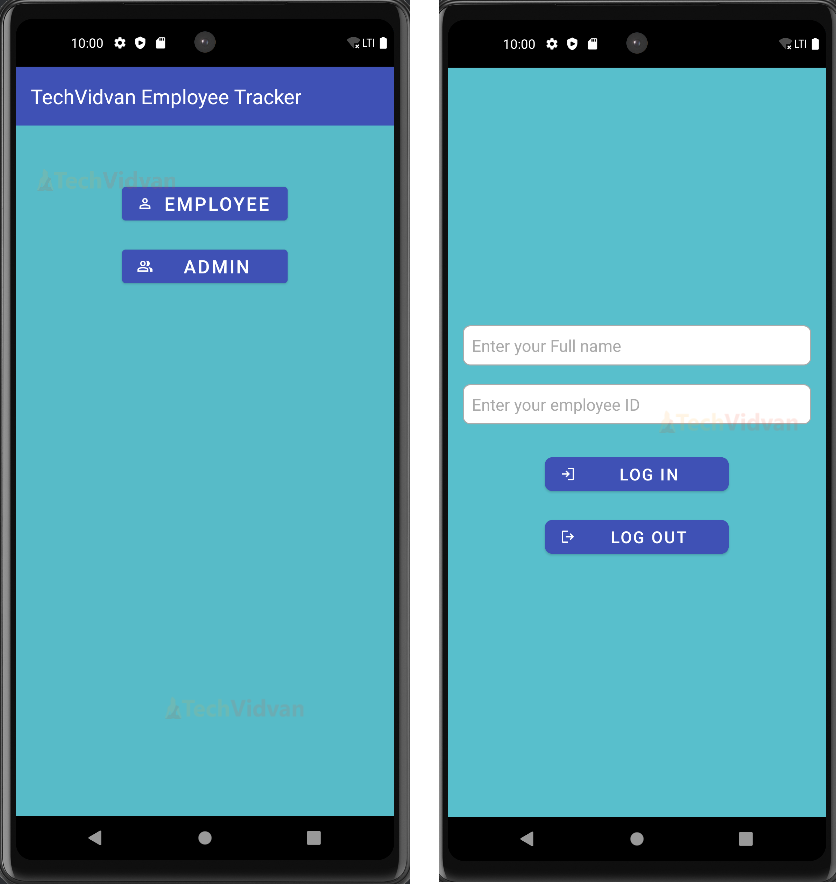
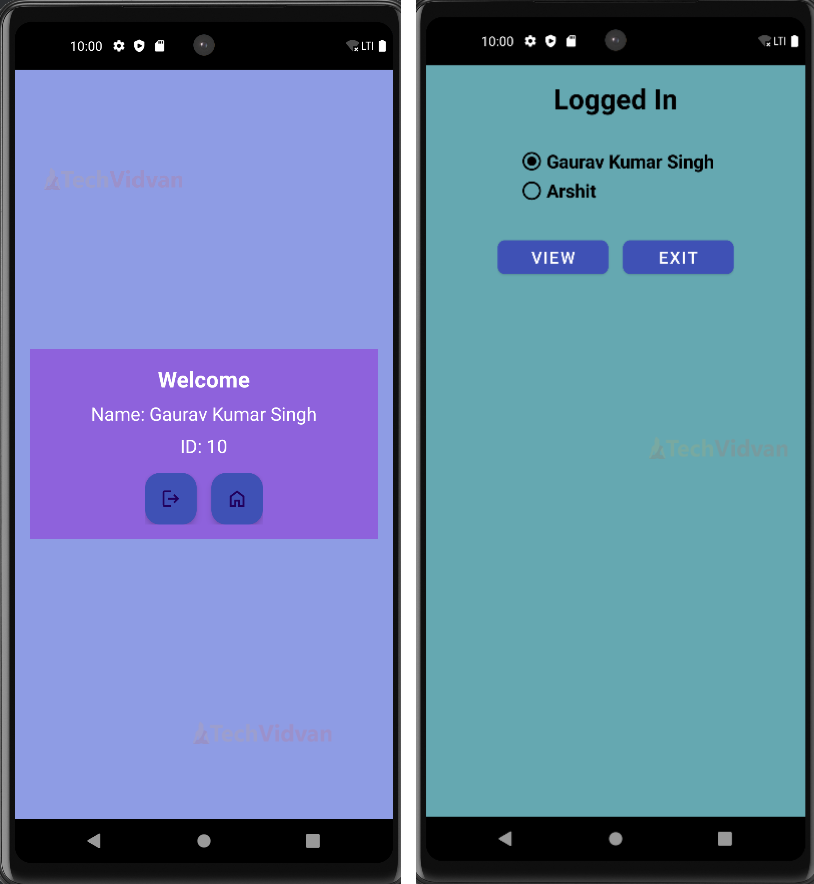
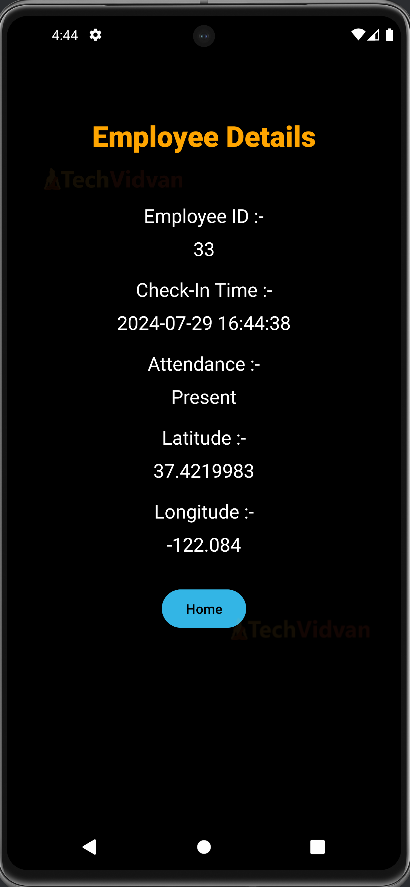
Android Employee Tracker Application Output
Conclusion
We have succeeded in implementing our TechVidvan Employee Tracker Application using Java and XML. We have discussed project details and prerequisites for this project. Also, we discussed the code explanation to make it easy to understand. We have used Firebase to store the data. I hope you liked this project. Thank You.