



Java Currency Converter is a desktop application that converts one currency into another currency based on recent market prices. It is very useful for foreign exchange trade and multinational business.
About Currency Converter Project
Users can convert the following Currencies:
1. From INR (Indian Rupee) to
- United States Dollar
- Euro
- Canadian Dollar
- Japanese Yen
- Chinese Yen
- Bitcoin
2. From USD (United States Dollar) to
- Indian Rupee
- Euro
- Canadian Dollar
- Japanese Yen
- Chinese Yuan
- Bitcoin
There are many more options to convert from one currency to another
Project Prerequisites
- Java should be installed on the machine
- To build Currency Converter user should have basic knowledge of Java AWT (Abstract Window Toolkit) and Java Swing
- IDE used: NetBeans 8.2
Download Java Currency Converter
Please download the source code of java currency converter project from the following link: Currency Converter Project
Steps to Create Currency Converter– Java Project
1. Import packages
In this step, we will import all the required AWT and Swing packages.
import java.awt.*;
import java.awt.event.*;
import javax.swing.*;
import javax.swing.event.*;
2. Creating User Interface
Now, its time to design the Front user layout which will be accessed by the user for conversion.
We had to make use of several components such as Label, ComboBox, Button and TextField. In Netbeans, there is facility of drag and drop components and adding functionalities in easy way it will automatically generate the code as per the requirement selected by you.
Function Definitions:
- setLayout() : This function lets you set the layout of the Frame used in the project.
- setBounds(x,y, width, height): This Function will let you set the dimensions of the components used in the project.
- setFont: This function will let you set the font of your choice to the UI screen to make it attractive.
private void initComponents() {

        title = new javax.swing.JLabel();
        convert = new javax.swing.JButton();
        jLabel1 = new javax.swing.JLabel();
        convertFrom = new javax.swing.JLabel();
        convertTo = new javax.swing.JLabel();
        input = new javax.swing.JTextField();
        choiceFrom = new javax.swing.JComboBox();
        choiceTo = new javax.swing.JComboBox();
        output = new javax.swing.JLabel();

        setDefaultCloseOperation(javax.swing.WindowConstants.EXIT_ON_CLOSE);
        setBackground(new java.awt.Color(0, 0, 0));

        title.setFont(new java.awt.Font("Times New Roman", 1, 48)); // NOI18N
        title.setText("Techvidvan - Currency Converter");
        title.setVerifyInputWhenFocusTarget(false);

        convert.setFont(new java.awt.Font("Times New Roman", 1, 18)); // NOI18N
        convert.setText("CONVERT");
        convert.addActionListener(new java.awt.event.ActionListener() {
            public void actionPerformed(java.awt.event.ActionEvent evt) {
                convertActionPerformed(evt);
            }
        });

        jLabel1.setFont(new java.awt.Font("Times New Roman", 1, 18)); // NOI18N
        jLabel1.setText("Enter Amount ");

        convertFrom.setFont(new java.awt.Font("Times New Roman", 1, 18)); // NOI18N
        convertFrom.setText("Convert From");

        convertTo.setFont(new java.awt.Font("Times New Roman", 1, 18)); // NOI18N
        convertTo.setText("Convert To");

        input.setFont(new java.awt.Font("Times New Roman", 0, 18)); // NOI18N
        input.addActionListener(new java.awt.event.ActionListener() {
            public void actionPerformed(java.awt.event.ActionEvent evt) {
                inputActionPerformed(evt);
            }
        });

        choiceFrom.setFont(new java.awt.Font("Times New Roman", 1, 18)); // NOI18N
        choiceFrom.setModel(new javax.swing.DefaultComboBoxModel(new String[] { "INR", "USD", "EUR", "CAD", "JPY", "CNY", "BTC" }));
        choiceFrom.addItemListener(new java.awt.event.ItemListener() {
            public void itemStateChanged(java.awt.event.ItemEvent evt) {
                choiceFromItemStateChanged(evt);
            }
        });

        choiceTo.setFont(new java.awt.Font("Times New Roman", 1, 18)); // NOI18N
        choiceTo.setModel(new javax.swing.DefaultComboBoxModel(new String[] { "INR", "USD", "EUR", "CAD", "JPY", "CNY", "BTC" }));
        choiceTo.addItemListener(new java.awt.event.ItemListener() {
            public void itemStateChanged(java.awt.event.ItemEvent evt) {
                choiceToItemStateChanged(evt);
            }
        });

        output.setFont(new java.awt.Font("Times New Roman", 1, 24)); // NOI18N
        output.setHorizontalAlignment(javax.swing.SwingConstants.CENTER);
        output.setBorder(javax.swing.BorderFactory.createLineBorder(new java.awt.Color(0, 0, 0)));
3. Adding Listeners to the components
Adding listeners to the components will return the action specified to it when the user selects the particular component.
choiceFrom.addItemListener(this);
        choiceTo.addItemListener(this);
        convert.addActionListener(this);
4. Overriding the Listeners
There is always the need to override the listener which is being used.
//Adding Item Listener to Choice From ComboBox
private void choiceFromItemStateChanged(java.awt.event.ItemEvent evt) { }

//Adding Item Listener to Choice To ComboBox
private void choiceToItemStateChanged(java.awt.event.ItemEvent evt) {}

//Adding Action Listener to Convert Button
private void convertActionPerformed(java.awt.event.ActionEvent evt) {
                Double total;
        Double amount= Double.parseDouble(input.getText());

//Then add Functionalities in continuity
5. Adding Functionalities
- Converting USD currency
switch (choiceFrom.getSelectedItem().toString()) {
            case "USD":
                //INR
                switch (choiceTo.getSelectedItem().toString()) {
                    case "INR":
                        total=amount*82.743;
                        output.setText(input.getText()+" USD = "+total+" INR");
                        break;
                    case "EUR":
                        total=amount*0.943;
                        output.setText(input.getText()+" USD = "+total+" EUR");
                        break;
                    case "CAD":
                        total=amount*1.351;
                        output.setText(input.getText()+" USD = "+total+" CAD");
                        break;
                    case "JPY":
                        total=amount*132.440;
                        output.setText(input.getText()+" USD = "+total+" JPY");
                        break;
                    case "CNY":
                        total=amount*6.871;
                        output.setText(input.getText()+" USD = "+total+" CNY");
                        break;
                    case "BTC":
                        total=amount*0.0000594;
                        output.setText(input.getText()+" USD = "+total+" BTC");
                        break;
                    default:
                        total=amount*1;
                        output.setText(input.getText()+" USD = "+total+" USD");
                        break;
                }
                break;
- Converting Indian Currency
case "INR":
                //USD
                switch (choiceTo.getSelectedItem().toString()) {
                    case "USD":
                        total=amount*0.0120;
                        output.setText(input.getText()+" INR = "+total+" USD");
                        break;
                    case "EUR":
                        total=amount*0.01139;
                        output.setText(input.getText()+" INR = "+total+" EUR");
                        break;
                    case "CAD":
                        total=amount*0.0163;
                        output.setText(input.getText()+" INR = "+total+" CAD");
                        break;
                    case "JPY":
                        total=amount*1.6012;
                        output.setText(input.getText()+" INR = "+total+" JPY");
                        break;
                    case "CNY":
                        total=amount*0.083;
                        output.setText(input.getText()+" INR = "+total+" CNY");
                        break;
                    case "BTC":
                        total=amount*0.000000726;
                        output.setText(input.getText()+" INR = "+total+" BTC");
                        break;
                    default:
                        total=amount*1;
                        output.setText(input.getText()+" INR = "+total+" INR");
                        break;
                }
                break;
- Converting EURO currency
case "EUR":
                //USD
                switch (choiceTo.getSelectedItem().toString()) {
                    case "USD":
                        total=amount*1.06057;
                        output.setText(input.getText()+" EUR = "+total+" USD");
                        break;
                    case "INR":
                        total=amount*87.74738;
                        output.setText(input.getText()+" EUR = "+total+" INR");
                        break;
                    case "CAD":
                        total=amount*1.4336;
                        output.setText(input.getText()+" EUR = "+total+" CAD");
                        break;
                    case "JPY":
                        total=amount*140.5083;
                        output.setText(input.getText()+" EUR = "+total+" JPY");
                        break;
                    case "CNY":
                        total=amount*7.2925;
                        output.setText(input.getText()+" EUR = "+total+" CNY");
                        break;
                    case "BTC":
                        total=amount*0.0000630;
                        output.setText(input.getText()+" EUR = "+total+" BTC");
                        break;
                    default:
                        total=amount*1;
                        output.setText(input.getText()+" EUR = "+total+" EUR");
                        break;
                }
                break;
- Converting CAD currency
case "CAD":
                //USD
                switch (choiceTo.getSelectedItem().toString()) {
                    case "USD":
                        total=amount*0.7397;
                        output.setText(input.getText()+" CAD = "+total+" USD");
                        break;
                    case "INR":
                        total=amount*61.2043;
                        output.setText(input.getText()+" CAD = "+total+" INR");
                        break;
                    case "EUR":
                        total=amount*0.6975;
                        output.setText(input.getText()+" CAD = "+total+" EUR");
                        break;
                    case "JPY":
                        total=amount*98.0054;
                        output.setText(input.getText()+" CAD = "+total+" JPY");
                        break;
                    case "CNY":
                        total=amount*5.0865;
                        output.setText(input.getText()+" CAD = "+total+" CNY");
                        break;
                    case "BTC":
                        total=amount*0.0000439;
                        output.setText(input.getText()+" CAD = "+total+" BTC");
                        break;
                    default:
                        total=amount*1;
                        output.setText(input.getText()+" CAD = "+total+" CAD");
                        break;
                }
                break;
- Converting Japanese Currency
case "JPY":
                //USD
                switch (choiceTo.getSelectedItem().toString()) {
                    case "USD":
                        total=amount*0.00754;
                        output.setText(input.getText()+" JPY = "+total+" USD");
                        break;
                    case "INR":
                        total=amount*0.6244;
                        output.setText(input.getText()+" JPY = "+total+" INR");
                        break;
                    case "EUR":
                        total=amount*0.00711;
                        output.setText(input.getText()+" JPY = "+total+" EUR");
                        break;
                    case "CAD":
                        total=amount*0.01020;
                        output.setText(input.getText()+" JPY = "+total+" CAD");
                        break;
                    case "CNY":
                        total=amount*0.051900;
                        output.setText(input.getText()+" JPY = "+total+" CNY");
                        break;
                    case "BTC":
                        total=amount*0.0000000453;
                        output.setText(input.getText()+" JPY = "+total+" BTC");
                        break;
                    default:
                        total=amount*1;
                        output.setText(input.getText()+" JPY = "+total+" JPY");
                        break;
                }
                break;
- Converting Chinese Currency
case "CNY":
                //USD
                switch (choiceTo.getSelectedItem().toString()) {
                    case "USD":
                        total=amount*0.1454;
                        output.setText(input.getText()+" CNY = "+total+" USD");
                        break;
                    case "INR":
                        total=amount*12.0325;
                        output.setText(input.getText()+" CNY = "+total+" INR");
                        break;
                    case "EUR":
                        total=amount*0.13712;
                        output.setText(input.getText()+" CNY = "+total+" EUR");
                        break;
                    case "CAD":
                        total=amount*0.19659;
                        output.setText(input.getText()+" CNY = "+total+" CAD");
                        break;
                    case "JPY":
                        total=amount*19.26750;
                        output.setText(input.getText()+" CNY = "+total+" JPY");
                        break;
                    case "BTC":
                        total=amount*0.000008646;
                        output.setText(input.getText()+" CNY = "+total+" BTC");
                        break;
                    default:
                        total=amount*1;
                        output.setText(input.getText()+" CNY = "+total+" CNY");
                        break;
                }
                break;
- Converting Bitcoin Currency
case "BTC":
                //USD
                switch (choiceTo.getSelectedItem().toString()) {
                    case "USD":
                        total=amount*16820.845;
                        output.setText(input.getText()+" BTC = "+total+" USD");
                        break;
                    case "INR":
                        total=amount*1391685.7254;
                        output.setText(input.getText()+" BTC = "+total+" INR");
                        break;
                    case "EUR":
                        total=amount*15860.1393;
                        output.setText(input.getText()+" BTC = "+total+" EUR");
                        break;
                    case "CAD":
                        total=amount*22738.3511;
                        output.setText(input.getText()+" BTC = "+total+" CAD");
                        break;
                    case "JPY":
                        total=amount*2228482.3907;
                        output.setText(input.getText()+" BTC = "+total+" JPY");
                        break;
                    case "CNY":
                        total=amount*115660.1311;
                        output.setText(input.getText()+" BTC = "+total+" CNY");
                        break;
                    default:
                        total=amount*1;
                        output.setText(input.getText()+" BTC = "+total+" BTC");
                        break;
                }
                break;
        }
    }
Main Driver Code
Adding functionalities like setting location, setting size and performing exit options on frame.
public static void main(String args[]) {

        java.awt.EventQueue.invokeLater(new Runnable() {
            public void run() {
                new CurrencyConverter().setVisible(true);
            }
        });
    }
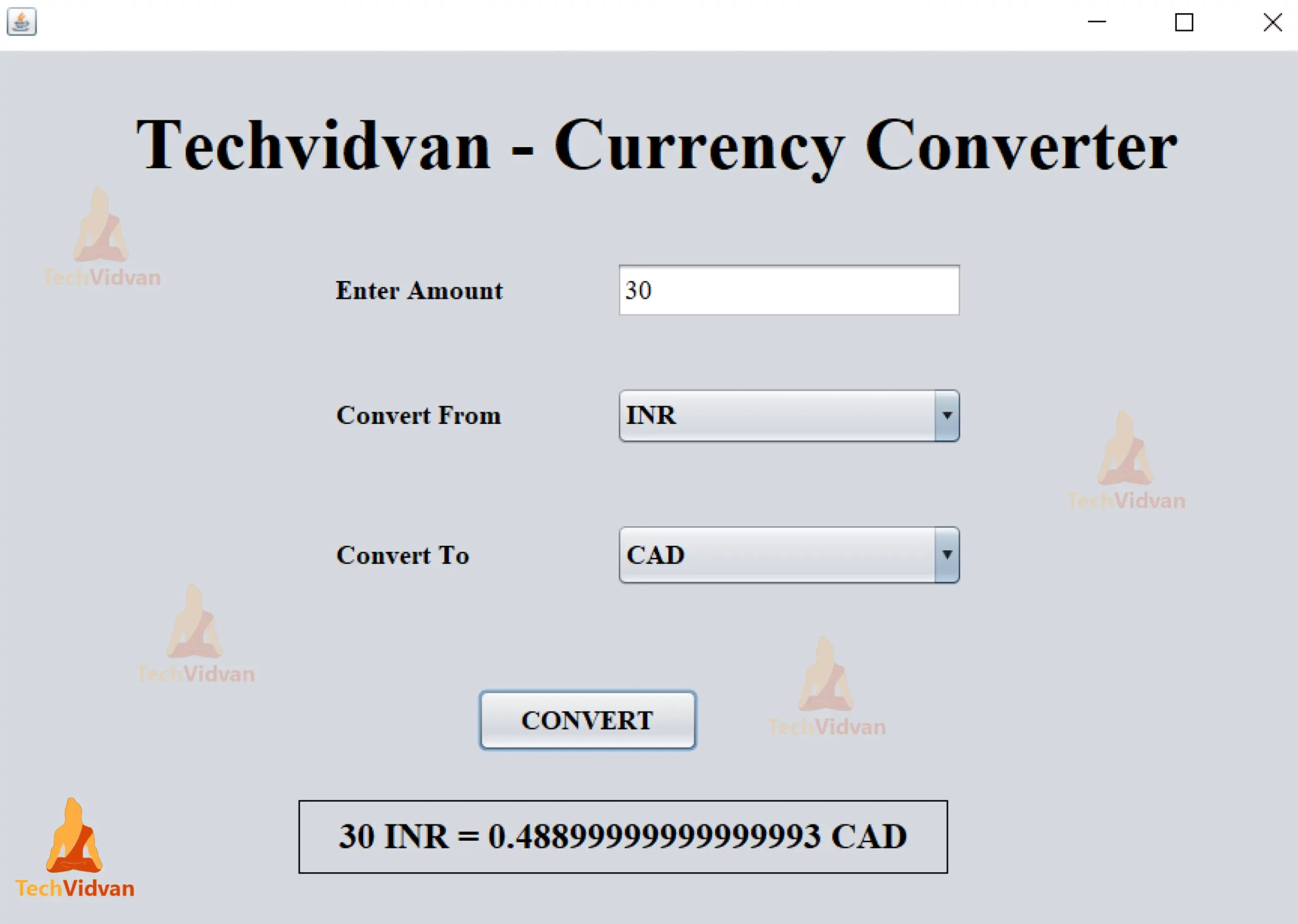
Java Currency Converter Project Output
Summary
Yayyy! We have finally built our Currency Converter in java. Now we can easily convert the currency from one type to another without the use of currency exchange rates API.
From this java project, we have learned how to use AWT & Swing components such as Label, ComboBox, Text Field and Button, add new functionality to the frame and how to make use of Action Listener and Item Listener.