

Minesweeper is a classic computer game with the objective of clearing a rectangular grid containing hidden mines. The grid is divided into cells, and each cell can either be empty or contains a mine. The player’s task is to uncover all the empty cells without triggering any mines.
About Java Minesweeper Game
- At the beginning of the game, the player is presented with a grid and has to select a cell to start the game.
- If the selected cell contains a mine, the game ends, and the player loses.
- If the selected cell is empty or doesn’t contain a mine, then it reveals a number which indicates the total number of mines adjacent to that cell( eight neighbouring cells)
- Based on the number, the player can deduce the presence of mines in the neighbouring cells.
Prerequisites for Minesweeper Game using Java:
- IDE Used: IntelliJ
- Java 1.8 or above must be installed.
Download Java Minesweeper Game Project:
Please download the source code of Java Minesweeper Game Project from the following link: Java Minesweeper Game Converter Project Code
Steps to Create Minesweeper Game Using Java:
These are the steps to build a minesweeper game in Java:
- Set up the project.
- Design the grid.
- Place mine randomly
- Calculate adjacent mines.
- Print grid and reveal cells.
- Create the game loop.
- Implement game-over conditions.
- Test the game.
1. Set up the project:
In this step, we basically create a Java project and initialize all necessary variables to build the game.
- Create a new Java project in your preferred IDE.
- Set up the basic project structure by importing appropriate packages.
- Declare and Initialize various variables and data structures needed for the game, such as ‘ROWS’, ‘COLUMNS’, ‘MINES’, ‘grid’, ‘remainingCells’ , ‘move’, ‘revealed’, and boolean flags like ‘gameWon’ and ‘gameLost’.
- Also, create a Scanner class object to read input from the user.
import java.util.Scanner;
public class Minesweeper {
   static int ROWS,COLUMNS,MINES, remainingCells;
   static char[][] grid;
   static int[] move = new int[2];
   static boolean[][] revealed;
   static boolean gameWon, gameLost;
   static Scanner sc = new Scanner(System.in);
2. Design the grid:
The grid size is decided based on the difficulty chosen by the user and also initialized.
- The ‘grid_size’ method uses a switch statement to assign values to the ‘ROWS’, ‘COLUMNS’ and ‘MINES’ variables based on the level of difficulty chosen.
- In case of custom difficulty level, the user is prompted to enter the number of rows, columns and mines manually.
private static void grid_size(int difficulty) {
   switch (difficulty) {  // A menu based system for adjusting the difficulty.
       case 1:
           ROWS = 30;
           COLUMNS = 16;
           MINES = 99;
           break;
       case 2:
           ROWS = 16;
           COLUMNS = 16;
           MINES = 40;
           break;
       case 3:
           ROWS = 9;
           COLUMNS = 9;
           MINES = 10;
           break;
       case 4:
           System.out.println("Enter the number of rows, columns, and mines: \n");
           ROWS = sc.nextInt();
           COLUMNS = sc.nextInt();
           MINES = sc.nextInt();
           break;
       default:
           System.out.println("Invalid choice\n");
           System.exit(0);
   }
   grid = new char[ROWS][COLUMNS];
}
- The ‘initializeGrid’ method is used to initialize the grid. This method also initializes the revealed array, which is a boolean array used to track the revealed cells.
private static void initializeGrid() { // Initialize the game grid with empty cells.
   for (int i = 0; i < ROWS; i++) {
       for (int j = 0; j < COLUMNS; j++) {
           grid[i][j] = '-';
       }
   }
   revealed = new boolean[ROWS][COLUMNS];   // Initialize the revealed array.
   remainingCells = ROWS * COLUMNS - MINES; // Calculate the number of remaining cells to be revealed.
}
3. Place the mine randomly:
Randomly select positions on the grid to place the mines.
- The ‘placeMines’ method randomly places the mines by generating random coordinates and checking if the cell is already occupied by a mine.
private static void placeMines() { // Place mines randomly on the grid.
   int minesPlaced = 0;
   while (minesPlaced < MINES) {
       int row = (int) (Math.random() * ROWS);
       int col = (int) (Math.random() * COLUMNS);
       if (grid[row][col] != 'M') {
           grid[row][col] = 'M';
           minesPlaced++;
       }
   }
}
4. Calculate adjacent mines:
For every cell that is not a mine, the number of mines in the neighbouring cells is counted, and that value is assigned to that cell.
- The ‘calculateAdjacentMines’ method iterates over the grid, and for each cell that is not a mine, it counts the adjacent cells that contain mines.
- The count is then stored in the corresponding cell to represent the number of adjacent mines.
private static void calculateAdjacentMines() {  // It calculated the adjacent numbers along the mines for each cell.
   for (int i = 0; i < ROWS; i++) {
       for (int j = 0; j < COLUMNS; j++) {
           if (grid[i][j] != 'M') {
               int count = 0;
               for (int x = -1; x <= 1; x++) {
                   for (int y = -1; y <= 1; y++) {
                       if ((x != 0 || y != 0) && isValidCell(i + x, j + y) && grid[i + x][j + y] == 'M'){
                           count++;
                       }
                   }
               }
               if (count > 0) {
                   grid[i][j] = (char) (count + '0');
               }
           }
       }
   }
}
The ‘isValidCell’ method checks if a given row and column are within the grid boundaries before performing any operations.
private static boolean isValidCell(int row, int col) { // Used to check for a valid cell.
   return row >= 0 && row < ROWS && col >= 0 && col < COLUMNS;
}
5. Print grid and reveal cells:
The game loop must include displaying the grid and taking input from the player for their every move.
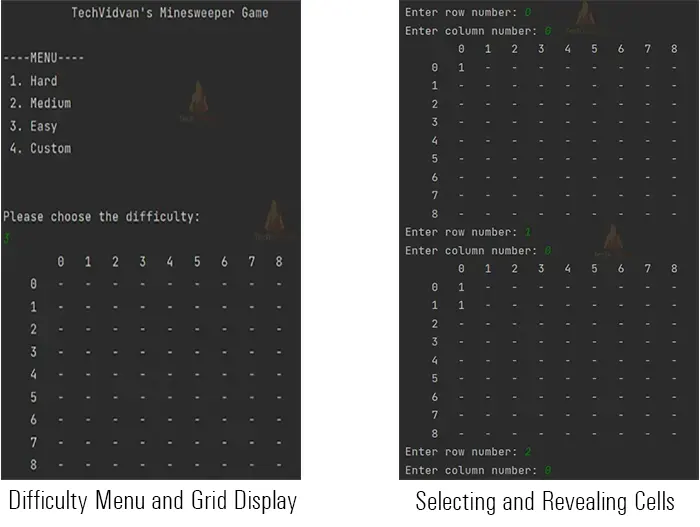
- The ‘printGrid’ method is responsible for displaying the current state of the game to the player, which includes the revealed cells and the number of mines adjacent to them.
private static void printGrid() { //This is the sole function to print the grid everytime over the output screen.
   System.out.print("     ");
   for (int j = 0; j < COLUMNS; j++) {
       System.out.printf(" %3s", j);
   }
   System.out.println(); // Print column numbers on top for reference
   for (int i = 0; i < ROWS; i++) {
       System.out.print("\t" + i);
       for (int j = 0; j < COLUMNS; j++) {
           if (grid[i][j] == 'F') {
               System.out.printf("\tF");
           } else if (revealed[i][j]) {
               if (grid[i][j] == '-') {
                   System.out.print("\t0");
               } else {
                   System.out.print("\t" + grid[i][j]);
               }
           } else {
               System.out.printf("\t-");
           }
       }
       System.out.println(); // Print the grid
   }
}
- The ‘revealCell’ method is recursively called to reveal the selected cell and its adjacent cell if the chosen cell is empty.
private static void revealCell(int row, int col) {  //Reveals the cells which have been visited
   if (!isValidCell(row, col) || revealed[row][col]) {
       return;
   }
   revealed[row][col] = true;
   remainingCells--;
   if (grid[row][col] == '-') {
       for (int x = -1; x <= 1; x++) {
           for (int y = -1; y <= 1; y++) {
               revealCell(row + x, col + y);
           }
       }
   }
}
- The ‘revealAllCells’ method is called to reveal all the cells at once in the grid presented on the output screen.
private static void revealAllCells() { // It is to reveal all the cells in output screen.
   for (int i = 0; i < ROWS; i++) {
       for (int j = 0; j < COLUMNS; j++) {
           revealed[i][j] = true;
       }
   }
}
- The ‘getPlayerMove’ method prompts the player to enter the row and column numbers of their next move.
private static void getPlayerMove() { // This method is defined to take input from the user.
   System.out.print("Enter row number: ");
   move[0] = sc.nextInt();
   System.out.print("Enter column number: ");
   move[1] = sc.nextInt();
}
6. Create the game loop:
Initialize the game, take the player’s first move, place the mines, calculate adjacent mines, and check whether the player won the game by revealing all non-mine cells or lost the game by stepping on a mine.
public static void play() {
   initializeGrid(); // Game initialization
   printGrid();
   getPlayerMove();
   int row = move[0];
   int col = move[1];
   placeMines(); // Place mines after the first move
   calculateAdjacentMines();
   while (!gameWon && !gameLost) {
       if (grid[row][col] == 'M') { // Check if player stepped on a mine
           gameLost = true;
           revealAllCells();
           printGrid();
           System.out.println("Game Over! You stepped on a mine.");
           break; // Exit the loop
       } else {
           revealCell(row, col);
           remainingCells--;
           printGrid();
           if (checkWin()) { // Check if player cleared all non-mine cells
               gameWon = true;
               System.out.println("Congratulations! You cleared all the mines.");
               break; // Exit the loop
           }
           getPlayerMove();
           row = move[0];
           col = move[1];
       }
   }
}
- The ‘play’ method initializes the game by calling the ‘initializeGrid’ method to set up the initial grid with empty cells and the ‘getPlayerMove’ to get the player’s first move.
- After receiving the first move, it places the mines on the grid randomly using the ‘placeMines’ method and calculates the number of adjacent mines for each cell using ‘calculateAdjacentMines’ method. Reveals the player’s chosen cell using ‘revealCell’ and updates the remaining cells counter.
- It then enters a loop where it repeatedly asks the player for their next move until the game is won or lost.
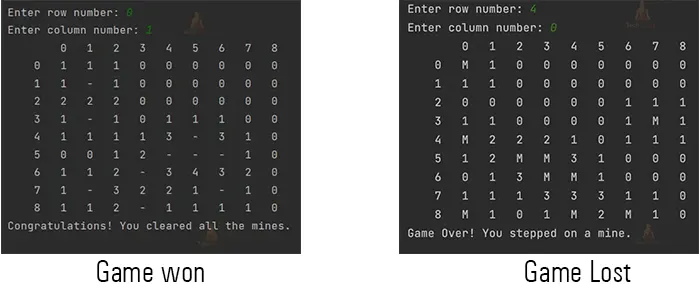
- If the player steps on a mine, the game is lost, the remaining cells are revealed, and the grid is printed with the “Game Over” message.
- If the player clears all non-mine cells, the game is won, and a victory message is displayed.
7. Implement game-over conditions:
The ‘checkwin’ method checks if the game is won by verifying if all non-mine cells have been revealed.
private static boolean checkWin() { //This is to check if the user has completed the game successfully or not.
   for (int i = 0; i < ROWS; i++) {
       for (int j = 0; j < COLUMNS; j++) {
           if (grid[i][j] != 'M' && !revealed[i][j]) {
               return false;
           }
       }
   }
8. The Main Method:
The main method is responsible for starting the game. It displays a menu and prompts the user to choose the difficulty level. Based on the user’s input, ‘the grid_size’ method is called to set the appropriate dimensions for the game grid. Finally, the ‘play’ method is invoked to start the game.
public static void main(String[] args) {
   System.out.format("%40s", "TechVidvan's Minesweeper Game\n"); // Game title
   System.out.println("\n----MENU---- ");  //Adding Menu to choose difficulty level of the game
   System.out.println(" 1. Hard\n 2. Medium\n 3. Easy\n 4. Custom\n");
   System.out.println("\nPlease choose the difficulty: ");
   int difficulty = sc.nextInt();
   grid_size(difficulty);
   play();
}
9. Test the game:
Verify that the game functions correctly by playing through various scenarios, including wins and losses.
Conclusion:
In conclusion, the Java version of the Minesweeper game exhibits a useful and engaging gaming environment. Users of the game can choose between easy, medium, hard, or custom settings for the difficulty. As the player advances, the game logic takes care of mine installation, neighbouring mine counts calculation, and cell revealing. The grid size is updated accordingly. The game keeps track of how many cells are still hidden and decides whether the player wins or loses. The procedural technique used in the code implementation successfully produces a competitive version of Minesweeper.