

Java is simple to understand and implement code in a variety of platforms. We are going to learn about String format(). String format() is used to create formatted String in format pattern. It is widely used for applications, formatting numbers and dates.
Explanation
The Java String format() method uses the specified locale, format string, and parameters to return a formatted string.
This method allows us to concatenate the texts while simultaneously formatting the resultant concatenated string.
Java’s format() method is similar to the sprintf() function in C and the printf() method in Java.
How to use Java string format():
The format() method accepts several parameters, including locale, format, and object, which carry the values of the locale, string format, and object arguments.
Syntax:
The following list of string format() functions includes two different types:
- public static String format(Locale loc, String form, Object… args)
- public static String format(String form, Object).
Syntax explanation :
public static String format(Locale loc, String form, Object… args)
- format() is a static method. We call the format() method using the class name String.
- str is a string that is to be formatted
- … in the above code signifies you can pass more than one object to format().
public static String format(String form, Object).
- format is the String object that represents the format for the output String.
- …args are zero or more number of arguments that the String object “format” could need.
Parameter:
- Locale: The format() method’s locale is specified by the locale argument.
- format: The string’s format.
- args: The format string’s parameters. It could be 0 or more.
Return Value:
- Return Formatted string
Implementation of Java string format():
public static String format(String format, Object... args) {
       return new Formatter().format(format, args).toString();
   }
Exception:
- NullPointerException is the first exception.If the argument format String object is null, this exception occurs.
- IllegalFormatException: This exception happens if the format argument String is invalid or there are insufficient arguments.
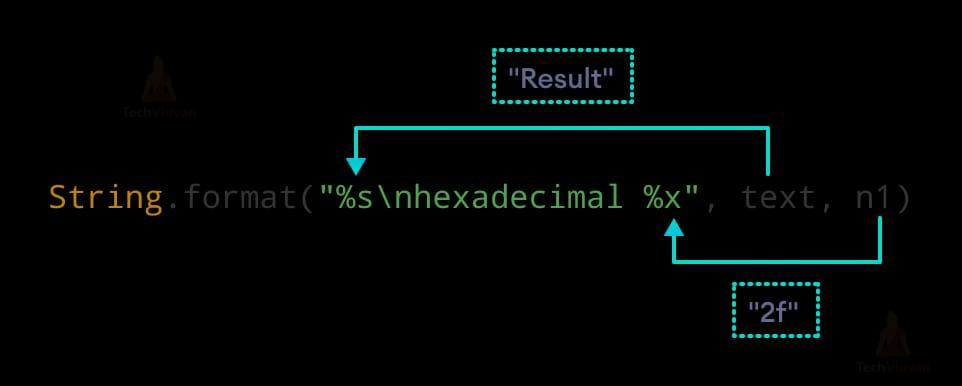
Diagram:
Example 1:
public class TechVidvanFormat{
public static void main(String args[]){
String name="Ram";
String sf1=String.format("The name is %s",name);
String sf2=String.format("value1 is %f",32.33);
String sf3=String.format("value2 is %d",32);

System.out.println(sf1);
System.out.println(sf2);
System.out.println(sf3);
}
}
Output:
The name is Ram
Value1 is 32.33
Value2 is 32
Example 2:
public class TechVidvanFormat {
    public static void main(String[] args) {
        String str1 = String.format("%d", 132);          // Integer value
        String str2 = String.format("%s", "Java"); // String value
        String str3 = String.format("%f", 10.32);       // Float value
        String str4 = String.format("%x", 100);          // Hexadecimal value
        String str5 = String.format("%c", 'A');          // Char value
        System.out.println(str1);
        System.out.println(str2);
        System.out.println(str3);
        System.out.println(str4);
        System.out.println(str5);
    }
 }
Output:
132
Java
10.320000
64
A
Example 3:
public class TechVidvanFormat{
    public static void main(String[] args) {
        String str1 = String.format("%d", 101);
        String str2 = String.format("|%10d|", 101);  // Specifying length of integer
        String str3 = String.format("|%-10d|", 101); // Left-justifying within the specified width
        String str4 = String.format("|% d|", 101);
        String str5 = String.format("|%010d|", 101); // Filling with zeroes
        System.out.println(str1);
        System.out.println(str2);
        System.out.println(str3);
        System.out.println(str4);
        System.out.println(str5);
    }
}
Output:
101
| 101|
|101 |
| 101|
|0000000101|
Table:
| Specifier | Description |
| %s, %S | string |
| %c, %C | Unicode character |
| %d | decimal integer |
| %o. | an octal integer |
| %x, %X | hexadecimal integer |
| %f. | for decimal numbers |
| %e, %E | for scientific notation |
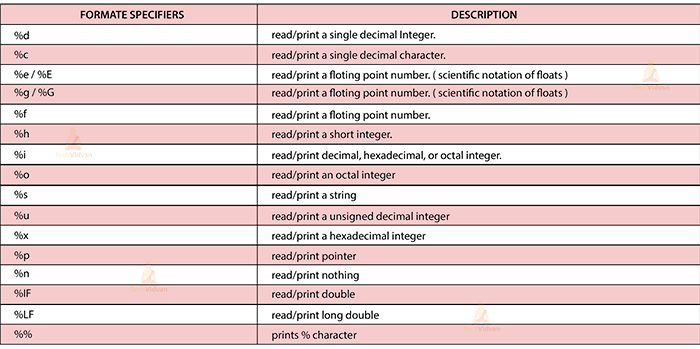
Format specifiers:
Format(IFormatProvider, String, Object, Object, Object):
The string representation of three supplied objects replaces the format components in a string. A parameter specifies culture-specific formatting.
Format(String, Object, Object, Object)
The string representation of three supplied objects replaces the format components in a string.
Format(IFormatProvider, String, Object, Object)
The string representation of two supplied objects replaces the format components in a string. A parameter specifies culture-specific formatting.
Format(String, Object, Object)
The string representation of two supplied objects replaces the format components in a string.
Format(IFormatProvider, String, Object)
The string representation of the corresponding object replaces the format item or items in a specified string. A parameter specifies culture-specific formatting.
Format(IFormatProvider, String, Object[])
The format components in a string are replaced with string representations of corresponding objects in a given array. A parameter specifies culture-specific formatting.
Format(String, Object[])
Replaces the format item in a given string with the string representation of a given array’s associated object.
Format(String, Object)
The string representation of a specified object replaces one or more format components in a string.
Usage of string format() in Java:
- Numbering format
- Datatype format
- Formatting in the locale
- Date Formatting
- Formatted control output
- Formatting control
- Managing Spacing
- Alignment management
- Keeping the number of integral digits under control
- Managing the number of digits following the decimal separator
- The use of literal braces in a result string
Advantages of String format():
- Formatting: It allows you to simply format strings in format specifiers.
- The code is simple to read and understand.
- Because it is a formatted string, it is simple to save and reuse.
Disadvantage of string format():
- Because of the extensive formatting, it is more difficult to read and maintain the code.
- Using long formatted strings consumes more memory.
- It does not return all errors in a formatted string.
Conclusion
We have thoroughly discussed the String format() function in Java. It is simple to understand and implement the format in code. It provides efficient string formatting.