

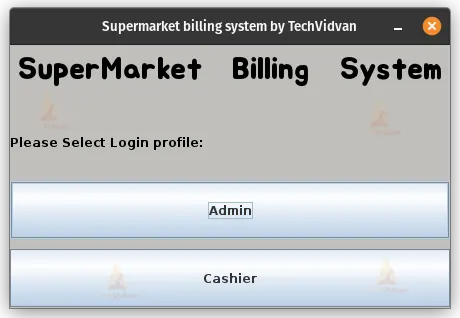
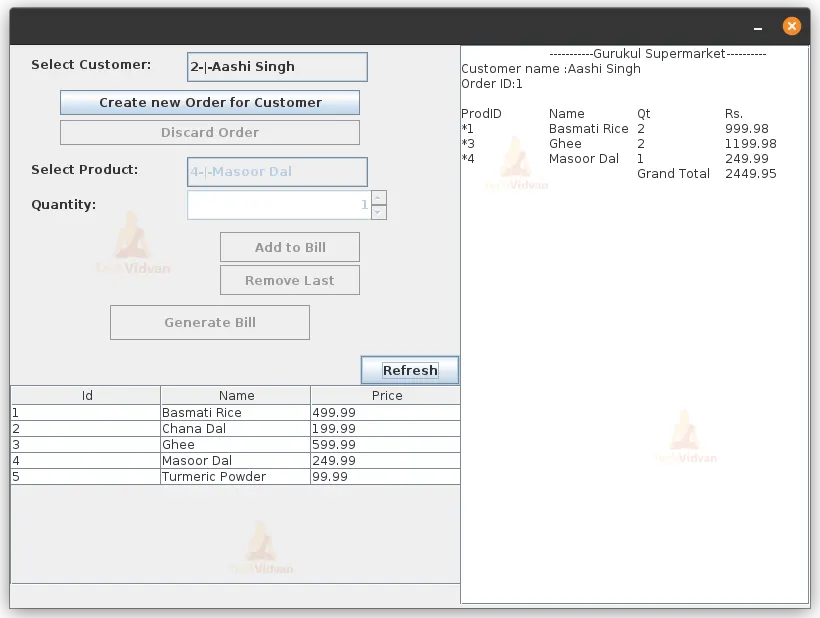
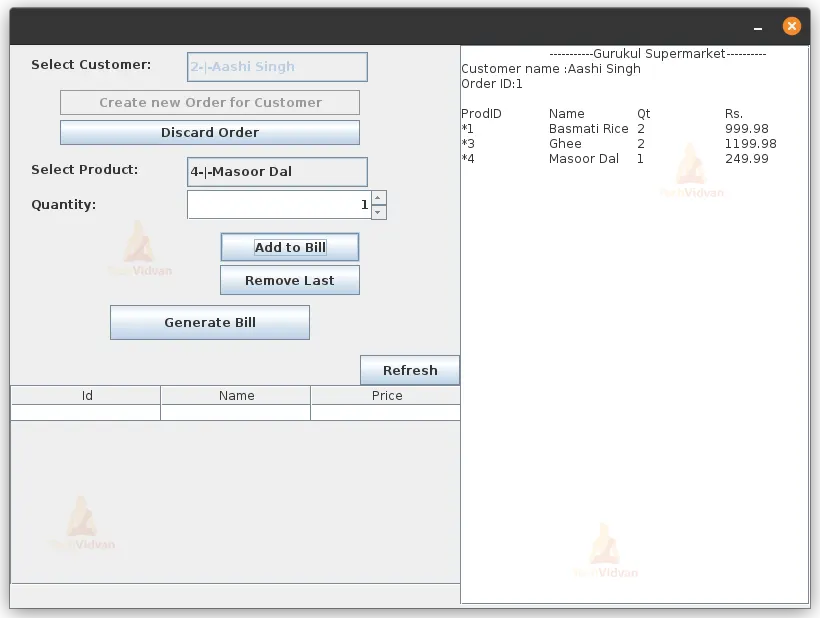
In this project, we will be creating a SuperMarket Billing System in Java using swing and SQLite as the database for the application. The System will have Admin and Cashier profiles to choose from. The Cashier can Create new orders and add products to them, and the Bill will be displayed while the products are being added. While the Admin can add and delete the Customer as well as Products from the database and can see the list of customers and products in the database.
About Java SuperMarket Billing System
The objective of this project is to provide an understanding of how to create a SuperMarket billing system in Java using SQLite as the database. This project will provide the necessary code to implement the system.
Prerequisites for SuperMarket Billing System using Java
1. Eclipse IDE
2. Basic knowledge of SQL
3. Knowledge of Java Programming
4.Basic Knowledge of SQLite(Needed to download the driver and add it to the project)
Download Java SuperMarket Billing System Project
Please download the source code of Java SuperMarket Billing System Project from the following link: Java SuperMarket Billing System Project Code
Steps to Create a SuperMarket Billing System Using Java
Following are the steps for developing the Java SuperMarket Billing System Project:
Step 1:Create the necessary classes
LoginWindow.java: This class will provide the login window to the users, which will contain two profiles to choose from The Admin and The Cashier.
The code for the class is
package com.techvidvan;

import java.awt.EventQueue;
import javax.swing.JFrame;
import javax.swing.JLabel;
import javax.swing.SwingConstants;
import java.awt.Font;
import java.awt.event.ActionEvent;
import java.awt.event.ActionListener;
import javax.swing.JButton;
import java.awt.Color;
import java.awt.GridLayout;

public class LoginWindow {

  private JFrame frmLoginWindow;

  /**
   * Launch the application.
   */
  public static void main(String[] args) {
    EventQueue.invokeLater(new Runnable() {
      public void run() {
        try {
          LoginWindow window = new LoginWindow();
          window.frmLoginWindow.setVisible(true);
        } catch (Exception e) {
          e.printStackTrace();
        }
      }
    });
  }

  /**
   * Create the application.
   */
  public LoginWindow() {
    DatabaseOperations.dbInit();
    initialize();
  }

  /**
   * Initialize the contents of the frame.
   */
  private void initialize() {
    frmLoginWindow = new JFrame();
    frmLoginWindow.getContentPane().setBackground(new Color(192, 191, 188));
    frmLoginWindow.setTitle("Supermarket billing system by TechVidvan");
    frmLoginWindow.setBounds(100, 100, 440, 300);
    frmLoginWindow.setDefaultCloseOperation(JFrame.EXIT_ON_CLOSE);
    frmLoginWindow.getContentPane().setLayout(new GridLayout(0, 1, 0, 10));

    JLabel lblWelcome = new JLabel("SuperMarket Billing System");
    lblWelcome.setForeground(new Color(0, 0, 0));
    lblWelcome.setFont(new Font("Jua", Font.BOLD, 30));
    lblWelcome.setHorizontalAlignment(SwingConstants.CENTER);
    frmLoginWindow.getContentPane().add(lblWelcome);

    JButton btnAdmin = new JButton("Admin");
    btnAdmin.addActionListener(new ActionListener() {

      @Override
      public void actionPerformed(ActionEvent e) {
        frmLoginWindow.dispose();
        new AdminLogin();
      }

    });

    JLabel lblInstruction = new JLabel("Please Select Login profile:");
    lblInstruction.setForeground(Color.BLACK);
    frmLoginWindow.getContentPane().add(lblInstruction);
    frmLoginWindow.getContentPane().add(btnAdmin);

    JButton btnCashier = new JButton("Cashier");
    btnCashier.addActionListener(new ActionListener() {

      @Override
      public void actionPerformed(ActionEvent e) {
        frmLoginWindow.dispose();
        new CashierPanel();


      }
    });
    frmLoginWindow.getContentPane().add(btnCashier);
  }
}
AdminLogin.java: This class will provide the Admin login window for the users
Code:
package com.techvidvan;

import javax.swing.JFrame;
import java.awt.event.ActionEvent;
import java.awt.event.ActionListener;
import javax.swing.JLabel;
import javax.swing.JOptionPane;
import javax.swing.JTextField;
import javax.swing.JPasswordField;
import javax.swing.JButton;

public class AdminLogin  {

  private JFrame frame;
  private JTextField adminNameField;
  private JPasswordField passwordField;
  private final String  adminName = "Admin";
  private final String password = "1234";

  public AdminLogin() {
    initialize();
  }

  /**
   * Initialize the contents of the frame.
   */
  private void initialize() {
    frame = new JFrame();
    frame.setBounds(100, 100, 450, 300);
    frame.setTitle("Admin Login");
    frame.setDefaultCloseOperation(JFrame.EXIT_ON_CLOSE);
    frame.getContentPane().setLayout(null);

    JLabel lblAdmin = new JLabel("Admin Name");
    lblAdmin.setBounds(0, 67, 173, 36);
    frame.getContentPane().add(lblAdmin);

    adminNameField = new JTextField();
    adminNameField.setBounds(222, 68, 184, 36);
    frame.getContentPane().add(adminNameField);
    adminNameField.setColumns(10);

    JLabel lblPassword = new JLabel("Password");
    lblPassword.setBounds(0, 134, 173, 36);
    frame.getContentPane().add(lblPassword);

    passwordField = new JPasswordField();
    passwordField.setBounds(220, 135, 184, 36);
    frame.getContentPane().add(passwordField);

    JButton btnLogin = new JButton("Login");
    btnLogin.setBounds(161, 201, 117, 25);
    btnLogin.addActionListener(new ActionListener() {

      @Override
      public void actionPerformed(ActionEvent e) {
        if(adminNameField.getText().equals(adminName) && password.equals(new String(passwordField.getPassword()))) {					frame.dispose();
          AdminPanel ap = new  AdminPanel();

        }else {
          JOptionPane.showMessageDialog(btnLogin, "Incorrect Username or Password");;
        }

      }
    });
    frame.getContentPane().add(btnLogin);
    frame.setVisible(true);
  }
}
AdminPanel: This class will provide Admin functionality to the users
Code
package com.techvidvan;

import java.awt.BorderLayout;
import java.awt.GridLayout;
import java.awt.event.ActionEvent;
import java.awt.event.ActionListener;
import java.sql.SQLException;
import javax.swing.JButton;
import javax.swing.JFrame;
import javax.swing.JLabel;
import javax.swing.JOptionPane;
import javax.swing.JPanel;
import javax.swing.JScrollPane;
import javax.swing.JTabbedPane;
import javax.swing.JTable;
import javax.swing.JTextField;
import javax.swing.table.DefaultTableModel;

@SuppressWarnings("serial")
public class AdminPanel extends JFrame {
  private JTextField customerNameField;
  private JTextField phoneField;
  private JTextField emailField;
  private JTextField addressField;
  private JTable cusotmerTable;
  private JTextField txtCustdeletefield;
  private JTextField productNameField;
  private JTextField priceField;
  private JTable productTable;
  private JTextField deleteProdField;

  public AdminPanel() {
    setSize(700,500);

    JTabbedPane tabbedPane = new JTabbedPane(JTabbedPane.TOP);
    getContentPane().add(tabbedPane, BorderLayout.CENTER);

    JPanel customerPanel = new JPanel();
    tabbedPane.addTab("Customers", null, customerPanel, null);
    customerPanel.setLayout(new GridLayout(0, 2, 0, 0));

    JPanel addCustomerPanel = new JPanel();
    customerPanel.add(addCustomerPanel);
    addCustomerPanel.setLayout(null);

    JLabel lblName = new JLabel("Name:");
    lblName.setBounds(0, 0, 173, 87);
    addCustomerPanel.add(lblName);

    customerNameField = new JTextField();
    customerNameField.setBounds(173, 0, 173, 87);
    addCustomerPanel.add(customerNameField);
    customerNameField.setColumns(10);

    JLabel lblPhone = new JLabel("Phone:");
    lblPhone.setBounds(0, 87, 173, 87);
    addCustomerPanel.add(lblPhone);

    phoneField = new JTextField();
    phoneField.setBounds(173, 87, 173, 87);
    addCustomerPanel.add(phoneField);
    phoneField.setColumns(10);

    JLabel lblEmail = new JLabel("Email;");
    lblEmail.setBounds(0, 174, 173, 87);
    addCustomerPanel.add(lblEmail);

    emailField = new JTextField();
    emailField.setBounds(173, 174, 173, 87);
    emailField.setColumns(10);
    addCustomerPanel.add(emailField);

    JLabel lblAddress = new JLabel("Address:");
    lblAddress.setBounds(0, 261, 173, 87);
    addCustomerPanel.add(lblAddress);

    addressField = new JTextField();
    addressField.setBounds(173, 261, 173, 87);
    addressField.setColumns(10);
    addCustomerPanel.add(addressField);

    JButton btnAddCustomer = new JButton("Add customer");
    btnAddCustomer.setBounds(0, 348, 340, 87);
    btnAddCustomer.addActionListener(new ActionListener() {
      public void actionPerformed(ActionEvent e) {
        try {
          DatabaseOperations.addCustomer(customerNameField.getText(), phoneField.getText(), emailField.getText(), addressField.getText());
          JOptionPane.showMessageDialog(btnAddCustomer, "Added Successfully");
        } catch (SQLException e1) {
          JOptionPane.showMessageDialog(btnAddCustomer, "Can't Add customer");
          e1.printStackTrace();
        }
      }
    });
    addCustomerPanel.add(btnAddCustomer);

    JPanel displayPanel = new JPanel();
    customerPanel.add(displayPanel);
    displayPanel.setLayout(null);

    JScrollPane scrollPane = new JScrollPane();
    scrollPane.setBounds(0, 36, 347, 400);
    displayPanel.add(scrollPane);

    cusotmerTable = new JTable();
    cusotmerTable.setModel(new DefaultTableModel(
      new Object[][] {
        {null, null, null, null, null},
      },
      new String[] {
        "id", "Name", "Phone", "Email", "Address"
      }
    ) {
      boolean[] columnEditables = new boolean[] {
        false, false, false, true, true
      };
      public boolean isCellEditable(int row, int column) {
        return columnEditables;
      }
    });
    cusotmerTable.getColumnModel().getColumn(0).setResizable(false);
    cusotmerTable.getColumnModel().getColumn(1).setResizable(false);
    cusotmerTable.getColumnModel().getColumn(2).setResizable(false);
    scrollPane.setViewportView(cusotmerTable);

    txtCustdeletefield = new JTextField();
    txtCustdeletefield.setBounds(0, 0, 125, 36);
    displayPanel.add(txtCustdeletefield);
    txtCustdeletefield.setColumns(10);

    JButton btnDeletecust = new JButton("Delete");
    btnDeletecust.addActionListener(new ActionListener() {
      public void actionPerformed(ActionEvent e) {
        try {
          DatabaseOperations.delete(Integer.valueOf(txtCustdeletefield.getText())  ,"customers" );
        } catch (NumberFormatException e1) {
          JOptionPane.showMessageDialog(btnDeletecust, "Entern numeric value");
          e1.printStackTrace();
        } catch (SQLException e1) {
          JOptionPane.showMessageDialog(btnDeletecust, "can't delete");
          e1.printStackTrace();
        }
      }
    });
    btnDeletecust.setBounds(125, 0, 117, 36);
    displayPanel.add(btnDeletecust);

    JButton btnRefereshCust = new JButton("Refresh");
    btnRefereshCust.addActionListener(new ActionListener() {
      public void actionPerformed(ActionEvent e) {
        try {
          DatabaseOperations.loadData((DefaultTableModel)cusotmerTable.getModel(), "customers");
        } catch (SQLException e1) {
          // TODO Auto-generated catch block
          e1.printStackTrace();
        }
      }
    });
    btnRefereshCust.setBounds(240, 0, 100, 36);
    displayPanel.add(btnRefereshCust);

    JPanel productsPanel = new JPanel();
    tabbedPane.addTab("Products", null, productsPanel, null);
    productsPanel.setLayout(new GridLayout(0, 2, 0, 0));

    JPanel addProductPanel = new JPanel();
    addProductPanel.setLayout(null);
    productsPanel.add(addProductPanel);

    JLabel lblName_1 = new JLabel("Name:");
    lblName_1.setBounds(0, 0, 173, 87);
    addProductPanel.add(lblName_1);

    productNameField = new JTextField();
    productNameField.setColumns(10);
    productNameField.setBounds(173, 0, 173, 87);
    addProductPanel.add(productNameField);

    JLabel lblPrice = new JLabel("Price:");
    lblPrice.setBounds(0, 87, 173, 87);
    addProductPanel.add(lblPrice);

    priceField = new JTextField();
    priceField.setColumns(10);
    priceField.setBounds(173, 87, 173, 87);
    addProductPanel.add(priceField);

    JButton btnAddProduct = new JButton("Add Product");
    btnAddProduct.addActionListener(new ActionListener() {
      public void actionPerformed(ActionEvent e) {
        try {
          DatabaseOperations.addProduct(productNameField.getText(), Float.valueOf(priceField.getText()));
        } catch (NumberFormatException e1) {
          JOptionPane.showMessageDialog(btnAddProduct, "Enter decimal values");
          e1.printStackTrace();
        } catch (SQLException e1) {

          e1.printStackTrace();
        }
      }
    });
    btnAddProduct.setBounds(0, 200, 340, 87);
    addProductPanel.add(btnAddProduct);

    JButton btnDeleteProduct = new JButton("Delete");
    btnDeleteProduct.addActionListener(new ActionListener() {
      public void actionPerformed(ActionEvent e) {
        try {
          DatabaseOperations.delete(Integer.valueOf(deleteProdField.getText()), "products");
        } catch (NumberFormatException e1) {
          JOptionPane.showMessageDialog(btnDeleteProduct, e1.getMessage());
          e1.printStackTrace();
        } catch (SQLException e1) {
          JOptionPane.showMessageDialog(btnDeleteProduct, e1.getMessage());
          e1.printStackTrace();
        }
      }
    });
    btnDeleteProduct.setBounds(230, 399, 117, 30);
    addProductPanel.add(btnDeleteProduct);

    deleteProdField = new JTextField();
    deleteProdField.setBounds(100, 399, 114, 30);
    addProductPanel.add(deleteProdField);
    deleteProdField.setColumns(10);

    JPanel productsDisplayPanel = new JPanel();
    productsPanel.add(productsDisplayPanel);
    productsDisplayPanel.setLayout(null);

    JScrollPane scrollPane_1 = new JScrollPane();
    scrollPane_1.setBounds(0, 36, 347, 400);
    productsDisplayPanel.add(scrollPane_1);

    productTable = new JTable();
    productTable.setModel(new DefaultTableModel(
      new Object[][] {
        {null, null, null},
      },
      new String[] {
        "id", "Name", "Price"
      }
    ));
    scrollPane_1.setViewportView(productTable);

    JButton btnRefreshProducts = new JButton("Refresh");
    btnRefreshProducts.addActionListener(new ActionListener() {
      public void actionPerformed(ActionEvent e) {
        try {
          DatabaseOperations.loadData((DefaultTableModel)productTable.getModel(), "products");
        } catch (SQLException e1) {

          e1.printStackTrace();
        }
      }
    });
    btnRefreshProducts.setBounds(0, 0, 117, 30);
    productsDisplayPanel.add(btnRefreshProducts);
    setVisible(true);
  }
}
CashierPanel.java: This class will provide the Cashier interface to the user
Code
package com.techvidvan;

import javax.swing.JFrame;
import javax.swing.BoxLayout;
import javax.swing.JPanel;
import javax.swing.JScrollPane;
import javax.swing.JButton;
import javax.swing.JTable;
import javax.swing.JComboBox;
import javax.swing.table.DefaultTableModel;
import javax.swing.JLabel;
import javax.swing.JOptionPane;
import javax.swing.JSpinner;
import java.awt.event.ActionListener;
import java.sql.SQLException;
import java.awt.event.ActionEvent;
import javax.swing.JTextArea;


@SuppressWarnings("serial")
public class CashierPanel extends JFrame{
  private JTable productsTable;
  private int currentOrderID = 0;

  public CashierPanel() {
      setSize(800,600);
      getContentPane().setLayout(null);
      setVisible(true);

      JPanel productsPanel = new JPanel();
      productsPanel.setBounds(0, 300, 450, 260);
      getContentPane().add(productsPanel);
      productsPanel.setLayout(null);

      JButton btnRefresh = new JButton("Refresh");
      btnRefresh.addActionListener(new ActionListener() {
        public void actionPerformed(ActionEvent e) {
          try {
            DatabaseOperations.loadData((DefaultTableModel)productsTable.getModel(), "products");
          } catch (SQLException e1) {
            // TODO Auto-generated catch block
            e1.printStackTrace();
          }
        }
      });
      btnRefresh.setBounds(350, 10, 100, 30);
      productsPanel.add(btnRefresh);

      JScrollPane scrollPane = new JScrollPane();
      scrollPane.setBounds(0, 40, 453, 200);
      productsPanel.add(scrollPane);

      productsTable = new JTable();
      productsTable.setModel(new DefaultTableModel(
        new Object[][] {
          {null, null, null},
        },
        new String[] {
          "Id", "Name", "Price"
        }
      ) {
        boolean[] columnEditables = new boolean[] {
          true, true, false
        };
        public boolean isCellEditable(int row, int column) {
          return columnEditables;
        }
      });
      scrollPane.setViewportView(productsTable);

      JPanel billDisplayPanel = new JPanel();
      billDisplayPanel.setBounds(450, 0, 350, 560);
      getContentPane().add(billDisplayPanel);
      billDisplayPanel.setLayout(new BoxLayout(billDisplayPanel, BoxLayout.X_AXIS));

      JScrollPane billScrollpane = new JScrollPane();
      billDisplayPanel.add(billScrollpane);

      JTextArea billTextArea = new JTextArea();
      billTextArea.setEditable(false);
      clearBillArea(billTextArea);
      billScrollpane.setViewportView(billTextArea);

      JPanel billingPanel = new JPanel();
      billingPanel.setBounds(0, 0, 450, 300);
      getContentPane().add(billingPanel);
      billingPanel.setLayout(null);

      JLabel lblSelectCustomer = new JLabel("Select Customer:");
      lblSelectCustomer.setBounds(21, 12, 135, 15);
      billingPanel.add(lblSelectCustomer);

      JComboBox<String> customerBox = new JComboBox<String>();
      customerBox.setBounds(177, 7, 200, 30);
      billingPanel.add(customerBox);

      JButton btnDiscardOrder = new JButton("Discard Order");

      btnDiscardOrder.setEnabled(false);
      btnDiscardOrder.setBounds(50, 75, 300, 25);
      billingPanel.add(btnDiscardOrder);

      JLabel lblSelectProducts = new JLabel("Select Product:");
      lblSelectProducts.setBounds(21, 117, 135, 15);
      billingPanel.add(lblSelectProducts);

      JComboBox<String> productBox = new JComboBox<String>();
      productBox.setEnabled(false);
      productBox.setBounds(177, 112, 200, 30);
      billingPanel.add(productBox);

      JSpinner quantitySpinner = new JSpinner();
      quantitySpinner.setEnabled(false);
      quantitySpinner.setBounds(177, 145, 200, 30);
      billingPanel.add(quantitySpinner);

      JLabel lblQuantity = new JLabel("Quantity:");
      lblQuantity.setBounds(21, 152, 135, 15);
      billingPanel.add(lblQuantity);

      JButton btnAddToBill = new JButton("Add to Bill");
      btnAddToBill.setEnabled(false);
      btnAddToBill.addActionListener(new ActionListener() {
        public void actionPerformed(ActionEvent e) {
          String prodID = (String)productBox.getSelectedItem();
          prodID = prodID.substring(0, prodID.indexOf('-'));
          String[] product = new String[3];
          try {
             product= DatabaseOperations.getProd(Integer.valueOf(prodID));
              float price = (int)quantitySpinner.getValue()*Float.valueOf(product[2]);

             DatabaseOperations.addOrderItems(currentOrderID,
                 							Integer.valueOf(prodID),
                 							(int)quantitySpinner.getValue(),
                 							Float.valueOf(price) );
          } catch (NumberFormatException | SQLException e1) {
            // TODO Auto-generated catch block
            e1.printStackTrace();
          }

          billTextArea.append("*"+product[0]+"\t"+product[1]+"\t"+(int)quantitySpinner.getValue()+"\t"+(int)quantitySpinner.getValue()*Float.valueOf(product[2])+"\n");
        }
      });
      btnAddToBill.setBounds(210, 187, 140, 30);
      billingPanel.add(btnAddToBill);

      JButton btnRemoveLast = new JButton("Remove Last");
      btnRemoveLast.addActionListener(new ActionListener() {
        public void actionPerformed(ActionEvent e) {
          try {
            DatabaseOperations.deleteOrderItem(currentOrderID);
          } catch (SQLException e2) {
            // TODO Auto-generated catch block
            e2.printStackTrace();
          }
          String text = billTextArea.getText();
          try {
            text = text.substring(0, text.lastIndexOf("*"));
          } catch (Exception e1) {
            JOptionPane.showMessageDialog(btnRemoveLast, "NO Items to remove");
            e1.printStackTrace();
          }
          billTextArea.setText(text);
        }
      });
      btnRemoveLast.setEnabled(false);
      btnRemoveLast.setBounds(210, 220, 140, 30);
      billingPanel.add(btnRemoveLast);

      JButton btnGenerateBill = new JButton("Generate Bill");
      btnGenerateBill.setEnabled(false);
      btnGenerateBill.setBounds(100, 260, 200, 35);
      billingPanel.add(btnGenerateBill);

      JButton btnCreateNewOrder = new JButton("Create new Order for Customer");
      btnCreateNewOrder.addActionListener(new ActionListener() {
        public void actionPerformed(ActionEvent e) {
          clearBillArea(billTextArea);
          btnCreateNewOrder.setEnabled(false);
          customerBox.setEnabled(false);
          productBox.setEnabled(true);
          quantitySpinner.setEnabled(true);
          btnAddToBill.setEnabled(true);
          btnRemoveLast.setEnabled(true);
          btnGenerateBill.setEnabled(true);
          btnDiscardOrder.setEnabled(true);

          String custID = (String)customerBox.getSelectedItem();
          try {
            currentOrderID = DatabaseOperations.createNewOrder(Integer.valueOf(custID.substring(0, custID.indexOf('-'))));
          } catch (NumberFormatException e1) {
            // TODO Auto-generated catch block
            e1.printStackTrace();
          } catch (SQLException e1) {
            // TODO Auto-generated catch block
            e1.printStackTrace();
          }
          billTextArea.append("Customer name :"+custID.substring(custID.lastIndexOf('-')+1)+"\n");
          billTextArea.append("Order ID:"+currentOrderID+"\n\n");
          billTextArea.append("ProdID\tName\tQt\tRs.\n");
        }
      });
      btnCreateNewOrder.setBounds(50, 45, 300, 25);
      billingPanel.add(btnCreateNewOrder);

      btnDiscardOrder.addActionListener(new ActionListener() {
        public void actionPerformed(ActionEvent e) {
          btnCreateNewOrder.setEnabled(true);
          customerBox.setEnabled(true);

          productBox.setEnabled(false);
          quantitySpinner.setEnabled(false);
          btnAddToBill.setEnabled(false);
          btnRemoveLast.setEnabled(false);
          btnGenerateBill.setEnabled(false);
          btnDiscardOrder.setEnabled(false);
          try {
            DatabaseOperations.discardOrder(currentOrderID);
            clearBillArea(billTextArea);
            currentOrderID =0;
          } catch (SQLException e1) {
            // TODO Auto-generated catch block
            e1.printStackTrace();
          }
        }
      });

      btnGenerateBill.addActionListener(new ActionListener() {
        public void actionPerformed(ActionEvent e) {
          btnCreateNewOrder.setEnabled(true);
          customerBox.setEnabled(true);
          productBox.setEnabled(false);
          quantitySpinner.setEnabled(false);
          btnAddToBill.setEnabled(false);
          btnRemoveLast.setEnabled(false);
          btnGenerateBill.setEnabled(false);
          btnDiscardOrder.setEnabled(false);
          float price =0;
          try {
            price = DatabaseOperations.getTotalPrice(currentOrderID);
          } catch (SQLException e1) {
            // TODO Auto-generated catch block
            e1.printStackTrace();
          }
          billTextArea.append("\t\tGrand Total\t"+price);
          currentOrderID =0;
        }
      });
      try {
        DatabaseOperations.updateCombox("customers",customerBox);
        DatabaseOperations.updateCombox("products",productBox);
      } catch (SQLException e1) {
        // TODO Auto-generated catch block
        e1.printStackTrace();
      }
  }

//	Method to reset the bill text area to the default
  private void clearBillArea(JTextArea area) {
    area.setText("\t-----------Gurukul Supermarket----------\n");
  }


}
DatabaseOperations.java: This class will provide us with the database operations such as adding and deleting records from the database. This class will be used to manipulate the database.
Code
package com.techvidvan;
import java.sql.Connection;
import java.sql.Date;
import java.sql.PreparedStatement;
import java.sql.ResultSet;
import java.sql.SQLException;
import java.sql.Statement;
import javax.swing.JComboBox;
import javax.swing.table.DefaultTableModel;
import org.sqlite.SQLiteDataSource;

public class DatabaseOperations {
//	declaring connection and dataSource variables
  private static Connection conn;
  private static SQLiteDataSource ds;

//	initialize method to initialize the database with all the tables
  public static void dbInit() {
    ds = new SQLiteDataSource();

    try {
            ds = new SQLiteDataSource();
            ds.setUrl("jdbc:sqlite:Supermarket.db");
        } catch ( Exception e ) {
            e.printStackTrace();

            System.exit(0);
        }
        try {
        	 conn = ds.getConnection();

        	 Statement statement = conn.createStatement();
             statement.executeUpdate("CREATE TABLE IF NOT EXISTS customers (\n"
             		+ "  id INTEGER PRIMARY KEY,\n"
             		+ "  name TEXT NOT NULL,\n"
             		+ "  phone TEXT NOT NULL,\n"
             		+ "  email TEXT,\n"
             		+ "  address TEXT\n"
             		+ ");\n"


             		+ "CREATE TABLE IF NOT EXISTS products (\n"
             		+ "  id INTEGER PRIMARY KEY,\n"
             		+ "  name TEXT NOT NULL,\n"
             		+ "  price DECIMAL(10,2) NOT NULL\n"
             		+ ");\n"


             		+ "CREATE TABLE IF NOT EXISTS orders (\n"
             		+ "  id INTEGER PRIMARY KEY AUTOINCREMENT,\n"
             		+ "  customer_id INTEGER NOT NULL,\n"
             		+ "  date DATETIME NOT NULL,\n"
             		+ "  FOREIGN KEY (customer_id) REFERENCES customers(id)\n"
             		+ ");\n"

             		+ "CREATE TABLE IF NOT EXISTS order_items (\n"
             		+ "  id INTEGER PRIMARY KEY AUTOINCREMENT,\n"
             		+ "  order_id INTEGER NOT NULL,\n"
             		+ "  product_id INTEGER NOT NULL,\n"
             		+ "  quantity INTEGER NOT NULL,\n"
             		+ "  price DECIMAL(10,2) NOT NULL,\n"
             		+ "  FOREIGN KEY (order_id) REFERENCES orders(id),\n"
             		+ "  FOREIGN KEY (product_id) REFERENCES products(id)\n"
             		+ ");\n"
             		);


//           Closing statement and connection
             statement.close();
        	 conn.close();

        }catch ( SQLException e ) {
            e.printStackTrace();
            System.exit( 0 );
        }
        finally {
            try {
                if (conn != null) {
                    conn.close();
                }
            }catch (SQLException e) {
                System.err.println(e);
              }

        }


  }


  /*
   * ----------------------------------- Order Operations--------------------------------------------------
   */
//	Method to create new orders
  public static int createNewOrder(int custID) throws SQLException {
    conn = ds.getConnection();
    PreparedStatement ps =conn.prepareStatement("INSERT INTO "
                          + "orders(customer_id,date)"
                          + "VALUES(?,?)");

    ps.setInt(1, custID);
    ps.setDate(2, Date.valueOf(java.time.LocalDate.now()));
    ps.executeUpdate();
    ResultSet rs = ps.getGeneratedKeys();
    rs.next();
    int oid = rs.getInt(1);
    rs.close();
    ps.close();
    conn.close();
    return oid;
  }

//	Method to add new items to the order
  public static void addOrderItems(int orderID,int prodID,int quantity,Float price) throws SQLException {
    conn = ds.getConnection();
    PreparedStatement ps = conn.prepareStatement("INSERT INTO order_items (order_id, product_id, quantity, price)"
        + " VALUES(?,?,?,?);");
    ps.setInt(1, orderID);
    ps.setInt(2, prodID);
    ps.setInt(3, quantity);
    ps.setFloat(4, price);

    ps.executeUpdate();
    ps.close();
    conn.close();

  }

//	Method to discard/delete the order and the ordered items
  public static void discardOrder(int orderID) throws SQLException{
    conn = ds.getConnection();
    String sql = "DELETE  FROM order_items WHERE order_id = ?;\n";
    PreparedStatement ps = conn.prepareStatement(sql);
    ps.setInt(1, orderID);
    ps.executeUpdate();
    ps = conn.prepareStatement("DELETE  FROM orders WHERE id = ?;");
    ps.setInt(1, orderID);
    ps.executeUpdate();
    ps.close();


    conn.close();
  }

//	Method to delete items from the order_items table
  public static void deleteOrderItem(int orderID) throws SQLException {
    conn = ds.getConnection();
    String sql = "DELETE FROM order_items WHERE id = (SELECT MAX(id) FROM order_items WHERE order_id = ?);";

    PreparedStatement ps = conn.prepareStatement(sql);
    ps.setInt(1, orderID);
    ps.executeUpdate();

    ps.close();
    conn.close();
  }

//	Method to total up the price for the specific order
  public static float getTotalPrice(int orderID) throws SQLException {
    conn = ds.getConnection();
    PreparedStatement ps =conn.prepareStatement("SELECT SUM(price) as total_price\n"
        + "FROM order_items WHERE order_id = ?;");

    ps.setInt(1, orderID);
    ResultSet rs = ps.executeQuery();
    float price = rs.getFloat(1);
    ps.close();
    conn.close();

    return price;
  }

  /*
   * ----------------------------------- Product Operations--------------------------------------------------
   */

//	method to add the produc into the database
  public static void addProduct( String name, Float price) throws SQLException {
        String query = "INSERT INTO products (name, price) VALUES (?, ?)";
    conn = ds.getConnection();
        PreparedStatement stmt = conn.prepareStatement(query);
            stmt.setString(1, name);
            stmt.setFloat(2, price);

            stmt.executeUpdate();
            stmt.close();
            conn.close();

        }


  //Method to get product details from the database
    public static String[] getProd(int id) throws SQLException {

      conn = ds.getConnection();
      PreparedStatement ps =conn.prepareStatement("SELECT * FROM products WHERE id = ?");

      ps.setInt(1, id);
      ResultSet rs = ps.executeQuery();
      String[] product = {rs.getString("id"),rs.getString("name"),rs.getString("price")};
      ps.close();
      conn.close();

      return product;
    }


  /*
   * ----------------------------------- Customer Operations--------------------------------------------------
   */
    public static void addCustomer( String name, String phone, String email, String address) throws SQLException {
          String query = "INSERT INTO customers (name, phone, email, address) VALUES (?, ?, ?, ?)";
      conn = ds.getConnection();
          PreparedStatement stmt = conn.prepareStatement(query);
              stmt.setString(1, name);
              stmt.setString(2, phone);
              stmt.setString(3, email);
              stmt.setString(4, address);

              stmt.executeUpdate();
              stmt.close();
              conn.close();

          }

    public static void delete(int id,String table) throws SQLException {
      String query = "DELETE FROM "+table+" WHERE id = ? ";
      conn = ds.getConnection();
          PreparedStatement stmt = conn.prepareStatement(query);
              stmt.setInt(1, id);
              stmt.executeUpdate();
              stmt.close();
              conn.close();
    }


//	Method to update the comboBoxes with data from the database
  public static void updateCombox(String table,JComboBox<String> cbx) throws SQLException {
    cbx.removeAll();
    conn = ds.getConnection();
    String sql = "SELECT * FROM "+table+";";
    PreparedStatement ps = conn.prepareStatement(sql);
    ResultSet rs = ps.executeQuery();

    while(rs.next()) {
      cbx.addItem(rs.getString("id") +"-|-"+ rs.getString("name"));
    }


    rs.close();
    ps.close();
    conn.close();

  }


//	Method to Load Data from the database into the table
  public static void loadData(DefaultTableModel model,String table) throws SQLException {
    model.setRowCount(0);
    conn = ds.getConnection();
    String sql = "SELECT * FROM "+table+";";
    PreparedStatement ps = conn.prepareStatement(sql);
    ResultSet rs = ps.executeQuery();
    Object[] row = new Object[model.getColumnCount()];
    while (rs.next()) {
      for (int i = 0; i < row.length; i++) {
        row[i] = rs.getObject(i+1);
      }
      model.addRow(row);

    }
    ps.close();
    conn.close();
  }
- The dbInit() method initializes the database with tables for customers, products, orders, and order_items if they don’t already exist. The method also creates an SQLiteDataSource object and sets the URL to the database location.
- The createNewOrder() method inserts a new order into the orders table and returns the order ID. The method takes the customer ID as an argument.
- The addOrderItems() method inserts a new order item into the order_items table. The method takes the order ID, product ID, quantity, and price as arguments.
- The discardOrder() method deletes an order and its associated order items from the database. The method takes the order ID as an argument.
- The deleteOrderItem() method deletes the most recently added order item from the database. The method takes the order ID as an argument.
- The getTotalPrice() method returns the total price of all items in a given order. The method takes the order ID as an argument.
- The addProduct() adds the product into the database. It takes two arguments name and price.
- The getProd() method takes id as input and returns an string array containing the information about the product from the database.
- The delete() method deletes the specific item from the given table by taking id and table’s name as parameter.
Java SuperMarket Billing System Output

Summary
At the end of the project, we successfully created the Super Market Billing System in Java using Swing and SQLite. We have created a system where the cashier can create new orders and generate bills, and the admin can delete and add Products and New Customers as well. We also learned how we could use SQL to query the database and get the relevant data from the database. However, we can add further information, like using our system to discount a particular bill, add GST and other taxes etc.