

A well-known game’s Java adaptation is the Tetris game project. It demonstrates how to develop a graphical user interface using the AWT and Swing libraries. Players must arrange falling blocks to form entire lines in order to win the game. The project presents key ideas in Java GUI programming and game creation.
About Java Tetris Game
- The objective of the game is to arrange falling Tetriminoes (block shapes) to create horizontal lines without any gaps.
- When a complete line is formed, it clears from the board, and you earn points.
- If the stack of Tetriminoes reaches the top of the board, the game ends.
- The goal is to achieve the highest score possible by clearing lines and surviving as long as you can.
- The user can use the left and right keys to move the Tetriminoes left and right. The upward key can be used to rotate the shape, and the downward key helps in dropping the Tetrominoes faster.
Prerequisites For Tetris Game Using Java
- IDE Used: IntelliJ
- Java 1.8 or above must be installed.
Download Java Tetris Game Project
Please download the source code of the Java Tetris Game Project from the following link: Java Tetris Game Project Code.
Steps to Create Tetris Game in Java:
- Initial Setup.
- Creating the Game Board
- Implementing the Tetromino Shapes
- Handling User Input
- Game Logic and State Updation
- Drawing the Game Components
- Testing the game
1. Initial SetUp:
This step involves the initialization of the game and setting up the necessary libraries required for the respective development. The imported packages are ‘java.awt’ and ‘javax.swing’ for the GUI implementation.
import java.awt.*;
import java.awt.event.*;
import javax.swing.*;
2. Creating the Game Board:
This step involves the definition of the main class ‘Tetris’ that extends ‘JPanel’ to create a game panel. The basic elements, like the game board and the GUI components, like- buttons and labels, are set up inside this main class.
public Tetris() {
    initBoard();
}

private void initBoard() {
    setFocusable(true);
    addKeyListener(new TAdapter());
    setBackground(Color.BLACK);
    curPiece = new Shape();
    timer = new Timer(INITIAL_DELAY, new GameCycle());
    board = new Tetrominoe[BOARD_WIDTH][BOARD_HEIGHT];
    clearBoard();

    // Designing the Game Over Label
    gameOverLabel = new JLabel("Game Over");
    gameOverLabel.setForeground(Color.RED);
    gameOverLabel.setFont(new Font("SansSerif", Font.BOLD, 36));
    gameOverLabel.setBounds(50, 230, 200, 50);
    gameOverLabel.setVisible(false);
    add(gameOverLabel);

    // Designing the START Button
    startButton = new JButton("Start");
    startButton.setBackground(Color.ORANGE);
    startButton.setOpaque(true);
    startButton.addActionListener(new ActionListener() {
        public void actionPerformed(ActionEvent e) {
            if (isStarted) {
                restart();
            } else {
                start();
            }
        }
    });
    setLayout(null);
    startButton.setBounds(0, 560, 300, 30);
    add(startButton);
}

@Override
public Dimension getPreferredSize() {
    return new Dimension(BOARD_WIDTH * SQUARE_SIZE, BOARD_HEIGHT * SQUARE_SIZE + 40);
}

// Helper methods for square dimensions
private int squareWidth() {
    return getWidth() / BOARD_WIDTH;
}

private int squareHeight() {
    return getHeight() / BOARD_HEIGHT;
}

// Get the Tetrominoe shape at a specific position on the board
private Tetrominoe shapeAt(int x, int y) {
    return board[x][y];
}
3. Implementing the Tetriminoe Shapes:
This step basically creates the class ‘Shapes’ to represent the Tetriminoe shapes.
import java.util.Random;

public class Shape {
    private Tetrominoe pieceShape;     // Represents the type of Tetrominoe shape of the piece.
    private int[][] coordinates;       // Stores the x and y coordinates of each block in the piece.

    public Shape() {
        coordinates = new int[4][2];   // Initialize the coordinates array with 4 rows and 2 columns.
        setShape(Tetrominoe.NoShape);  // Set the initial shape to NoShape.
    }

    public void setShape(Tetrominoe shape) {
        int[][][] coordsTable = new int[][][] {
                {{0, 0}, {0, 0}, {0, 0}, {0, 0}},             // NoShape
                {{0, -1}, {0, 0}, {-1, 0}, {-1, 1}},         // ZShape
                {{0, -1}, {0, 0}, {1, 0}, {1, 1}},           // SShape
                {{0, -1}, {0, 0}, {0, 1}, {0, 2}},           // LineShape
                {{-1, 0}, {0, 0}, {1, 0}, {0, 1}},           // TShape
                {{0, 0}, {1, 0}, {0, 1}, {1, 1}},             // SquareShape
                {{-1, -1}, {0, -1}, {0, 0}, {0, 1}},         // LShape
                {{1, -1}, {0, -1}, {0, 0}, {0, 1}}           // MirroredLShape
        };

        // Copy the coordinates from the lookup table for the given shape.
        for (int i = 0; i < 4; i++) {
            for (int j = 0; j < 2; ++j) {
                coordinates[i][j] = coordsTable[shape.ordinal()][i][j];
            }
        }
        pieceShape = shape;   // Set the piece shape.
    }

    private void setX(int index, int x) {
        coordinates[index][0] = x;   // Set the x-coordinate of the block at the given index.
    }

    private void setY(int index, int y) {
        coordinates[index][1] = y;   // Set the y-coordinate of the block at the given index.
    }

    public int x(int index) {
        return coordinates[index][0];   // Get the x-coordinate of the block at the given index.
    }

    public int y(int index) {
        return coordinates[index][1];   // Get the y-coordinate of the block at the given index.
    }

    public Tetrominoe getShape() {
        return pieceShape;   // Get the shape of the piece.
    }

    public void setRandomShape() {
        Random rand = new Random();
        int x = Math.abs(rand.nextInt()) % 7 + 1;
        Tetrominoe[] values = Tetrominoe.values();
        setShape(values[x]);   // Set the shape of the piece to a random shape.
    }

    public int minY() {
        int minY = coordinates[0][1];
        for (int i = 0; i < 4; i++) {
            minY = Math.min(minY, coordinates[i][1]);   // Find the minimum y-coordinate of the piece.
        }
        return minY;
    }

    public Shape rotateLeft() {
        if (pieceShape == Tetrominoe.SquareShape) {
            return this;   // Square shape does not change when rotated, so return the current instance.
        }
        Shape rotatedShape = new Shape();   // Create a new Shape instance for the rotated shape.
        rotatedShape.pieceShape = pieceShape;   // Set the shape of the rotated piece.

        // Perform rotation calculations for each block.
        for (int i = 0; i < 4; ++i) {
            rotatedShape.setX(i, y(i));
            rotatedShape.setY(i, -x(i));
        }

        return rotatedShape;   // Return the rotated shape.
    }

    public Shape rotateRight() {
        if (pieceShape == Tetrominoe.SquareShape) {
            return this;   // Square shape does not change when rotated, so return the current instance.
        }
        Shape rotatedShape = new Shape();   // Create a new Shape instance for the rotated shape.
        rotatedShape.pieceShape = pieceShape;   // Set the shape of the rotated piece.

        // Perform rotation calculations for each block.
        for (int i = 0; i < 4; ++i) {
            rotatedShape.setX(i, -y(i));
            rotatedShape.setY(i, x(i));
        }

        return rotatedShape;   // Return the rotated shape.
    }
}
Enum named ‘Tetriminoe’ has also been created to provide color to the shapes.
import java.awt.*;

public enum Tetrominoe {
    NoShape, ZShape, SShape, LineShape, TShape, SquareShape, LShape, MirroredLShape;

    // Define the color associated with each shape
    private final Color[] shapeColors = {
            Color.BLACK,           // NoShape (Empty)
            new Color(204, 102, 102),  // ZShape
            new Color(102, 204, 102),  // SShape
            new Color(102, 102, 204),  // LineShape
            new Color(204, 204, 102),  // TShape
            new Color(204, 102, 204),  // SquareShape
            new Color(102, 204, 204),  // LShape
            new Color(218, 170, 0)     // MirroredLShape
    };

    // Get the color associated with the shape
    public Color getColor() {
        return shapeColors[this.ordinal()];
    }
}
4. Handling User Input:
This step basically creates an event listener using the ‘TAdapter’ class. Handling of the key presses for movement of the shapes and pause functionality of the game is managed under this step.
// Handle keyboard input
private class TAdapter extends KeyAdapter {
    @Override
    public void keyPressed(KeyEvent e) {
        if (!isStarted || curPiece.getShape() == Tetrominoe.NoShape) {
            return;
        }
        int keycode = e.getKeyCode();
        if (keycode == 'p' || keycode == 'P') {
            pause();
        }
        if (isPaused) {
            return;
        }
        switch (keycode) {
            case KeyEvent.VK_LEFT:
                tryMove(curPiece, curX - 1, curY);
                break;
            case KeyEvent.VK_RIGHT:
                tryMove(curPiece, curX + 1, curY);
                break;
            case KeyEvent.VK_DOWN:
                tryMove(curPiece, curX, curY - 1); // Move the piece one line down
                break;
            case KeyEvent.VK_UP:
                tryMove(curPiece.rotateLeft(), curX, curY);
                break;
            case KeyEvent.VK_SPACE:
                dropShape();
                break;
        }
    }
}

// Game cycle timer
private class GameCycle implements ActionListener {
    @Override
    public void actionPerformed(ActionEvent e) {
        gameCycle();
    }
}
5. Game Logic and State Updation:
The game starts from this step. Here we have three basic methods to control the game state: ‘start’, ‘restart’ and ‘pause’.
// Start the game
private void start() {
    if (isPaused) {
        return;
    }
    isStarted = true;
    startButton.setVisible(false);
    isFallingFinished = false;
    numLinesRemoved = 0;
    clearBoard();
    newPiece();
    timer.start();
    startButton.setEnabled(false);
    gameOverLabel.setVisible(false); // Reset the game over label
    requestFocus();
}

// Restart the game
private void restart() {
    isStarted = false;
    isFallingFinished = false;
    isPaused = false;
    numLinesRemoved = 0;
    clearBoard();
    startButton.setEnabled(true);
    gameOverLabel.setVisible(false); // Reset the game over label
    repaint();
}

// Pause or resume the game
private void pause() {
    if (!isStarted) {
        return;
    }
    isPaused = !isPaused;
    if (isPaused) {
        timer.stop();
    } else {
        timer.start();
    }
    repaint();
}
This step also handles all the implementation and updation of the game like, implementing a timer cycle (‘gameCycle’), moving shapes (‘oneLineDown’, ‘dropShape’, ‘pieceDropped’, ‘tryMove’), line clearings ( ‘removeFullLines’ ), creating new shapes (‘newPiece’ ) and managing gameover condition (‘update’).
// Move the current piece one line down
private void oneLineDown() {
    if (!tryMove(curPiece, curX, curY - 1)) {
        pieceDropped();
    }
}

// Drop the current piece to the bottom
private void dropShape() {
    int newY = curY;
    while (newY > 0) {
        if (!tryMove(curPiece, curX, newY - 1)) {
            break;
        }
        newY--;
    }
    pieceDropped();
}

// Place the dropped piece on the board
private void pieceDropped() {
    for (int i = 0; i < 4; i++) {
        int x = curX + curPiece.x(i);
        int y = curY - curPiece.y(i);
        board[x][y] = curPiece.getShape();
    }
    removeFullLines();
    if (!isFallingFinished) {
        newPiece();
    }
}

// Remove full lines from the board and update the score
private void removeFullLines() {
    int numFullLines = 0;
    for (int i = BOARD_HEIGHT - 1; i >= 0; i--) {
        boolean lineIsFull = true;
        for (int j = 0; j < BOARD_WIDTH; j++) {
            if (shapeAt(j, i) == Tetrominoe.NoShape) {
                lineIsFull = false;
                break;
            }
        }
        if (lineIsFull) {
            numFullLines++;
            for (int k = i; k < BOARD_HEIGHT - 1; k++) {
                for (int j = 0; j < BOARD_WIDTH; j++) {
                    board[j][k] = shapeAt(j, k + 1);
                }
            }
        }
    }
    if (numFullLines > 0) {
        numLinesRemoved += numFullLines;
        isFallingFinished = true;
        curPiece.setShape(Tetrominoe.NoShape);
        repaint();
    }
}

// Generate a new random piece
private void newPiece() {
    curPiece.setRandomShape();
    curX = BOARD_WIDTH / 2 - 1;
    curY = BOARD_HEIGHT - 1 + curPiece.minY();

    if (!tryMove(curPiece, curX, curY)) {
        curPiece.setShape(Tetrominoe.NoShape);
        timer.stop();
        isStarted = false;
        startButton.setEnabled(true);
        gameOverLabel.setVisible(true);
        startButton.setVisible(true);
    }
}

// Try to move the current piece to a new position
private boolean tryMove(Shape newPiece, int newX, int newY) {
    for (int i = 0; i < 4; i++) {
        int x = newX + newPiece.x(i);
        int y = newY - newPiece.y(i);
        if (x < 0 || x >= BOARD_WIDTH || y < 0 || y >= BOARD_HEIGHT || shapeAt(x, y) != Tetrominoe.NoShape) {
            return false;
        }
    }
    curPiece = newPiece;
    curX = newX;
    curY = newY;
    repaint();
    return true;
}
// Update the game state
private void gameCycle() {
    update();
    repaint();
}


// Update the game state
private void update() {
    if (isFallingFinished) {
        isFallingFinished = false;
        newPiece();
    } else {
        oneLineDown();
    }
}
6. Drawing the Game Components:
This step involves the drawing and display of the game board and its components like grid lines, occupied squares, score and lines cleared display, etc. The doDrawing method manages colors and rendering, using the drawSquare method to draw each square with its associated color. It sets rendering hints for smooth graphics and creates a grid structure with vertical and horizontal lines. The method iterates over the game board, retrieves the shape at each position, and renders colored squares for occupied positions. The current falling piece is drawn using the curX and curY variables. The drawPause method displays a pause message when needed. Overall, the doDrawing method ensures visually appealing game components.
// Draw the game components on the panel
private void doDrawing(Graphics g) {
    Graphics2D g2d = (Graphics2D) g;
    g2d.setRenderingHint(RenderingHints.KEY_ANTIALIASING, RenderingHints.VALUE_ANTIALIAS_ON);

    Dimension size = getSize();
    g2d.setColor(Color.DARK_GRAY);
    int boardTop = (int) size.getHeight() - BOARD_HEIGHT * squareHeight();

    // Draw the vertical lines of the board
    for (int i = 0; i < BOARD_HEIGHT; i++) {
        g2d.drawLine(0, boardTop + i * squareHeight(), BOARD_WIDTH * squareWidth(), boardTop + i * squareHeight());
    }

    // Draw the horizontal lines of the board
    for (int j = 0; j < BOARD_WIDTH; j++) {
        g2d.drawLine(j * squareWidth(), boardTop, j * squareWidth(), boardTop + BOARD_HEIGHT * squareHeight());
    }

    // Draw the occupied squares on the board
    for (int i = 0; i < BOARD_HEIGHT; i++) {
        for (int j = 0; j < BOARD_WIDTH; j++) {
            Tetrominoe shape = shapeAt(j, BOARD_HEIGHT - i - 1);
            if (shape != Tetrominoe.NoShape) {
                drawSquare(g2d, j * squareWidth(),
                        boardTop + i * squareHeight(), shape);
            }
        }
    }

    // Draw the current falling piece
    if (curPiece.getShape() != Tetrominoe.NoShape) {
        for (int i = 0; i < 4; i++) {
            int x = curX + curPiece.x(i);
            int y = curY - curPiece.y(i);
            drawSquare(g2d, x * squareWidth(),
                    boardTop + (BOARD_HEIGHT - y - 1) * squareHeight(),
                    curPiece.getShape());
        }
    }

    // Draw the pause message if the game is paused
    if (isPaused) {
        drawPause(g2d);
    }
}

// Draw a square with a specified color
private void drawSquare(Graphics2D g2d, int x, int y, Tetrominoe shape) {
    Color[] colors = {
            new Color(0, 0, 0), new Color(204, 102, 102),
            new Color(102, 204, 102), new Color(102, 102, 204),
            new Color(204, 204, 102), new Color(204, 102, 204),
            new Color(102, 204, 204), new Color(218, 170, 0)
    };
    Color color = colors[shape.ordinal()];
    g2d.setColor(color);
    g2d.fillRect(x + 1, y + 1, squareWidth() - 2, squareHeight() - 2);
    g2d.setColor(color.brighter());
    g2d.drawLine(x, y + squareHeight() - 1, x, y);
    g2d.drawLine(x, y, x + squareWidth() - 1, y);
    g2d.setColor(color.darker());
    g2d.drawLine(x + 1, y + squareHeight() - 1,
            x + squareWidth() - 1, y + squareHeight() - 1);
    g2d.drawLine(x + squareWidth() - 1, y + squareHeight() - 1,
            x + squareWidth() - 1, y + 1);
}


// Clear the board by setting all positions to NoShape
private void clearBoard() {
    for (int i = 0; i < BOARD_WIDTH; i++) {
        for (int j = 0; j < BOARD_HEIGHT; j++) {
            board[i][j] = Tetrominoe.NoShape;
        }
    }
}

// Draw the pause message on the panel
private void drawPause(Graphics2D g2d) {
    String pauseMsg = "Paused";
    g2d.setColor(Color.YELLOW);
    g2d.setFont(new Font("SansSerif", Font.BOLD, 24));
    FontMetrics fm = getFontMetrics(g2d.getFont());
    int msgWidth = fm.stringWidth(pauseMsg);
    int msgHeight = fm.getHeight();
    int x = (getWidth() - msgWidth) / 2;
    int y = (getHeight() - msgHeight) / 2;
    g2d.drawString(pauseMsg, x, y);
}

@Override
public void paintComponent(Graphics g) {
    super.paintComponent(g);

    // Draw the lines cleared and score information
    Font font = new Font("SansSerif", Font.BOLD, 14);
    FontMetrics fontMetrics = g.getFontMetrics(font);
    String linesClearedText = "Lines Cleared: " + numLinesRemoved;
    String scoreText = "Score: " + (numLinesRemoved * 100);
    int textWidth = fontMetrics.stringWidth(linesClearedText);
    g.setColor(Color.GREEN);
    g.setFont(font);
    g.drawString(linesClearedText, 5, 15);
    g.drawString(scoreText, 180, 15);

    // Draw the game components
    doDrawing(g);
}
7. The main() method:
The main method is the entry point of the program. It initiates the frame and its border layout by invoking through SwingUtilites.invokeLater().
// Entry point of the program
public static void main(String[] args) {
    SwingUtilities.invokeLater(() -> {
        JFrame frame = new JFrame("TechVidvan's Tetris");
        frame.setDefaultCloseOperation(JFrame.EXIT_ON_CLOSE);
        frame.setResizable(false);
        frame.add(new Tetris(), BorderLayout.CENTER);
        frame.pack();
        frame.setLocationRelativeTo(null);
        frame.setVisible(true);
    });
}
8. Test the Tetris game:
Run the respective code to test the game.
1. Basic GUI

2. Score Updation

3. Pause State
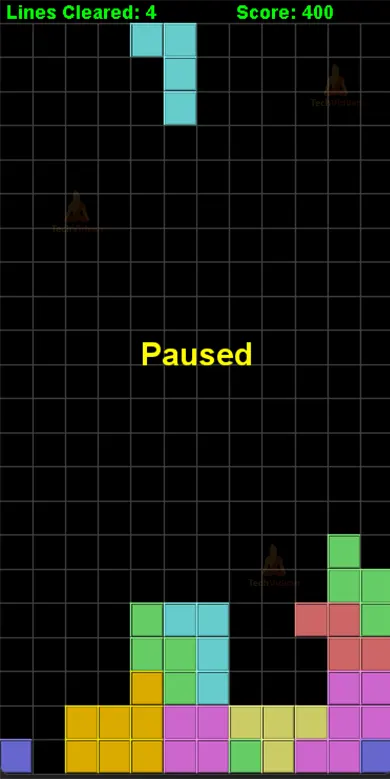
4. GameOver State
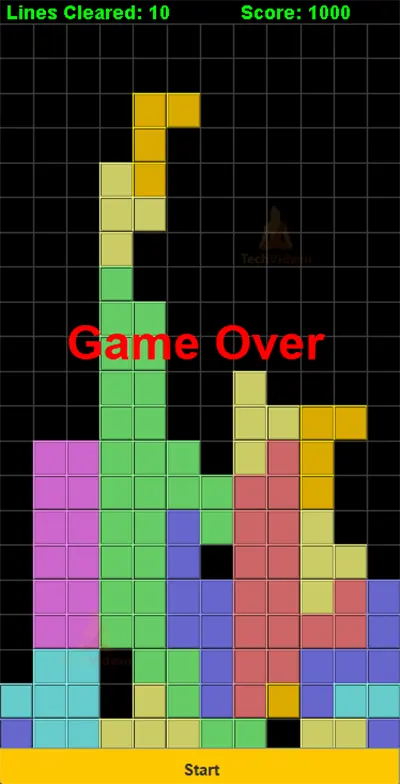
Conclusion:
In conclusion, using the AWT and Swing APIs, this Tetris project illustrated how to create a graphical user interface. To win the game, players must arrange falling blocks into complete lines. The project has also demonstrated important concepts in Java GUI programming and game development, including user input, object-oriented programming, and event handling. Anyone who is interested in learning more about these subjects should check out this initiative.