


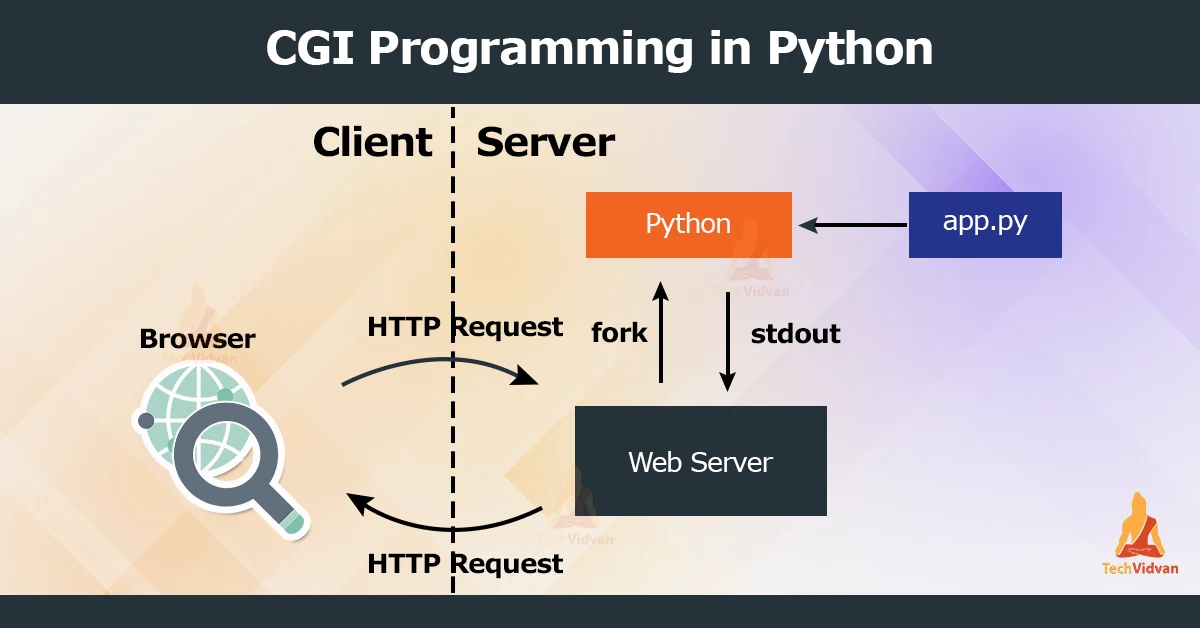
CGI programming is a way of creating dynamic web pages using the Python programming language. CGI stands for Common Gateway Interface, a standard protocol for web servers to execute programs that generate web content.
Python is a popular language for CGI programming because it is powerful, easy to learn, and has an extensive standard library. It also has a wide variety of third-party libraries and frameworks that can be used to build sophisticated web applications.
To create a CGI program in Python, you first need to import the CGI module, which provides several functions and classes for parsing and processing CGI requests. You can then use this module to access form data, cookies, and other information sent by the client web browser.
Once you have parsed the request, you can use Python’s built-in functions and libraries, or third-party modules, to generate the desired response. This can be in the form of HTML or XML content or any other format that a web server can serve.
One of the key advantages of using Python for CGI programming is its simplicity. Unlike other languages, Python has a clean and readable syntax that makes writing and maintaining CGI programs easy. This is especially useful for beginners, who can quickly learn the basics of CGI programming and start creating dynamic web pages.
Another advantage of using Python for CGI programming is its wide range of libraries and frameworks. For example, the Django web framework is popular among Python developers for its easy-to-use tools and powerful features. In addition, it provides a rich set of components for building web applications, including data handling, database access, and authentication.
In conclusion, CGI programming with Python is a powerful and versatile way of creating dynamic web pages. Its simplicity, rich standard library, and wide range of third-party modules make it an ideal choice for web developers of all skill levels.
How to get started with CGI programming with Python?
Your web server must have support for the CGI protocol to use CGI programming with Python. Most modern web servers, such as Apache and NGINX, come with built-in support for CGI, but you may need to enable it in the server’s configuration.
To enable CGI support in Apache, you must add the following lines to the httpd.conf file:
ScriptAlias /cgi-bin/ "/usr/local/cgi-bin/" <Directory "/usr/local/cgi-bin"> AllowOverride None Options +ExecCGI Require all granted </Directory>
With this setting, scripts in the /usr/local/cgi-bin directory will have CGI support. The path can be changed to meet your needs.
For NGINX, you can enable CGI support by adding the following lines to the server block configuration file:
location /cgi-bin/ { root /usr/local/cgi-bin; fastcgi_pass 127.0.0.1:9000; include fastcgi.conf; }
This configuration will enable CGI support for scripts located in the /usr/local/cgi-bin directory and pass requests to a FastCGI server running on the local machine on port 9000.
Once you have enabled CGI support on your web server, you can create your CGI programs in Python and place them in the appropriate directory.
Then, when a client browser requests a page from your web server, the server will execute the Python script and return the generated content to the client.
It is also recommended to set the file permissions on your CGI scripts to make them executable.
Using the Chmod Command this can be achieved, for example:
chmod +x /usr/local/cgi-bin/myscript_TechVidvan.py
This will allow the webserver to execute the myscript.py script.
In summary, enabling CGI support on your web server and configuring it to execute Python scripts is necessary to use CGI programming with Python. This can be done through the web server’s configuration files and requires setting the appropriate file permissions on your CGI scripts.
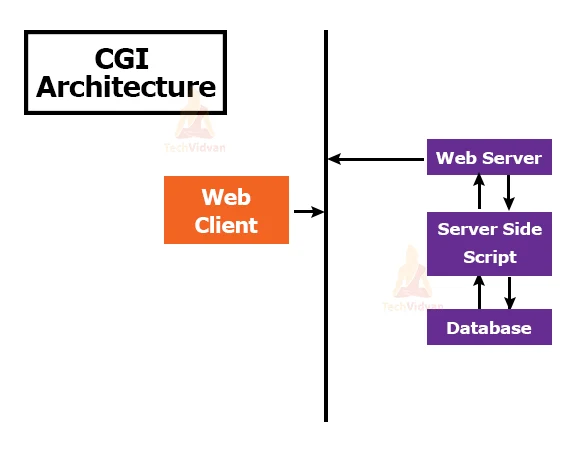
CGI Architecture

HTTP headers used in CGI Programming
There are a few additional essential HTTP headers that you will regularly utilize when developing CGI programs.
In CGI programming, HTTP headers provide additional information about the response to the client web browser. Some of the essential HTTP headers that are commonly used in CGI programming include:
1. Content-Type: This header specifies the media type of the response body, such as text/html for HTML content or application/json for JSON data.
2. Content-Length: This header specifies the size of the response body in bytes. This is important for the client browser to know how much data to expect and when the response is complete.
3. Location: This header redirects the client to a different URL. It is commonly used in conjunction with the 3xx HTTP status codes, such as 301 (Moved Permanently) or 302 (Found).
4. Set-Cookie: This header sets cookies on the client browser. Cookies, which are stored on the Client’s Computer, are Small pieces of Data. They are sent back to the server with each subsequent request. They store user preferences, session information, or other data.
5. Cache-Control: This header controls how the client or intermediate proxies cache the response. It can be used to specify that the response should not be cached or that it should only be cached for a certain amount of time.
These are some examples of HTTP headers that can be used in CGI programming. Many other headers can be used for various purposes, such as authentication, compression, or security. Consult the HTTP specification for a complete list of headers and their meanings.
CGI Get and Post Methods
We must have encountered many situations where we need to pass some information from our browser to a web server and finally to our CGI program. The browser most often uses two methods to pass this information to the web server. These methods are the GET method and the POST method.
Passing Info using GET Method
The GET method sends encoded user information attached to the page request. The page and encoded information are separated by a ? sign like –
http://www.testing.com/cgi-bin/hellouser.py?key1=value1&key2=value2
The GET method is the default method for passing information from a browser to a web server and produces a long string that appears in your browser’s Location:box. Never use the GET method if you have a password or other sensitive information to pass to the server. The GET method has a size limit: only 1024 characters can be sent in the request string. The GET method sends information using the QUERY_STRING header and will be accessible in your CGI program via the QUERY_STRING environment variable.
You can pass information by simply concatenating key-value pairs along with any URL, or you can use HTML <FORM> tags to pass information using the GET method.
A simplistic Form Example by GET Method
This example passes two values using an HTML FORM and a Submit button. We use the same CGI script hellouser_get.py to process this input.
<form action = "/cgi-bin/hellouser_get.py" method = "get">
First Name: <input type = "text" name = "firstname">  <br />

Last Name: <input type = "text" name = "lastname" />
<input type = "submit" value = "Submit" />
</form>
Passing information using the POST method
In general, the POST method is a more reliable method of passing information to a CGI program. This wraps the information in the same way as the GET methods, but instead of sending it as a text string behind the ? in the URL will send it as a separate message. This message comes to the CGI script as standard input.
A simplistic Form Example by POST Method
Let’s take the same example as above again, passing two values using an HTML FORM and a Submit button. We use the same CGI script hellouser_get.py to process this input.
<form action = "/cgi-bin/hellouser_get.py" method = "post">
First Name: <input type = "text" name = "firstname"><br />
Last Name: <input type = "text" name = "lastname" />

<input type = "submit" value = "Submit" />
</form>
CGI Environment Variables using Python
In CGI programming, environment variables store information about the request and the server environment. The CGI program can access these variables and generate a dynamic response.
You can access the CGI environment variables in Python using the os module. This module provides an environment dictionary that contains the current environment variables. For example, you can access the REQUEST_METHOD variable, which specifies the HTTP method of the request, using the following code:
import os method = os.environ["REQUEST_METHOD"]
CGI environment variables
There are many other CGI environment variables that you can access in this way. Some of the common ones include:
- QUERY_STRING: The query string of the URL, if any.
- CONTENT_TYPE: if provided, they are the media type of the request body.
- CONTENT_LENGTH: The size of the request body in bytes, if provided.
- HTTP_COOKIE: The cookies sent by the client with the request.
- REMOTE_ADDR: The IP address of the client computer that makes the request.
These are just a few examples of the available CGI environment variables. Consult the CGI specification for a complete list of variables and their meanings.
In summary, CGI environment variables store information about the request and the server environment in CGI programming. These variables can be accessed in Python using the os.environ dictionary.
Running First Python File as CGI
To run your first Python file as CGI, you will need to follow these steps:
1. Ensure you have a web server with CGI support installed and configured on your computer. Web servers like Apache or like Nginx include support for CGI by default although you need to enable it in the server config file.
2. Create a Python script to generate your web page’s HTML code. This script should contain the necessary Python code to generate the HTML and any other functions or libraries you want to use.
3. Save the Python script in the appropriate directory on your web server. Most web servers have a special directory for CGI scripts, such as /var/www/cgi-bin on Linux or C:\inetpub\cgi-bin on Windows.
4. Make sure the Python script can be executed by the web server. On most systems, you can do this by setting the script’s permissions to 755 using the chmod command.
5. Test the script by accessing it through your web browser. Most web servers will allow you to access CGI scripts using a URL in the following format: http://[server name]/cgi-bin/[script name].py.
6. If the script is working correctly, you should see that the HTML code is generated in your web browser. You can then modify the script and continue testing it until it works as desired.
7. Running your first Python file as CGI involves setting up a web server, creating a Python script, saving it in the appropriate directory, and testing it using a web browser.
Functions of CGI
CGI Module provides various functions to work with CGI. Some of them are as follows-
1. parse(fp = None, environ = os.environ, keep_blanks_values = False, strict_parsing = False) – It is used to parse the query in the environment. We can also analyze it using a file that defaults to sys.stdin.
2. parse_qs(qs, keep_blank_values = False, strict _parsing = False) – Although deprecated, Python uses it for urllib.parse.parse_qs() instead.
3. parse_qsl(qs, keep_blank_value = False, strict_parsing = False) – This is also denigrated and maintained for backward compatibility.
4. parse_multipart(fb, pdict) – Used to parse multipart/form-data input for file uploads. The first argument is the input file and a second argument is a dictionary containing the other parameters in the content-type header.
5. parse_header(string) – Used to parse headers. Enables the MIME header into the main value and parameter dictionary.
6. test() – It is used to test the CGI script and we can use it in our program. It will generally write minimal HTTP headers.
7. print_form(form) – It performs formatting on a form in HTML.
8. print_directory() – It performs formatting on the current directory in HTML.
9. escape(s, quote = False) – The escape() function is used to convert the ‘<‘, ‘>’, and ‘&’ characters in a string into a safe HTML sequence.
Advantages of CGI Programming in Python
There are several advantages to using CGI programming in Python for creating dynamic web content. Some of the key benefits include:
1. Python is a high-level, interpreted language, which means that it is easy to learn and use. This makes it a good choice for developers who are new to CGI programming or want to prototype an application quickly.
2. Python has a huge active community of users, meaning a wealth of online resources and support is available. This can be very helpful for developers learning the language or looking for solutions to specific problems.
3. Python has a wide variety of libraries and frameworks that can be used for CGI programming. This allows developers to easily integrate functionality such as database access, image manipulation, and other common web development tasks.
4. Python is a versatile language used for many apps, including web dev, scientific computing, and data computing. This means that developers who learn Python for CGI programming can also use their skills in other areas.
5. Overall, Python offers several benefits for CGI programming, including ease of use, a large and supportive community, and a wealth of available libraries and frameworks.
Disadvantages of CGI Programming in Python
1. Using CGI (computer-generated imagery) in films and other kinds of media could have a few drawbacks. The price is one of the biggest disadvantages. Creating CGI effects can be quite expensive, especially for complex scenes or large-scale productions. This can limit the use of CGI to only those productions with the budget to support it.
2. Another disadvantage of CGI is that it can sometimes look unrealistic or fake. While technological advances have made CGI effects more lifelike, there are still situations where the effects do not look completely convincing. This can take audiences out of the experience and make the overall production less effective.
3. Additionally, CGI effects can be time-consuming to create, which can delay the production schedule and increase the project’s overall cost. This can be particularly challenging for productions on a tight deadline or with limited resources.
4. Overall, while CGI can be a powerful tool for creating stunning visuals, it is not without its drawbacks.
Conclusion
We learned CGI programming with Python is a powerful and versatile way of creating dynamic web pages. Its simplicity, rich standard library, and wide range of third-party modules make it an ideal choice for web developers of all skill levels.