

Background subtraction is a common technique used in computer vision to isolate moving objects in a video stream. It is widely used in applications such as surveillance, traffic monitoring, and sports analysis.
In this project at DataFlair, we will explore how to perform background subtraction using OpenCV. To begin, let’s gain an understanding of the fundamental concept of background subtraction and explore the various techniques available in OpenCV. We will then walk through the step-by-step implementation of the most commonly used method, to extract foreground objects from a video stream.
By the end of this project, you will have a clear understanding of the theory behind background subtraction and the practical skills to apply this technique using OpenCV. This project assumes that you have basic knowledge of Python and OpenCV, although we will explain each step in detail to make it accessible to beginners. So, let’s dive into the exciting world of background subtraction with OpenCV!
Background Subtraction Technique
Background subtraction is a technique used in computer vision to separate an object or a person from the background in an image or a video. OpenCV is a library that provides many functions and algorithms for image and video processing, including background subtraction. There are several popular background subtraction techniques in OpenCV, including simple subtraction, running average, Gaussian Mixture Model, adaptive background subtraction, and deep learning-based techniques. These methods differ in their complexity and accuracy, with some being more suitable for certain scenarios than others. Overall, background subtraction is an essential tool in various applications such as motion detection, video surveillance, and object tracking.
Prerequisites for Background Subtraction Using Python OpenCV
It is important to have a solid understanding of the Python programming language and the OpenCV library. Apart from this, you should have the following system requirements.
- Python 3.7 (64-bit) and above
- Any python editor (VS code, Pycharm,etc.)
Download Python OpenCV Background Subtraction Project
Please download the source code of Python OpenCV Background Subtraction Project from the following link: Python OpenCV Background Subtraction Project Code
Installation
Open windows cmd as administrator
1. To install the opencv library run the command.
pip install opencv-python
2. To install the Mediapipe library run the command.
pip install mediapipe
3. To install the Cvzone library run the command.
pip install cvzone
Let’s Implement
1. We need to import some libraries that will be used in our implementation.
import cv2
import cvzone
from cvzone.SelfiSegmentationModule import SelfiSegmentation
2. By passing ‘0’ in cv2.VideoCapture() function we are opening the webcam and storing webcam feed in the cap.
cap = cv2.VideoCapture(0)
3. These are used to adjust the size of the frames captured by the video capture object. The first line sets the width of the frame to 412 pixels and the second line sets the height of the frame to 480 pixels.
cap.set(3, 412)
cap.set(4, 480)
4. It creates an instance of the SelfiSegmentation class from the cvzone library. The SelfiSegmentation class is used for background subtraction and can be used to remove the background from an image or a video stream.
segment = SelfiSegmentation()
5. Start the while loop.
while True:
6. cap.read() function returns two values, first is stored in ‘ret’ which is a boolean value The function cap.read() reads the frame and returns two values: ret (a boolean indicating if the frame was successfully read) and frame (an array of pixel values in the captured frame). These values can be used to process or display the image.
ret, frame = cap.read()
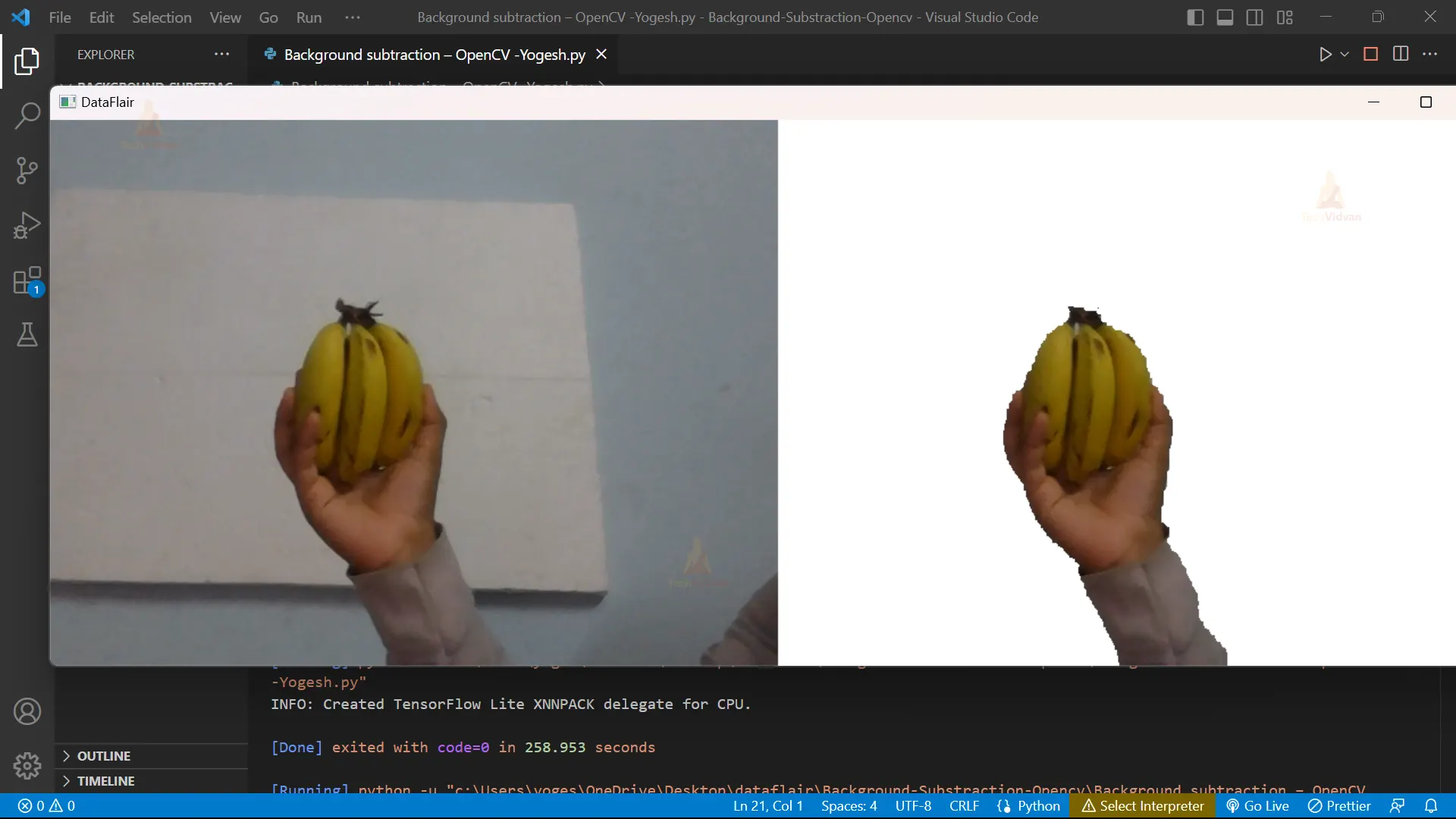
7. This code removes the background from an image or video by using a method called “removeBG”. It takes the current frame, a specified color (white), and a threshold value to determine how sensitive the algorithm is to changes in the background. The resulting image with the removed background is stored in a new variable called “BG_remove”.
BG_remove = segment.removeBG(frame, (255, 255, 255), threshold=0.9)
8. This line of code uses the “stackImages” function from the cvzone library to combine the original frame and the image with the background removed horizontally. The resulting image is stored in the “stack_img” variable.
stack_img = cvzone.stackImages([frame, BG_remove], 2, 1)
9. It is used to display Background removed images in a new window named DataFlair.
cv2.imshow("DataFlair", stack_img)
10. The cv2.waitKey() function waits for keyboard input for a specified time, and if no key is pressed, it returns -1. In this code, the if statement checks if the key pressed is ‘q’ by comparing its code with the key code returned by cv2.waitKey(). If the ‘q’ key is pressed, the program exits the loop and terminates, allowing the user to quit the program by pressing the ‘q’ key.
cv2.waitKey(1)
    if cv2.waitKey(1) & 0xFF == ord('q'):
        break
Note:- Step 6-10 must be under the while loop.
11. cap.release() frees the resources used to capture the video or camera stream, allowing them to be used by other applications. cv2.destroyAllWindows() closes all OpenCV windows, freeing system resources and ensuring the program ends cleanly.
cap.release()
cv2.destroyAllWindows()
Python OpenCV Background Subtraction Output

Conclusion
To summarize, background subtraction is a technique used to remove the background from an image or video to isolate foreground objects. In this code, we used OpenCV and cvzone to perform background subtraction on live video frames. We applied the “removeBG” method to each frame, combined the original and processed frames, and displayed them using the “imshow” function. This technique has many uses, including object tracking and video surveillance.