

The Face Recognition Based Criminal Identification System is an advanced technology that uses computer vision and machine learning to help law enforcement agencies identify known criminals more quickly and accurately. It works by detecting and recognizing faces in real time, allowing authorities to compare them to a database of known criminals.
This automated system reduces mistakes made by humans, improves efficiency, and can easily be integrated with existing surveillance systems. Ultimately, it strengthens public safety and security by helping law enforcement agencies respond effectively to potential threats.
How is face detection and recognition performed?
The system uses the Haar cascades algorithm to detect faces in images or video frames. It then utilizes the face_recognition library, which employs the FaceNet model, to generate numerical representations of unique facial features called face encodings. By comparing these encodings with known criminals’ encodings, the system determines if there is a match. The code calculates similarity scores and displays the name of the matched criminal on the video frame.
HaarCascades in Face Recognition
Haar cascades are an essential part of detecting human faces. They use a machine learning technique to analyze unique patterns and features of faces. By scanning images or video frames, Haar cascades quickly identify potential faces while ignoring non-face areas. This initial step helps subsequent algorithms match the detected faces with known criminals, making the system more accurate and efficient for law enforcement.
Prerequisites For Face Recognition Based on Criminal Identification Using Python Open
It is important to have a solid understanding of the Python programming language and the OpenCV and tkinter library and follow system requirements.
1. Python 3.7 (64-bit) and above
2. Any Python editor (VS code, Pycharm)
Download Python OpenCV Face Recognition Based on Criminal Identification Project
Please download Python OpenCV Face Recognition Based on Criminal Identification Project: Python OpenCV Face Recognition Based on Criminal Identification Project Code
Installation
Open Windows cmd as administrator
1. To install the opencv library, run the command from the cmd.
pip install opencv-python
2. To install face_recognition, run the command from cmd.
pip install face_reccognition
Let’s Implement
Follow the below instruction to implement it.
1. We need to import some libraries that will be used in our implementation.
import os
import cv2
import face_recognition
from tkinter import Tk, Label, Button, filedialog, simpledialog
2. It initializes variables, including the folder path for known criminal’s images, empty lists for storing facial encodings and names, and an initial flag value.
known_criminals_folder = "images"
known_encodings = []
known_names = []
flag = 0
3. The load_known_criminals function loads images of known criminals, computes their facial encodings, and stores the encodings and names for subsequent face-matching operations.
def load_known_criminals():
    for file_name in os.listdir(known_criminals_folder):
        image_path = os.path.join(known_criminals_folder, file_name)
        name = os.path.splitext(file_name)[0]
        image = face_recognition.load_image_file(image_path)
        encoding = face_recognition.face_encodings(image)[0]
        known_encodings.append(encoding)
        known_names.append(name)
4. It defines the function for matching criminals with the database.
def match_criminal():
5. It opens the camera.
cap = cv2.VideoCapture(0)
6. It starts the while loop.
while True:
7. It reads a frame from a video source, such as a webcam, and identifies the locations of faces within the frame using the face_recognition library. It then generates unique numerical representations, called encodings, for each detected face.
ret, frame = cap.read()
face_locations = face_recognition.face_locations(frame)
face_encodings = face_recognition.face_encodings(frame, face_locations)
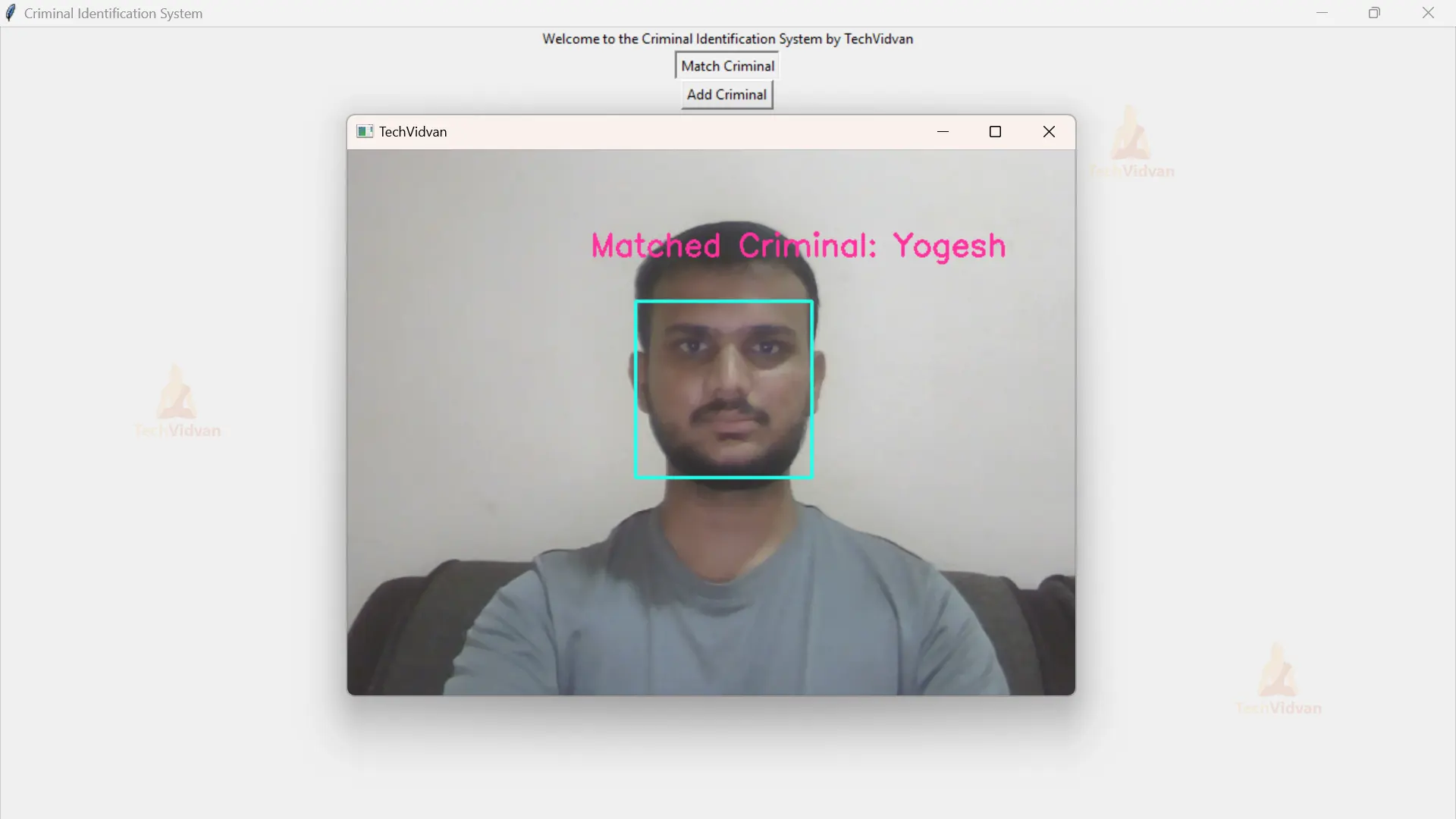
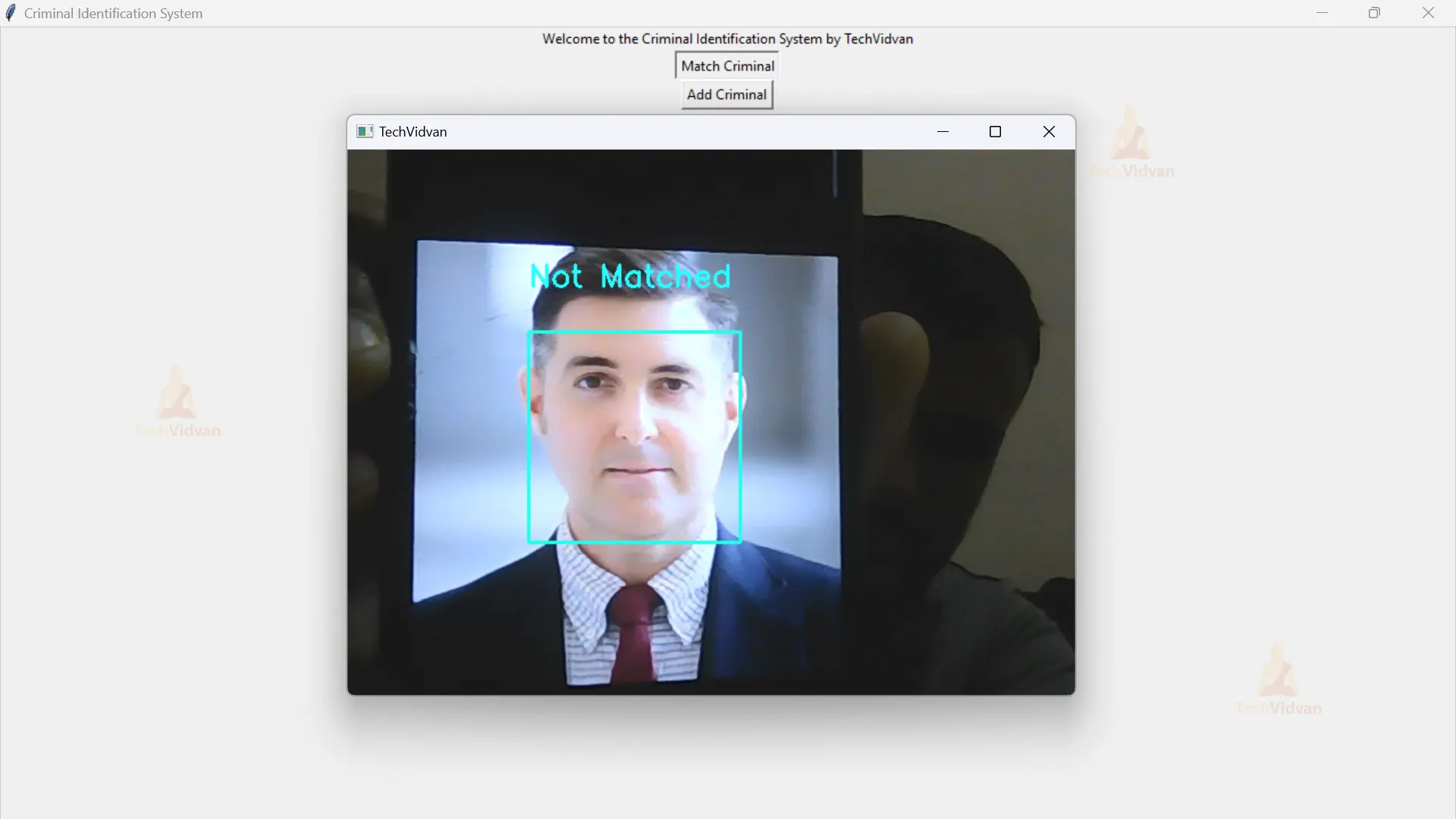
8. It compares the facial features of detected faces with a database of known criminals to find matches. If a match is found, the system displays the criminal’s name and marks their face with a rectangle. If no match is found, it labels the face as “Not Matched.” The position of the rectangle is determined by the location of the face. The match_label is updated accordingly.
for face_encoding in face_encodings:
            matches = face_recognition.compare_faces(known_encodings, face_encoding)
            name = "Unknown"
            flag = 1
            if True in matches:
                matched_indices = [index for index, match in enumerate(matches) if match]
                first_match_index = matched_indices[0]
                name = known_names[first_match_index]
                flag = 0
            top, right, bottom, left = face_locations[0]
            cv2.rectangle(frame, (left, top), (right, bottom), (237, 255, 32), 2)
            if flag == 0:
                cv2.putText(frame, "Matched Criminal: "+name, (left-40, top - 40), cv2.FONT_HERSHEY_SIMPLEX, 0.9, (158, 49, 255), 2)
            else:
                cv2.putText(frame, "Not Matched", (left, top - 40), cv2.FONT_HERSHEY_SIMPLEX, 0.9, (255, 255, 37), 2)
            match_label.config(text="Matched Criminal: " + name)
9. It displays the processed frame with the name “TechVidvan” using the cv2.imshow function from the OpenCV library. It then waits for a key press event using cv2.waitKey(1) and checks if the pressed key is ‘q’. If the ‘q’ key is pressed, the program breaks out of the loop, ending the execution.
cv2.imshow('TechVidvan', frame)
        if cv2.waitKey(1) & 0xFF == ord('q'):
            break
10. It releases all the resources occupied by the program and closes all the windows.
cap.release()
 cv2.destroyAllWindows()
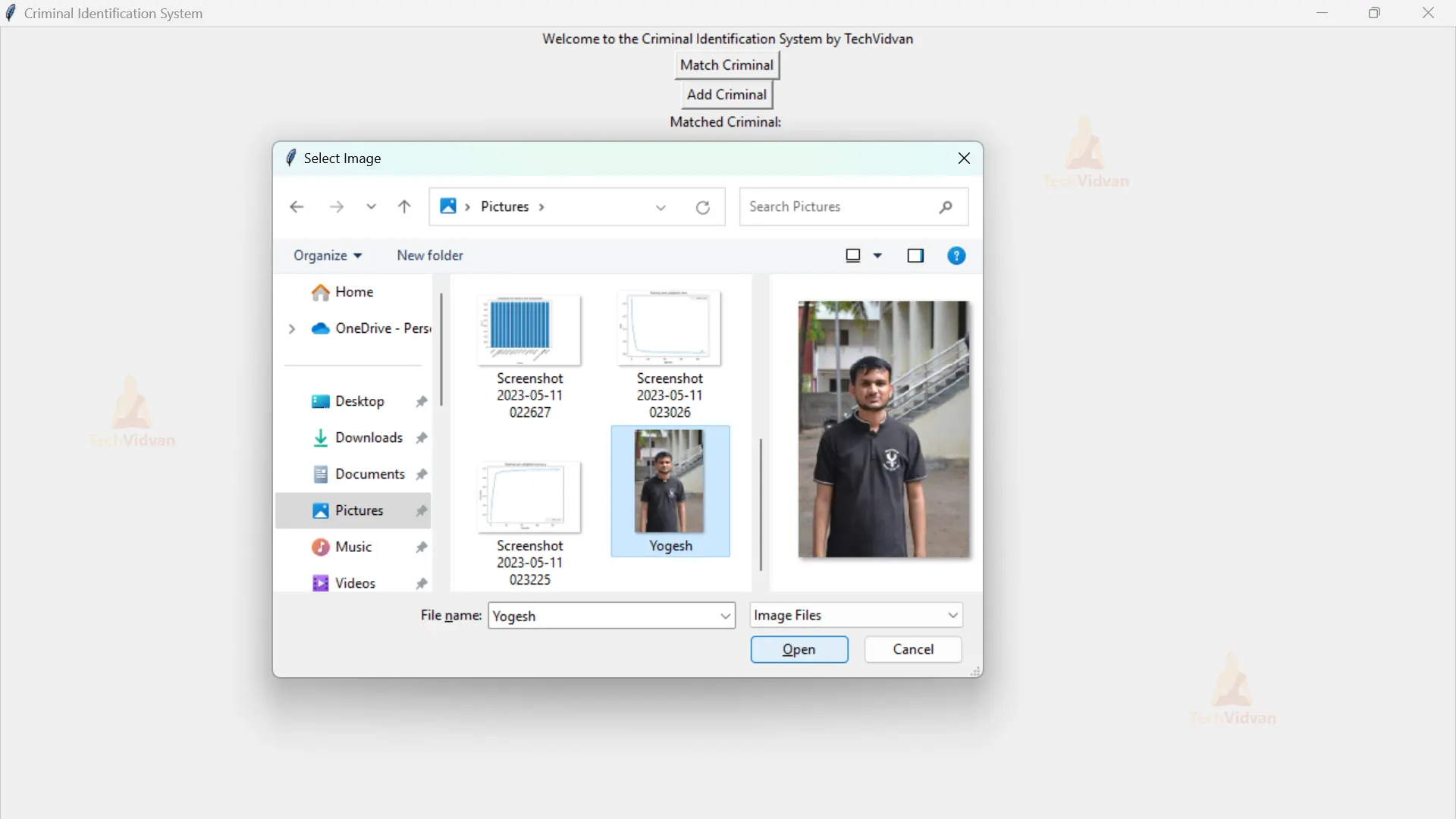
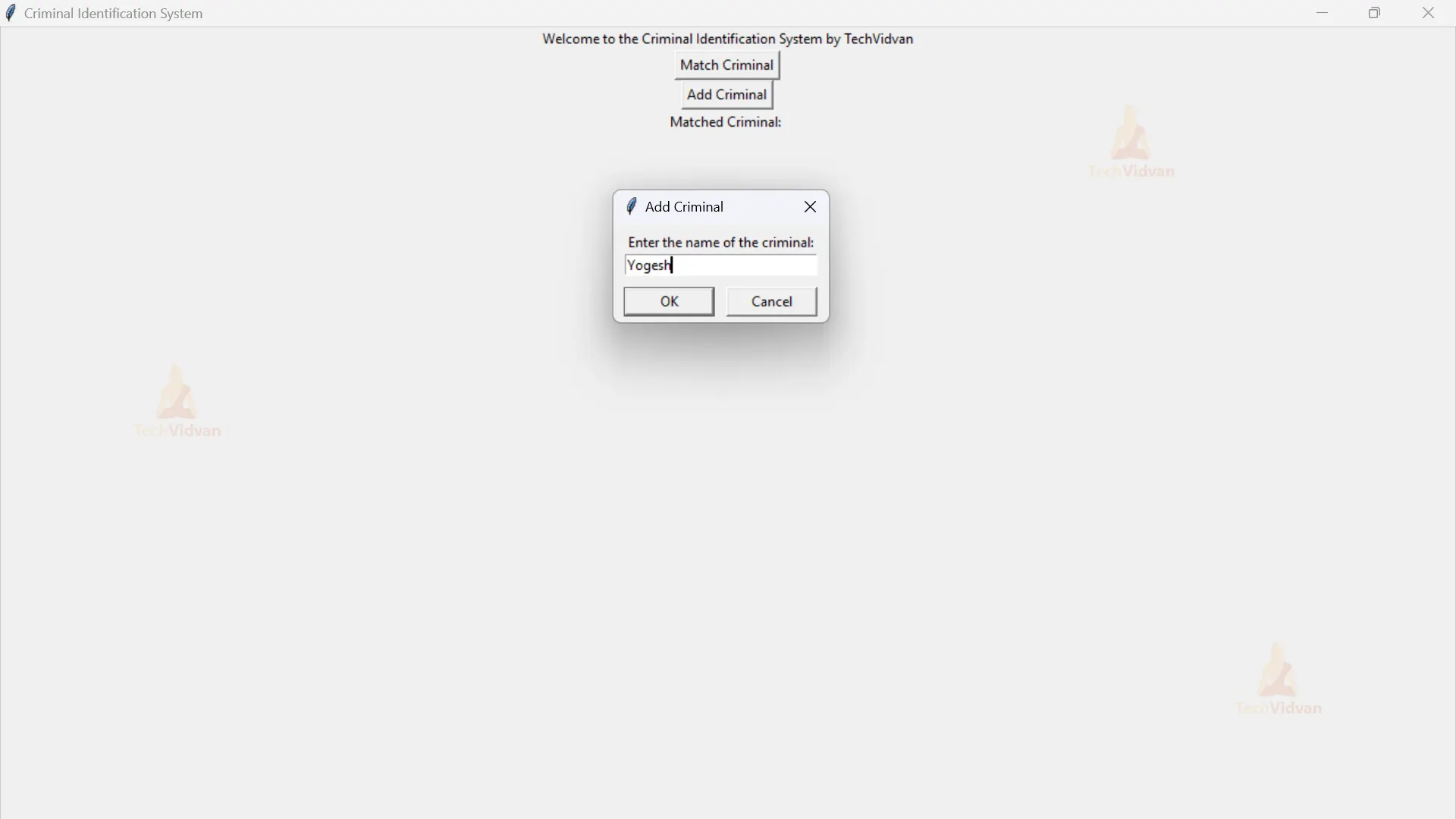
11. The add_criminal function allows users to add a new criminal to the system by selecting an image file and providing the criminal’s name. The system calculates the unique facial features and stores them along with the name for future matching. The image is saved with the criminal’s name as the file name. A success message confirms the addition of the criminal to the system.
def add_criminal():
    file_path = filedialog.askopenfilename(initialdir="/", title="Select Image",
                                           filetypes=(("Image Files", "*.jpg;*.jpeg;*.png"), ("All Files", "*.*")))
    if file_path:
        image = cv2.imread(file_path)
        rgb_image = cv2.cvtColor(image, cv2.COLOR_BGR2RGB)
        encoding = face_recognition.face_encodings(rgb_image)[0]
        name = simpledialog.askstring("Add Criminal", "Enter the name of the criminal:")
        if name:
            known_encodings.append(encoding)
            known_names.append(name)
            file_name = name + ".jpg"
            save_path = os.path.join(known_criminals_folder, file_name)
            cv2.imwrite(save_path, image)
            print("Criminal added successfully.")
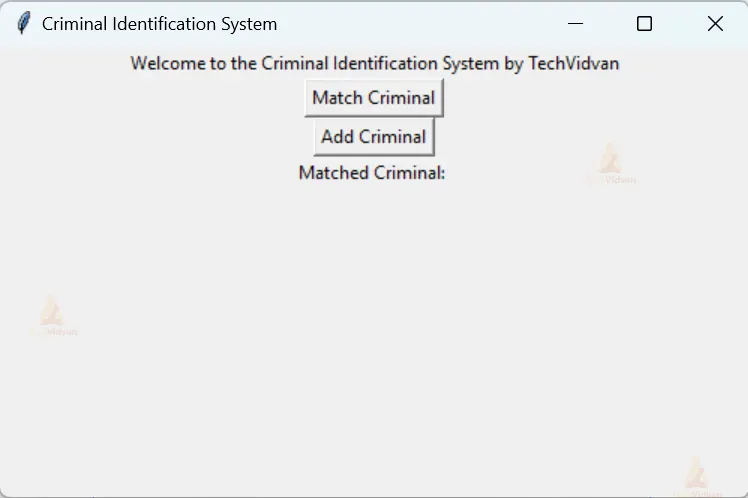
12. It creates a GUI window for the Criminal Identification System using Tkinter. The window has a title and dimensions of 500×300 pixels.
root = Tk()
root.title("Criminal Identification System")
root.geometry("500x300")
13. It creates a label widget in the GUI window, displaying the text “Welcome to the Criminal Identification System by TechVidvan”.
label = Label(root, text="Welcome to the Criminal Identification System by TechVidvan")
label.pack()
14. It creates two buttons in the GUI window. The “match_button” is labeled as “Match Criminal” and is associated with the “match_criminal” function. The “add_button” is labeled as “Add Criminal” and is associated with the “add_criminal” function. Additionally, a label widget named “match_label” is created, initially displaying the text “Matched Criminal: “.
match_button = Button(root, text="Match Criminal", command=match_criminal)
match_button.pack()
add_button = Button(root, text="Add Criminal", command=add_criminal)
add_button.pack()
match_label = Label(root, text="Matched Criminal: ")
match_label.pack()
15. The “root.mainloop()” function starts the event loop of the GUI, which allows the window to be displayed and for user interactions to be captured and processed.
root.mainloop()
Full code
import os
import cv2
import face_recognition
from tkinter import Tk, Label, Button, filedialog, simpledialog

known_criminals_folder = "images"
known_encodings = []
known_names = []
flag = 0

def load_known_criminals():
    for file_name in os.listdir(known_criminals_folder):
        image_path = os.path.join(known_criminals_folder, file_name)
        name = os.path.splitext(file_name)[0]
        image = face_recognition.load_image_file(image_path)
        encoding = face_recognition.face_encodings(image)[0]
        known_encodings.append(encoding)
        known_names.append(name)

def match_criminal():
    cap = cv2.VideoCapture(0)
    while True:
        ret, frame = cap.read()
        face_locations = face_recognition.face_locations(frame)
        face_encodings = face_recognition.face_encodings(frame, face_locations)
        for face_encoding in face_encodings:
            matches = face_recognition.compare_faces(known_encodings, face_encoding)
            name = "Unknown"
            flag = 1
            if True in matches:
                matched_indices = [index for index, match in enumerate(matches) if match]
                first_match_index = matched_indices[0]
                name = known_names[first_match_index]
                flag = 0
            top, right, bottom, left = face_locations[0]
            cv2.rectangle(frame, (left, top), (right, bottom), (237, 255, 32), 2)
            if flag == 0:
                cv2.putText(frame, "Matched Criminal: "+name, (left-40, top - 40), cv2.FONT_HERSHEY_SIMPLEX, 0.9, (158, 49, 255), 2)
            else:
                cv2.putText(frame, "Not Matched", (left, top - 40), cv2.FONT_HERSHEY_SIMPLEX, 0.9, (255, 255, 37), 2)
            match_label.config(text="Matched Criminal: " + name)
        cv2.imshow('TechVidvan', frame)
        if cv2.waitKey(1) & 0xFF == ord('q'):
            break

    cap.release()
    cv2.destroyAllWindows()

def add_criminal():
    file_path = filedialog.askopenfilename(initialdir="/", title="Select Image",
                                           filetypes=(("Image Files", "*.jpg;*.jpeg;*.png"), ("All Files", "*.*")))
    if file_path:
        image = cv2.imread(file_path)
        rgb_image = cv2.cvtColor(image, cv2.COLOR_BGR2RGB)
        encoding = face_recognition.face_encodings(rgb_image)[0]
        name = simpledialog.askstring("Add Criminal", "Enter the name of the criminal:")
        if name:
            known_encodings.append(encoding)
            known_names.append(name)
            file_name = name + ".jpg"
            save_path = os.path.join(known_criminals_folder, file_name)
            cv2.imwrite(save_path, image)
            print("Criminal added successfully.")

load_known_criminals()

root = Tk()
root.title("Criminal Identification System")
root.geometry("500x300")

label = Label(root, text="Welcome to the Criminal Identification System by TechVidvan")
label.pack()

match_button = Button(root, text="Match Criminal", command=match_criminal)
match_button.pack()
add_button = Button(root, text="Add Criminal", command=add_criminal)
add_button.pack()
match_label = Label(root, text="Matched Criminal: ")
match_label.pack()
root.mainloop()
Python OpenCV Face Recognition Based on Criminal Identification Output

Conclusion
The Face Recognition Based Criminal Identification System using openCV is a powerful tool for law enforcement. It uses computer vision and machine learning to automatically identify individuals accurately. OpenCV provides a strong foundation for face detection and recognition tasks. The system compares facial images with a database of known criminals. It saves time and enhances accuracy, but challenges like lightning variations and privacy protection must be considered.