


Extensible Markup Language, sometimes known as XML, is a markup language that is frequently used for data storage and transmission. It is a flexible and powerful format, but it can also be complex to work with. Fortunately, Python provides several different libraries and modules that can make XML processing in Python much easier.
The most common way to work with XML in Python is to use the `xml.etree.ElementTree` module, which is part of the standard library. This module provides a simple and efficient way to parse and create XML documents.
XML Parser Architecture
An XML parser is a software that is used to read and process XML documents. There are several different ways that an XML parser can be designed, including event-based, tree-based, and hybrid approaches.
There are two main types of XML parser architectures: event-driven parsers and tree-based parsers.
Event-driven parsers, also known as streaming parsers, process XML documents sequentially and use a series of callbacks to notify the application of different events, such as the start and end of elements and the presence of attributes. These parsers are efficient in terms of memory usage and processing speed, but they require the application to handle the event-based structure of the XML document.
On the other hand, tree-based parsers construct a basic tree representation of the mentioned XML document in memory, allowing the application to navigate the tree and extract information from it. These parsers are easier to use and allow for more flexibility in accessing and manipulating the XML data, but they require more memory and may be slower than event-driven parsers.
XML Parser APIs
Several APIs are available for working with XML parsers, including the Document Object Model (DOM), the Simple API for XML (SAX), and the Streaming API for XML.
1. DOM API
The DOM API provides a tree-based representation of an XML document, allowing the application to traverse the tree and manipulate the data. It is a commonly used API for working with XML documents, but it can be memory-intensive for large documents.
2. The SAX API
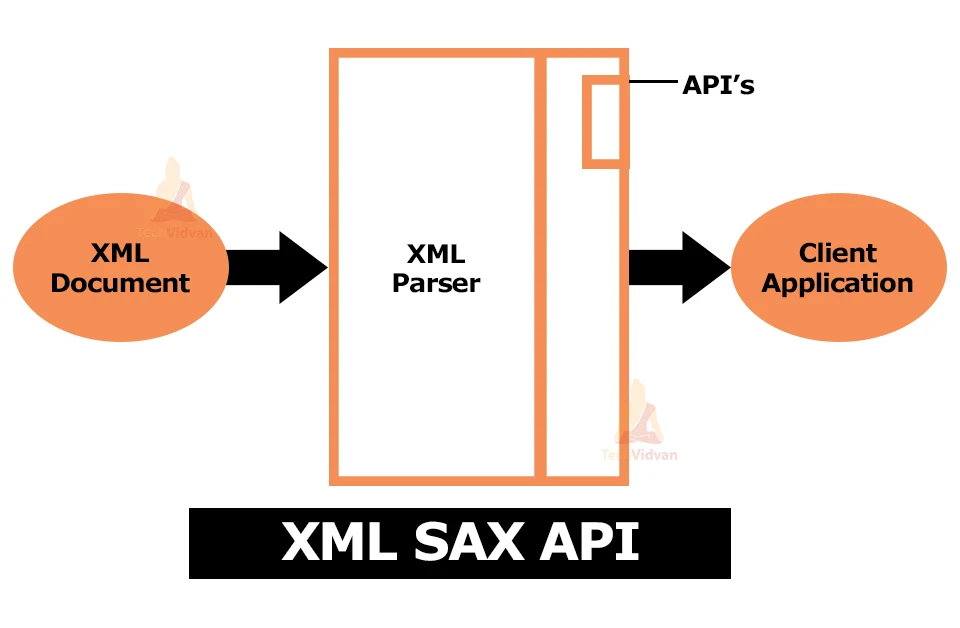
On the other hand, the SAX API uses an event-driven approach. It provides a series of callbacks to the application to notify it of different events in the XML document. It is a simple and efficient API, but it requires the application to handle the event-based structure of the XML document.
3. The StAX API
The StAX API is a hybrid of the DOM and SAX APIs and allows for event-driven and tree-based processing of XML documents. It will enable the application to traverse the XML document tree and receive notifications of events as they occur. This API provides flexibility and efficiency for working with XML documents.
Parsing XML with SAX APIs

To parse XML using SAX APIs in python3, we first need to import the required modules:
import xml.sax
from xml.sax.handler import ContentHandler
Next, we create a custom ContentHandler class that will handle the different events that occur during the parsing of the XML document:
class MyContentHandler(ContentHandler):
    def startElement(self, name, attrs):
        # Do something when an element starts
        pass

    def endElement(self, name):
        # Do something when an element ends
        pass

    def characters(self, content):
        # Do something with the element's content
        pass
Then, we create an instance of the SAX parser and set our custom content handler as its default content handler:
parser = xml.sax.make_parser()
parser.setContentHandler(MyContentHandler())
Finally, we can parse the XML document by calling the parse() method on the parser instance, passing the path to the XML document as an argument:
parser.parse('my_xml_document.xml')
The parser will then call the different methods of our custom content handler class as it processes the XML document, allowing us to handle and process the elements and data within the document.
Parsing XML with DOM APIs
Firstly what we need to import are some of the necessary modules:
from xml.dom import minidom
Next, we need to read the XML file and parse it into a DOM tree:
# Read in the given XML file
TechVidvan_file = minidom.parse('TechVidvan.xml')

# Next step is to parse the XML into a DOM tree
dom_tree = TechVidvan_file.documentElement
Once we have the DOM tree, we can access the different elements in the tree using DOM APIs. For example, to access all the child elements of the root element, we can use the getElementsByTagName() method:
# Get all child elements of the root element from the file
child_elements = dom_tree.getElementsByTagName('*')

# Loop through the child elements and print their tag names
for element in child_elements:
    print(element.tagName)
To access the attributes of an element, we can use the getAttribute() method:
# You have to get the first child element of the root element
first_child = dom_tree.getElementsByTagName('*')[0]

# Get the value of the 'id' attribute of the first child element from the file
child_id = first_child.getAttribute('id')

# To print the value of the 'id' attribute
print(child_id)
We can also access the text content of an element using the firstChild.data property:
# Get the first child element of the root element
first_child = dom_tree.getElementsByTagName('*')[0]

# Get the text content of the first child element
child_text = first_child.firstChild.data

# Print the text content of the first child element
print(child_text)
With these DOM APIs, we can easily access and manipulate the elements and attributes in an XML file using Python.
Python Parse string method
To parse a string containing XML data in Python, you can use the xml.etree.ElementTree module. This module provides the fromstring function, which allows you to parse an XML string and create an ElementTree object that represents the XML data.
Here is an example of how to use the fromstring function to parse an XML string in Python:
import xml.etree.ElementTree as ET

xml_string = '''
<root>
    <element attr="value">Text</element>
</root>
'''

root = ET.fromstring(xml_string)
In this example, the xml_string variable contains a simple XML document with a root element and a single child element. We use the fromstring function to parse the XML string and create an ElementTree object that represents the XML data.
Once you have an ElementTree object, you can use various methods and attributes of the Element class to access and manipulate the XML data. For example, you can use the find method to locate an element by its tag name, and you can use the attrib attribute to access the element’s attributes.
Here is an example of how to access and manipulate the elements and attributes of an ElementTree object:
import xml.etree.ElementTree as ET

xml_string = '''
<root>
    <element attr="value">Text</element>
</root>
'''

root = ET.fromstring(xml_string)

# Find the element by its tag name
element = root.find('element')

# Print the element's text
print(element.text)

# Print the value of the 'attr' attribute
print(element.attrib['attr'])

# Set the value of the 'attr' attribute
element.attrib['attr'] = 'new value'

# Print the modified XML tree
print(ET.tostring(root))
This will clarify the Parse string method in Python
Python Make-Parser method
The make_parser method is a function of the xml.sax module in Python, which provides a Simple API for XML (SAX) parser. A SAX parser is an event-based parser that reads an XML document and generates events as it encounters different elements and content in the document.
The make_parser method creates a new instance of a SAX parser and returns it. You can then use the parser to parse an XML document by calling its parse method and passing in the XML document as a file-like object or a URL.
Here is an example of how to use the make_parser method to create a SAX parser and parse an XML document in Python:
import xml.sax

# Create a SAX parser
parser = xml.sax.make_parser()

# Set the content handler for the parser
handler = MyContentHandler()
parser.setContentHandler(handler)

# Parse the XML document
parser.parse('document.xml')
In this example, we create a SAX parser using the make_parser method and set the content handler for the parser using the setContentHandler method. A content handler is an object that implements the ContentHandler interface and defines methods to handle the events generated by the parser.
We then call the parse method of the parser and pass it in the XML document as an argument. The parser reads the document and generates events as it encounters different elements and content in the document. The content handler’s methods are called as the events are generated, allowing you to process the XML data.
I hope this helps clarify how to use the make_parser method in the xml.sax module to create a SAX parser in Python.
Conclusion
The article demonstrates how to use the dom and sax APIs to process XML data in Python3. The dom API allows for the creation and manipulation of an in-memory XML document, while the sax API allows for parsing XML data from a file or string. The above approaches have advantages as well as disadvantages, and the choice of when to use them depends on the application’s specific needs.
Overall, the article provides a comprehensive guide to XML processing in Python3 using API, with clear explanations and code examples to help readers understand and implement the concepts discussed.