
How to Send Email using Node.js?
Node.js is a popular server-side JavaScript runtime that provides a number of useful features for building web applications. One of those features is the ability to send emails directly from your Node.js application using the built-in nodemailer module. In this article, we will explore how to use Node.js to send email, including how to set up a mail server, configure nodemailer, and send emails with attachments.
Setting up a Mail Server
Before you can send emails with Node.js, you need to set up a mail server. There are a number of mail servers available, but one of the most popular options is Mailtrap. Mailtrap is a fake SMTP server that allows you to test email functionality without actually sending emails to real email addresses.
To use Mailtrap, you will need to sign up for an account and create a new mailbox. Once you have done that, you will be provided with a set of SMTP credentials that you can use to connect to the Mailtrap server.
Configuring Nodemailer to Send Emails
Once you have a mail server set up, you can start configuring nodemailer to send emails. Nodemailer is a popular Node.js module for sending emails that supports a number of different email providers and protocols.
To use nodemailer, you will need to install it using npm. You can do this by running the following command in your terminal:
You can also do this by executing the following command in the terminal:
npm install nodemailer
Once nodemailer is installed, you can start using it to send emails. Here is an example configuration that uses the Mailtrap SMTP server:
const nodemailer = require('nodemailer');

const transporter = nodemailer.createTransport({
    host: 'smtp.mailtrap.io',
    port: 2525,
    auth: {
        user: 'your_mailtrap_username',
        pass: 'your_mailtrap_password'
    }
});
const mailOptions = {
    from: 'your_email_address',
    to: 'recipient_email_address',
    subject: 'Test Email',
    text: 'This is a test email'
};

transporter.sendMail(mailOptions, function(error, info){
    if (error) {
        console.log(error);
    } else {
        console.log('Email sent: ' + info.response);
    }
});
In this configuration, we are creating a nodemailer transport object that connects to the Mailtrap SMTP server using the provided SMTP credentials. We are then defining a set of mailOptions that include the from and to email addresses, the email subject, and the email body.
Finally, we are calling the sendMail method of the transporter object to send the email. If the email is sent successfully, we will see a success message in the console.
Sending Emails with Attachments using Node.js
Nodemailer also allows you to send emails with attachments, such as images or PDF files. To send an email with an attachment, you will need to modify the mailOptions object to include the attachment information. However it makes sense to validate email addresses before sending them with an email validator tool.
Here is an example configuration that sends an email with an attached image:
const mailOptions = {
    from: 'your_email_address',
    to: 'recipient_email_address',
    subject: 'Test Email with Attachment',
    text: 'This is a test email with an attachment',
    attachments: [{
        filename: 'image.jpg',
        path: '/path/to/image.jpg'
    }]
};
In this configuration, we are including an attachments array in the mailOptions object that contains an object with the filename and path of the image we want to attach.
Here are some additional things that a student should know about NodeJS email:
1. SMTP and other email services: In addition to the built-in email module in NodeJS, there are also third-party libraries that provide more features and functionality for sending emails using various email services like Gmail, Yahoo, or Outlook.
These libraries may require additional setup and configuration to work properly.
2. Email templates: When sending emails, it’s often helpful to use templates to ensure a consistent look and feel, especially if you’re sending out multiple emails at once. There are several libraries available in NodeJS that make it easy to generate dynamic email content using templates, such as Handlebars or EJS.
3. Email validation: It’s important to ensure that the email addresses you’re sending to are valid and formatted correctly. There are several libraries available in NodeJS for email validation, such as validator.js.
4. Email security: When sending emails, it’s important to take steps to ensure that the email is not marked as spam or blocked by email providers. This includes using valid DKIM and SPF records, ensuring your email content and subject line is not spammy or misleading, and avoiding the use of certain trigger words or phrases.
5. Email analytics: If you’re sending out emails for marketing or other purposes, it’s helpful to track and analyze the success of your email campaigns. There are several email analytics services available, such as Mailchimp or Sendinblue, that integrate with NodeJS and provide detailed reports on email opens, clicks, and other metrics.
Multiple Receivers
Sending an email to multiple recipients is a common requirement in many web applications. Nodemailer makes it easy to send emails to multiple recipients by allowing you to specify an array of email addresses in the ‘to’, ‘cc’, or ‘bcc’ fields. Here is an example of how to send an email to multiple recipients using Nodemailer:
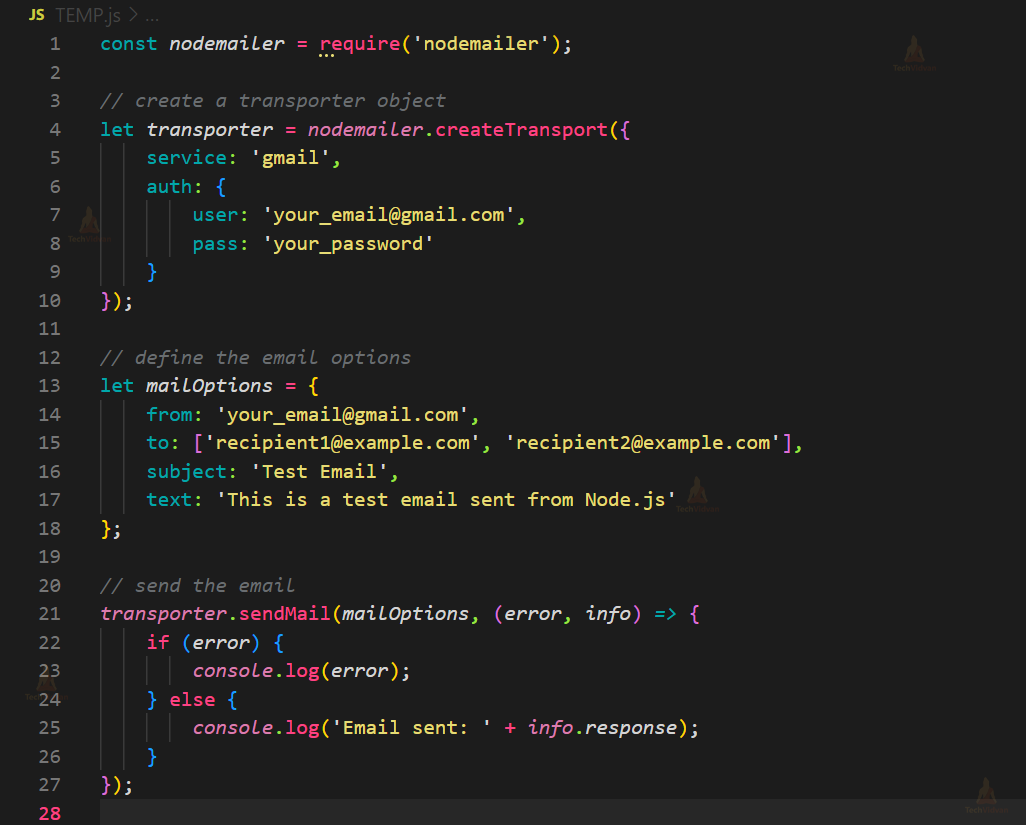
In this example, we first create a transporter object by specifying the email service and authentication credentials. We then define the email options, including the ‘to’ field as an array of email addresses. We also specify the email subject and body text. Finally, we call the ‘sendMail’ function to send the email and handle any errors or response information.
Note that you can also specify multiple recipients in the ‘cc’ (carbon copy) or ‘bcc’ (blind carbon copy) fields using the same array syntax. Carbon copy recipients will receive the email along with the main recipients, while blind carbon copy recipients will receive the email without the other recipients being aware of it.
Nodemailer features:
Nodemailer is a popular Node.js module that makes it easy to send emails in web applications. Here are some of the key features of Nodemailer, along with examples of how to use them:
1. Attachments
You can use Nodemailer to send emails with attachments, such as images, PDFs, or other files. Here is an example of how to send an email with an attachment:
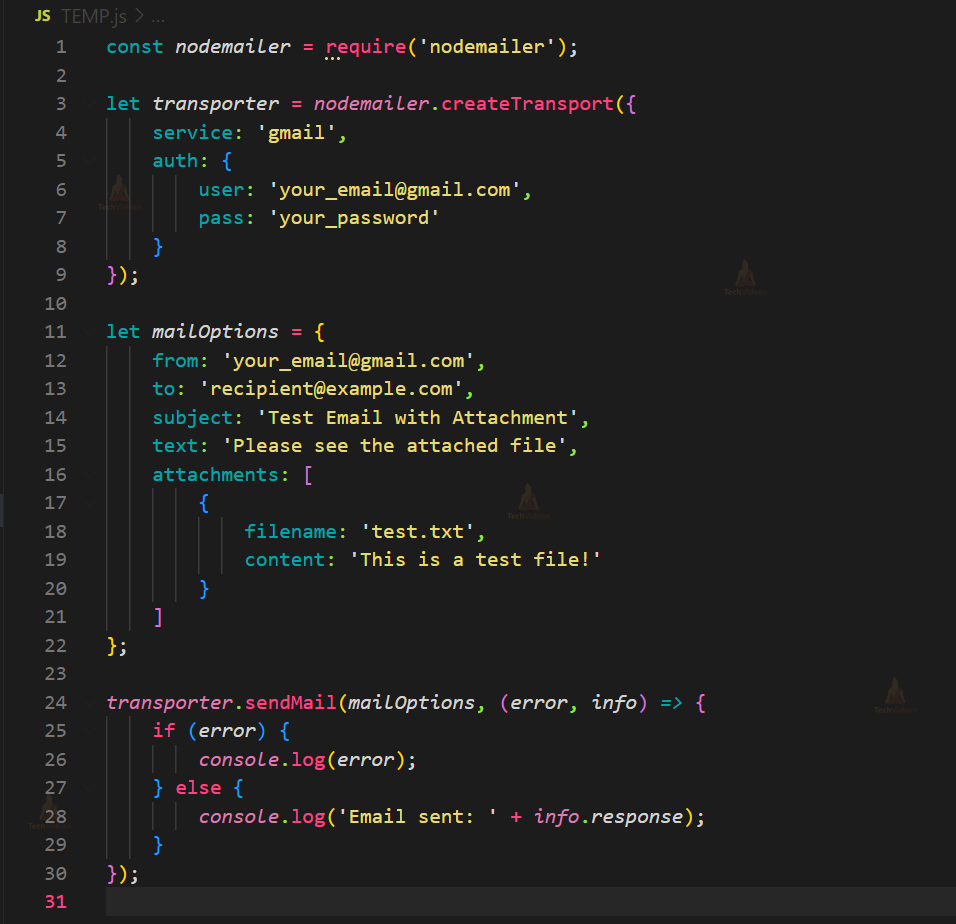
In this example, we use the ‘attachments’ option to specify an array of attachments, where each attachment is an object with a ‘filename’ and ‘content’. The content can be either a string or a Buffer object containing the file data.
2. Email Templates
Nodemailer supports a variety of templating engines, such as EJS, Handlebars, and Pug, which you can use to create dynamic emails with placeholders for personalized information. Here is an example of how to use Handlebars to create an email template:
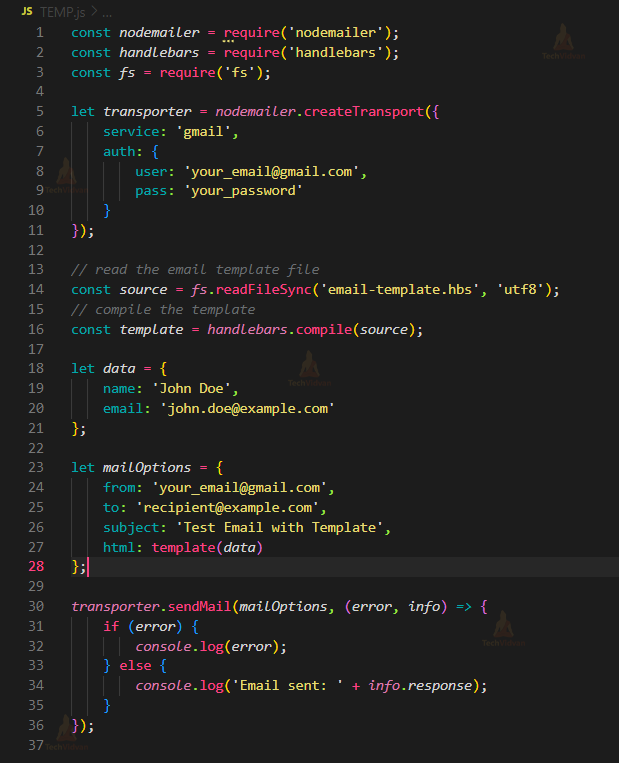
In this example, we use Handlebars to create an email template file (’email-template.hbs’) that includes placeholders for the name and email fields. We then use the ‘handlebars’ module to compile the template and pass the ‘data’ object to fill in the placeholders. Finally, we set the ‘html’ field in the ‘mailOptions’ object to the compiled template.
3. SMTP and Sendmail Transport
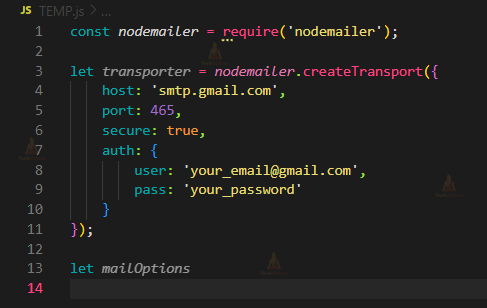
Nodemailer supports multiple transport options, including SMTP and Sendmail. SMTP is the most commonly used transport for sending emails, while Sendmail is useful if you have a local Sendmail installation. Here is an example of how to use the SMTP transport:
Conclusion
Node.js provides a powerful and easy-to-use way to send emails in web applications using the Nodemailer module. With Nodemailer, you can create and send dynamic emails with attachments, use email templates, validate email addresses, and communicate with email servers using SMTP or API. Nodemailer is a Node.js library that allows you to create and send dynamic emails with attachments, use email templates, validate email addresses, and communicate with email servers using SMTP or API.
It is also important to ensure the security of your email account and communication with the email server by using strong passwords, two-factor authentication, and encrypted connections. Overall, understanding the basics and additional features of Node.js email can help you to build robust and secure web applications that can communicate effectively with email services.
Overall, understanding the basics and additional features of Node.js email can help you to build robust and secure web applications. These applications can communicate effectively with email services, allowing you to send and receive emails, create email templates, validate email addresses, and perform other email-related operations.