
Java Continue Statement
The “continue” statement empowers developers to skip specific iterations within loops, enabling more precise control over program execution. We will examine the capabilities of continuation statements, look at their syntax and use, as well as examples highlighting their usefulness in this article.
By the end of this article, you’ll have a comprehensive understanding of how to leverage the “continue” statement to write cleaner, more elegant, and more efficient Java code.
What is a “continue” statement?
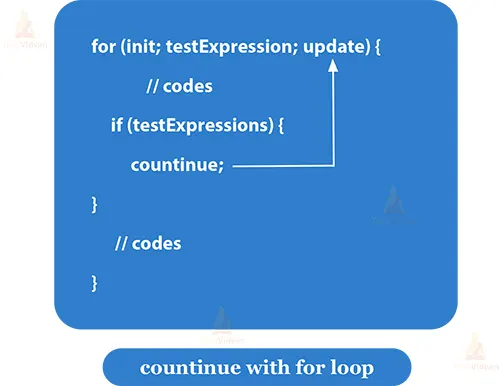
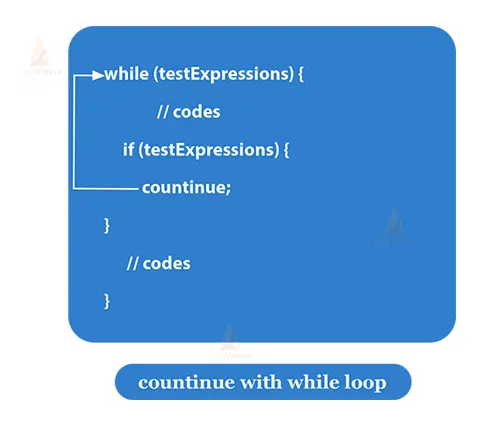
The “continue” statement in Java is a control statement that is used within loops to skip the rest of the current iteration and proceed with the next iteration of the loop. It allows you to selectively bypass a portion of code within a loop based on a certain condition without terminating the entire loop.
Syntax of Continue:
continue;
You can also use a labelled continue statement to specify which loop to continue in case of nested loops. The syntax for a labelled continue statement is as follows:
continue label name;
Continue with for loop:
class TechVidvan{
    public static void main(String[] args) {
        for (int i = 1; i <= 10; i++) {
            if (i % 2 == 0) {
                continue; // Skip even numbers
            }
            System.out.println("Odd number: " + i);
        }
    }}
Output:
1
3
5
7
9
| Iteration | Value of i | for condition:
i<=10 |
if condition:
i%2==0 |
Action | Increment:
i++ |
| 1st | 1 | 1<=10
True |
1%2==0
False |
1 will be printed | 2 |
| 2nd | 2 | 2<=10
True |
2%2==0
True |
Skipped | 3 |
| 3rd | 3 | 3<=10
True |
3%2==0
False |
3 will be printed | 4 |
| 4th | 4 | 4<=10
True |
4%2==0
True |
Skipped | 5 |
| 5th | 5 | 5<=10
True |
5%2==0
False |
5 will be printed | 6 |
| 6th | 6 | 6<=10
True |
6%2==0
True |
Skipped | 7 |
| 7th | 7 | 7<=10
True |
7%2==0
False |
7 will be printed | 8 |
| 8th | 8 | 8<=10
True |
8%2==0
True |
Skipped | 9 |
| 9th | 9 | 9<=10
True |
9%2==0
False |
9 will be printed | 10 |
| 10th | 10 | 10<=10
True |
10%2==0
True |
Skipped | 11 |
| 11th | 11 | 11<=10
True |
Loop Termination |
Time Complexity: O(1)
Auxiliary Space: O(1)
Continue with the while loop:
class TechVidvan{
    public static void main(String[] args) {
        String[] names = { "Alice", "Bob", "Charlie", "Jessica", "John", "Emily" };
        int i = 0;
        while (i < names.length) {
            String name = names[i];
            if (name.startsWith("J")) {
                i++;
                continue; // Skip names starting with "J"
            }
            System.out.println("Name: " + name);
            i++;
        }
    }}
Output:
Name: Alice
Name: Bob
Name: Charlie
Name: Emily
Time Complexity: O(n)
Auxiliary Space: O(1)
Program Working:
In the above example, the while loop iterates through an array of names. For each name, it checks whether the name starts with the letter “J”.If the name does not start with “J”, the code inside the if block is skipped, and the name is printed to the console.
Continue with the do-while Loop:
class TechVidvan{
    public static void main(String[] args) {
        Scanner scanner = new Scanner(System.in);
        int sum = 0;
        int number;
        do {
            System.out.print("Enter a positive number (enter 0 to stop): ");
            number = scanner.nextInt();
            if (number <= 0) {
                continue; // Skip non-positive numbers
            }
            sum += number;
        } while (number != 0);
        System.out.println("Sum of positive numbers: " + sum);
        scanner.close();
    }
}
Output:
Enter a positive number (enter 0 to stop): 54
Enter a positive number (enter 0 to stop): 20
Enter a positive number (enter 0 to stop): -6
Enter a positive number (enter 0 to stop): -8
Enter a positive number (enter 0 to stop): 23
Enter a positive number (enter 0 to stop): 0
A sum of positive numbers: 97
Time Complexity: O(n)
Auxiliary Space: O(1)
Program Working:
In the above example, the program prompts the user to enter positive numbers. The continue statement is used to skip any non-positive numbers (including negative numbers and zero) and prevents them from being added to the sum.

Continue with Nested for-Loop:
class TechVidvan{
    public static void main(String[] args) {
        int rows = 6;
        for (int i = 1; i <= rows; i++) {
            if (i % 2 == 0) {
                continue; // Skip even rows
            }
            for (int j = 1; j <= i; j++) {
                System.out.print("* ");
            }
            System.out.println();
        }
    }
}
Output:
*
* * *
* * * * *
Time Complexity: O(n^2)
Auxiliary Space: O(1)
Program Working:
To skip even rows, however, the continue statement is used, resulting in a pattern of asterisks for odd rows only.
continue with Nested while-Loop:
class TechVidvan{
    public static void main(String[] args) {
        int row = 1;
        while (row <= 5) {
            int col = 1;
            while (col <= 5) {
                int product = row * col;
                if (product % 2 == 0) {
                    col++;
                    continue; // Skip even products
                }
                System.out.printf("%d * %d = %d%n", row, col, product);
                col++;
            }
            row++;
        }
    }
}
Output:
1 * 3 = 3
1 * 5 = 5
3 * 1 = 3
3 * 3 = 9
3 * 5 = 15
5 * 1 = 5
5 * 3 = 15
5 * 5 = 25
Time Complexity: O(n^2)
Auxiliary Space: O(1)
Program Working:
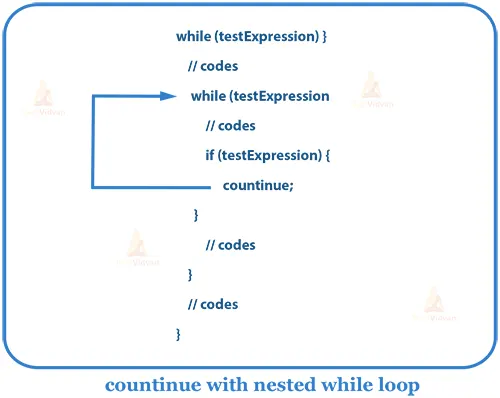
In this example, the outer while loop iterates through the rows of the multiplication table (from 1 to 5). The inner while loop calculates the products for each column in the current row. However, the continue statement is used to skip even products, resulting in the display of only odd product entries.
Labled continue:
The continue statement can also be used with labels in Java to specify which loop you want to continue. If you have nested loops and you want to control the flow of a specific outer loop from inside an inner loop, this is particularly useful.
class TechVidvan{
    public static void main(String[] args) {
        outerLoop: for (int i = 1; i <= 3; i++) {
            innerLoop: for (int j = 1; j <= 3; j++) {
                if (i == 2 && j == 2) {
                    continue outerLoop; // Continue the outer loop
                }
                System.out.println("i: " + i + ", j: " + j);
            }
        }
    }
}
Output:
i: 1, j: 1
i: 1, j: 2
i: 1, j: 3
i: 2, j: 1
i: 3, j: 1
i: 3, j: 2
i: 3, j: 3
Time Complexity: O(1)
Auxiliary Space: O(1)
Program Working:
In this example, we have two nested loops: an outer loop labeled outer loop and an inner loop labeled innerloop. As you can see, when the inner loop encounters i == 2 and j == 2, the continue outerLoop; statement is executed, and the program jumps to the next iteration of the outer loop, effectively skipping the remaining iterations of the inner loop for that iteration of the outer loop.
Key takeaways about the continue statement include
Selective Iteration: The continue statement enables you to skip specific loop iterations, allowing you to focus on processing only the relevant data or performing necessary computations.
Loop Optimization: By avoiding unnecessary computations or actions, the continue statement contributes to improved code efficiency and performance.
Loop Nesting: Labeled continue statements can be employed to control the flow of nested loops, providing targeted control over which loop’s iteration to skip.
Maintainable Code: Proper use of the continue statement enhances code readability and maintainability, as it allows you to express your intentions more explicitly.
Diverse Applications: The continue statement can be applied in various scenarios, such as skipping even numbers, filtering elements, handling invalid inputs, and more, offering flexibility in loop control.
Summary
In summary, When using the continue statement, it’s important to strike a balance between optimizing code and maintaining its clarity. Overuse of the continue statement can sometimes lead to complex logic, so thoughtful consideration of its usage is essential to ensure that your code remains both efficient and comprehensible.