
Java Break Statement
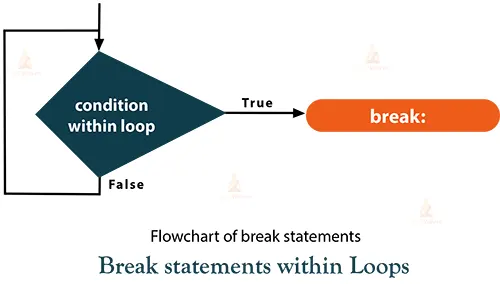
In Java, the break statement is used within loop and switch statements to control the flow of execution by immediately exiting the loop or switch block it is placed in. It is used to terminate the current loop iteration or to exit the switch block prematurely.
The break statement is a control flow mechanism that helps improve the efficiency and readability of your code by allowing you to exit loops or switch blocks when specific conditions are met.
It’s a powerful tool for managing program flow and making your code more responsive to different scenarios.
A break statement is a versatile tool that allows you to control the flow of your code and make it more responsive to different conditions and scenarios. It’s commonly used to optimize loop execution, handle cases efficiently, and manage program flow. Here’s how the break statement works in different contexts:
Within Loops:
class DataFlair{
    public static void main(String[] args) {
        for (int i = 1; i < 10; i++) {
            if (i == 6) {
                break; // Exit the loop when i is 6
            }
            System.out.println(i);
        }
    }
}
Output:
1
2
3
4
5
Time Complexity: O(1)
Auxiliary Space: O(1)
Explanation:
In this example, the loop will iterate from 0 to 2 and then exit when i becomes 3 due to the break statement.
Break with do-while loop:
class DataFlair {
        public static void main(String[] args) {
            Scanner scanner = new Scanner(System.in);
            do {
                System.out.print("Enter a number (or -1 to exit): ");
                int num = scanner.nextInt();
                if (num == -1) {
                    System.out.println("Exiting the loop.");
                    break; // Exit the loop when -1 is entered
                }
                System.out.println("You entered: " + num);
            } while (true);
            System.out.println("Loop has been stopped.");
      }
}
Output:
Enter a number (or -1 to exit): 3
You entered: 3
Enter a number (or -1 to exit): 22
You entered: 22
Enter a number (or -1 to exit): 5
You entered: 5
Enter a number (or -1 to exit): -1
Exiting the loop.
The loop has been stopped.
Time Complexity: Unbounded or Undefined (depends on user input)
Auxiliary Space: O(1)
Explanation:
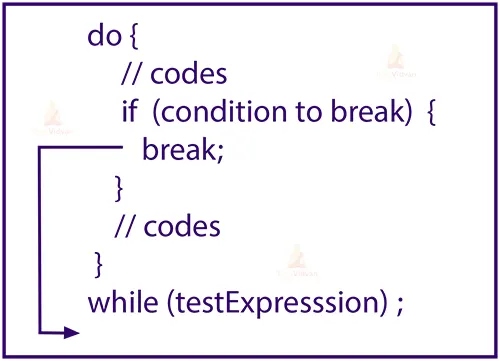
In this example, the program uses a do-while loop to repeatedly prompt the user to enter a number. If the user enters -1, the program displays a message and exits the loop using the break statement. Otherwise, it displays the entered number and continues looping.
Within Switch Statements :
class DataFlair{
    public static void main(String[] args) {
        int dayOfWeek = 3;
        switch (dayOfWeek) {
            case 1:
                System.out.println("Monday");
                break;
            case 2:
                System.out.println("Tuesday");
                break;
            case 3:
                System.out.println("Wednesday");
                break; // Exit the switch block after printing "Wednesday"
           default:
            System.out.println("Other day");
        }
    }
}
Output:
Wednesday
Time Complexity: O(1)
Auxiliary Space: O(1)
Explanation:
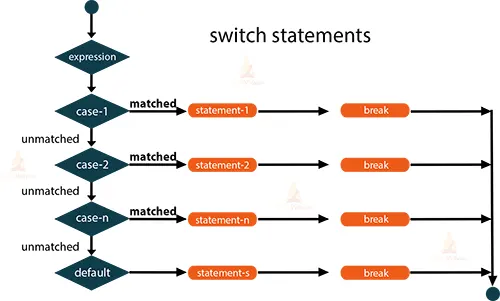
In this example, when dayOfWeek is 3, the case for Wednesday will execute, and then the break statement will exit the switch block.
Using Break with Labeled Statements
class DataFlair{
    public static void main(String[] args) {
        outerloop: for (int i = 0; i < 3; i++) {
            for (int j = 0; j < 3; j++) {
                if (i == 1 && j == 1) {
                    break outerLoop; // Exit both loops
                }
                System.out.println("i: " + i + ", j: " + j);
            }
        }
    }
}
Output:
i: 0, j: 0
i: 0, j: 1
i: 0, j: 2
i: 1, j: 0
Time Complexity: O(1)
Auxiliary Space: O(1)
Explanation:
In this example, the labelled break statement breaks out of both nested loops when i is 1 and j is 1.
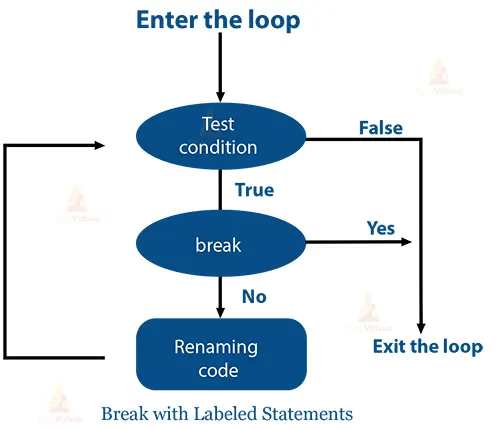
A potent control flow tool, the break statement enables you to govern the flow of your program and escape loops or switch blocks in response to certain situations.
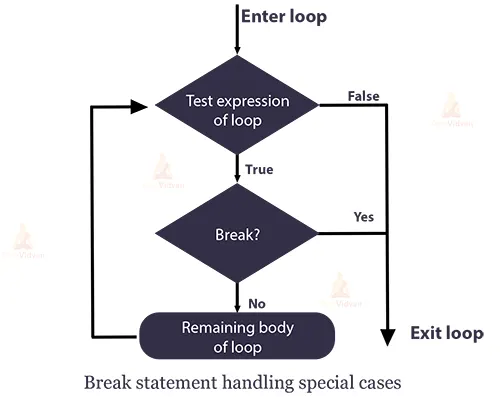
Handling Special Cases:
 class DataFlair {
    public static void main(String[] args) {
        Scanner scanner = new Scanner(System.in);
        while (true) {
            System.out.print("Enter your age: ");
            int age = scanner.nextInt();
            if (age < 0) {
                System.out.println("Invalid age. Please enter a non-negative value.");
                break; // Exit the loop on invalid input
            }
            if (age >= 18) {
                System.out.println("You are an adult.");
            }
            else {
                System.out.println("You are a minor.");
            }
        }
        System.out.println("Exiting the program.");
    }
}
Output:
Enter your age: 20
You are an adult.
Enter your age: 8
You are a minor.
Enter your age: -2
Invalid age. Please enter a non-negative value.
Exiting the program.
Time Complexity: O(1)
Auxiliary Space: O(1)
Explanation:
In this example, the program prompts the user to enter their age. If the user enters a negative value, the program displays an error message and exits the loop using the break statement. Otherwise, it determines whether the user is an adult (age 18 or older) or a minor (age below 18) and continues looping.
Stopping Infinite Loop:
class DataFlair {
        public static void main(String[] args) {
            Scanner scanner = new Scanner(System.in);
            while (true) {
                System.out.print("Enter 'exit' to stop the loop: ");
                String userInput = scanner.nextLine();
                if (userInput.equalsIgnoreCase("exit")) {
                    System.out.println("Exiting the loop.");
                    break; // Exit the loop when the user enters 'exit'
                }
                System.out.println("Looping... You entered: " + userInput);
            }
            System.out.println("Loop has been stopped.");
        }
}
Output:
Enter ‘exit’ to stop the loop: TechVidvan
Looping… You entered: TechVidvan
Enter ‘exit’ to stop the loop: Java course
Looping… You entered the Java course
Enter ‘exit’ to stop the loop: break statement demo
Looping… You entered: break statement demo
Enter ‘exit’ to stop the loop: exit
Exiting the loop.
The loop has been stopped.
Time Complexity: Unbounded or Undefined (depends on user input)
Auxiliary Space: O(1)
Explanation:
In this example, the program creates an infinite loop that prompts the user to enter some input. If the user enters the word “exit” (case-insensitive), the program displays a message and exits the loop using the break statement.
Conclusion
The reserved keyword in Java is a break. It is one of the keywords used by programmers to immediately end the execution of a loop or conditional expression and shift the program execution control to the following step. Under the decision-making statements is its better use case scenario.
You may skip pointless iterations by using break statements. The program’s overall processing time and performance may be improved by doing this. Therefore, when we are sure that we don’t need to iterate anymore, we must utilize the break statement.