
Utility Modules in Node.js
One of the strengths of Node.js lies in its utility modules, which provide essential tools and functionalities to streamline development processes. In this article, we will delve into some key utility modules in Node.js and showcase their practical usage with code examples.
Module Name and Description:
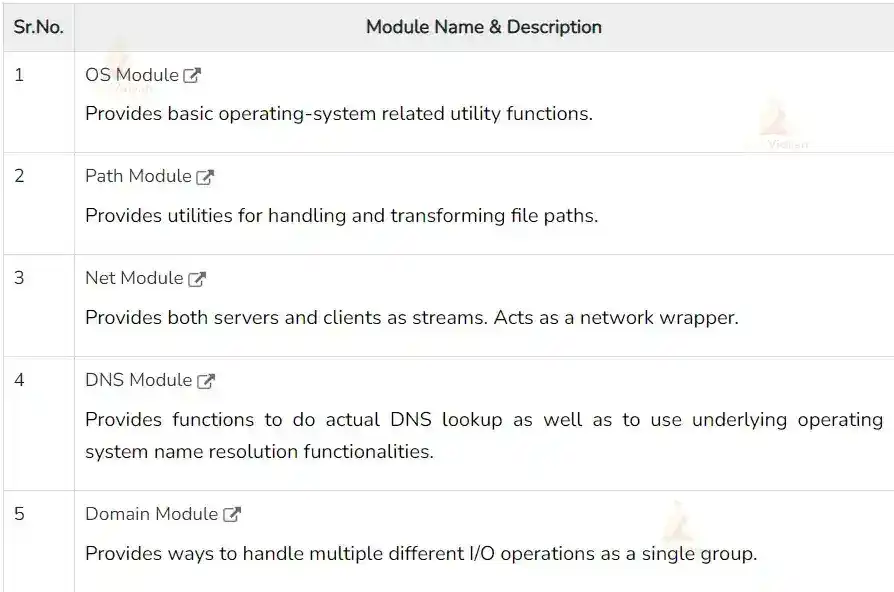
Util Module
The util module is a core module in Node.js that offers a variety of utility functions for debugging, formatting, and working with objects. Let’s see a few common use cases:
a) Inheriting Objects: The ‘util.inherits’ function allows you to create object inheritance in Node.js. It sets up the prototype chain between two constructors, enabling prototype-based inheritance.
const util = require('util');

function Parent() {}
Parent.prototype.greet = function() {
    console.log('Hello, I am the parent.');
}

function Child() {}
util.inherits(Child, Parent);

const childObj = new Child();
childObj.greet(); // Output: Hello, I am the parent.
Output:
Hello, I am the parent.
b) Promisify: The ‘util.promisify’ function is used to convert callback-based functions into Promise-based functions, simplifying asynchronous operations. Here’s an example:
const util = require('util');
const fs = require('fs');

const readFileAsync = util.promisify(fs.readFile);

readFileAsync('file.txt', 'utf8')
    .then(data => console.log(data))
    .catch(err => console.error(err));
Output:
Hello, World!
Hence the file.txt contains Hello, World!
Path Module
The path module offers tools for navigating between files and directories. It helps in handling cross-platform path compatibility and resolving file paths correctly. Consider the following examples:
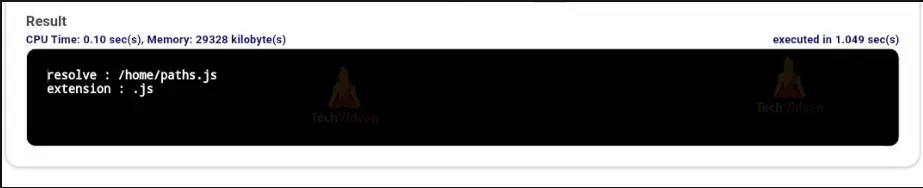
a) Resolving Paths: The ‘path.resolve’ method resolves a series of routes or path segments into an absolute path.
// Require path
const path = require('path');

// Display Resolve
console.log('resolve:' + path.resolve('paths.js'));

// Display Extension
console.log('extension:' + path.extname('paths.js'));
Output:
const path = require('path');

const filePath = '/path/to/file.txt';
const fileInfo = path.parse(filePath);

console.log(fileInfo);
/* Output:
{
    root: '/',
    dir: '/path/to',
    base: 'file.txt',
    ext: '.txt',
    name: 'file'
}
*/
Crypto Module
The crypto module provides cryptographic functionalities, such as generating secure hashes, encrypting and decrypting data, and creating digital signatures. Let’s see an example of generating an MD5 hash:
const crypto = require('crypto');

const data = 'Hello, World!';
const hash = crypto.createHash('md5').update(data).digest('hex');

console.log(hash); // Output: 6cd3556deb0da54bca060b4c39479839
OS Module
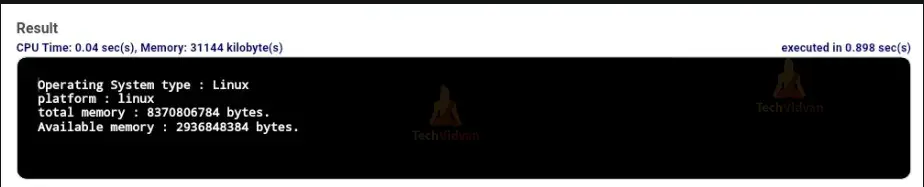
The OS module provides a set of utility methods for interacting with the operating system. It allows developers to retrieve information about the operating system, and network interfaces, and perform certain system-related operations. Here are a few notable use cases:
a) Retrieving Operating System Information:
The OS module provides functions to retrieve information about the operating system, such as the platform, hostname, and architecture.
// Require operating System module
const os = require("os");

// Display operating System type
console.log('Operating System type : ' + os.type());

// Display operating System platform
console.log('platform : ' + os.platform());

// Display total memory
console.log('total memory : ' + os.totalmem() + " bytes.");

// Display available memory
console.log('Available memory : ' + os.availmem() + " bytes.");
Output
Net Module
For building both servers and clients, the net module offers a set of asynchronous network APIs. It allows you to create TCP or IPC (inter-process communication) servers and establish network connections with other servers. Here’s an example of creating a TCP server:
// Require net module
const net = require('net');

const server = net.createServer(function (connection) {
    console.log('client connected'); connection.on('end', function () {
        console.log('client disconnected');
    });
    connection.write('Hello World!\r\n'); connection.pipe(connection);
});

server.listen(8080, function () {
    console.log('server listening');
});
Client-side:
const net = require('net');

const client = net.connect(8124, function () {
    console.log('Client Connected');
    client.write('Hello World\r\n');
});

client.on('data', function (data) {
    console.log(data.toString());
    client.end();
});

client.on('end', function () {
    console.log('Server Disconnected');
});
Output:
Server listening
Client Connected
Hello World
Server Disconnected
DNS Module
The DNS module provides functions to perform DNS (Domain Name System) lookups and resolve domain names. It allows you to convert domain names to IP addresses and vice versa. Here’s an example of resolving a domain name:
// Require dns module
const dns = require('dns');

// Store the web address
const website = 'www.google.com ';

// Call lookup function of DNS
dns.lookup(website, (err, address, family) => {
    console.log('Address of %s is %j family: IPv%s',
        website, address, family);
});
Output:
Address of www.google.com is “203.92.39.72”
family: IPv4
Domain Module
The domain module provides a way to handle uncaught exceptions in a graceful manner, isolating them within a specific domain. It helps in managing errors and preventing the termination of the entire application due to an unhandled exception. However, note that the domain module has been deprecated since Node.js v10.0.0. It is recommended to use try…catch and other error-handling mechanisms provided by Node.js.
An example of how the domain module could have been used in earlier versions of Node.js:
const EventEmitter = require("events").EventEmitter;
const domain = require("domain");
const emit_a = new EventEmitter();
const dom_a = domain.create();

dom_a.on('error', function (err) {
    console.log("Error handled by dom_a (" + err.message + ")");
});

dom_a.add(emit_a);
emit_a.on('error', function (err) {
    console.log("listener handled this error (" + err.message + ")");
});

emit_a.emit('error', new Error('Listener handles this'));
emit_a.removeAllListeners('error');
emit_a.emit('error', new Error('Dom_a handles this'));
const dom_b = domain.create();

dom_b.on('error', function (err) {
    console.log("Error handled by dom_b (" + err.message + ")");
});

dom_b.run(function () {
    const emit_b = new EventEmitter();
    emit_b.emit('error', new Error('Dom_b handles this'));
});

dom_a.remove(emit_a);
emit_a.emit('error', new Error('Exception message...!'));
Output:

Conclusion
Node.js utility modules play a vital role in enhancing productivity and simplifying common tasks during development. The utility module offers various useful functions for debugging and working with objects, while the path module provides utilities for handling file paths. Additionally, the crypto module empowers developers with cryptographic capabilities.
The OS, NET, DNS, and domain modules in Node.js offer essential functionalities for working with the operating system, networking, DNS lookups, and error handling. These modules enable developers to create robust and efficient applications while interacting with various system components and services.