
Selenium Tool Suite
Selenium is a widely popular open-source automation tool used for testing web applications. It is widely used for automation testing of web applications due to its robust and flexible nature.
Selenium tool suite comprises four components – Selenium IDE, Selenium WebDriver, Selenium Grid, and Selenium Remote Control. Each component of the tool suite has unique features that cater to the diverse testing requirements of web applications. Let us learn more about these components.
Selenium Tool Suite Components
1. Selenium IDE
Selenium Integrated Development Environment, or Selenium IDE, is a tool that allows developers to record and playback tests in the browser. It supports programming languages like Java, C#, Ruby, and Python. It provides a user-friendly interface that allows developers to create and run test cases quickly and easily. This is a useful tool for beginners who want to learn about automation testing without writing complex code.
2. Selenium WebDriver
Selenium WebDriver is an advanced tool that enables developers to write test scripts in a programming language. It supports multiple programming languages, including Java, C#, Python, Ruby, and JavaScript. Selenium WebDriver allows developers to interact with web elements using various methods, including click(), type(), submit(), and get(). It provides various capabilities, including navigation, locating web elements, interacting with them, and handling pop-ups and alerts.
Widely used Webdrivers
WebDriver is a web automation tool that allows testers to automate interactions with web browsers. It provides a set of APIs for controlling a browser programmatically and simulating user actions such as clicking buttons, filling out forms, and navigating between pages.
There are several widely used web drivers for WebDriver, including:
a. ChromeDriver: ChromeDriver is the web driver for Google Chrome. It enables WebDriver to interact with the Chrome browser and control its behavior.
b. GeckoDriver: GeckoDriver is the web driver for Mozilla Firefox. It provides a way for WebDriver to communicate with Firefox and control its behavior.
c. SafariDriver: SafariDriver is the web driver for Apple’s Safari browser. It allows WebDriver to control the Safari browser and automate interactions with web applications.
d. EdgeDriver: EdgeDriver is the web driver for Microsoft Edge. It provides a way for WebDriver to interact with Edge and control its behavior.
e. InternetExplorerDriver: InternetExplorerDriver is the web driver for Microsoft Internet Explorer. It allows WebDriver to control Internet Explorer and automate interactions with web applications.
Each web driver has its own set of features and limitations, and it is important to choose the right one based on your specific needs and requirements. Nonetheless, these web drivers have become widely used and reliable tools for web automation testing.
3. Selenium Grid
Selenium Grid is a tool that enables developers to run tests on multiple machines simultaneously. It is used to distribute tests across multiple browsers, operating systems, and machines, which helps reduce the overall testing time. Selenium Grid allows developers to run tests in parallel, significantly improving the testing process’s speed. It supports multiple languages, including Java, C#, Ruby, and Python.
4. Selenium Remote Control
Selenium Remote Control, or Selenium RC, is a deprecated tool no longer actively supported. It allowed developers to write test scripts in various programming languages, including Java, C#, Python, and Ruby. It provided various capabilities, including navigation, locating web elements, interacting with them, and handling pop-ups and alerts. Selenium WebDriver replaced it due to its limited capabilities and functionalities.
SRC Architecture
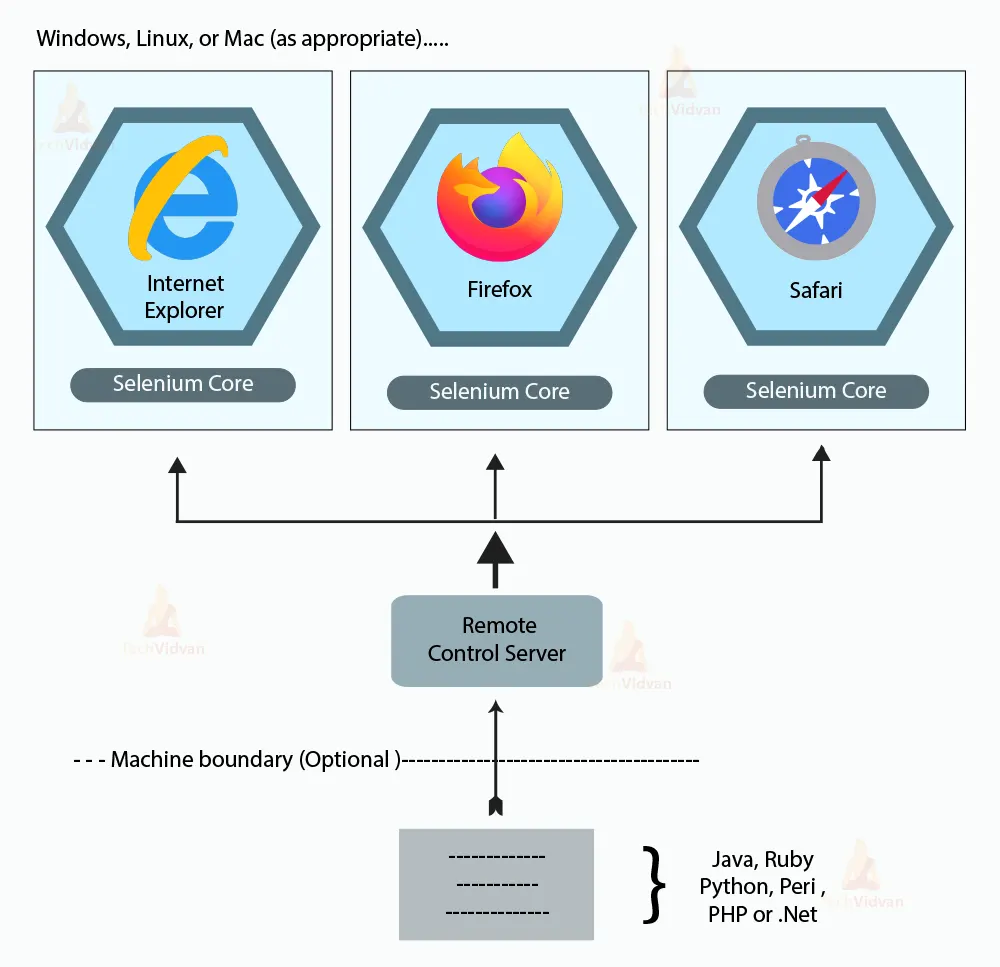
Selenium RC (Remote Control) was the first version of Selenium that allowed testers to write automated tests in any programming language and execute them on various browsers. The architecture of Selenium RC consists of three main components: the Selenium Server, the client library, and the browser drivers.
The Selenium Server acts as a bridge between the client library and the browser drivers. It receives commands from the client library and communicates with the browser drivers to execute the commands on the target browser. The Selenium Server can be installed and run on any machine that has a supported browser and programming language environment.
The client library is a programming language-specific library that interacts with the Selenium Server to automate the testing of web applications. It provides a set of APIs that allow testers to write test scripts in their preferred programming language, such as Java, Python, Ruby, etc.
The browser drivers are platform-specific components that interact with the target browser to execute commands and retrieve results. They provide a standard API that the Selenium Server uses to communicate with the browser. The browser drivers are responsible for launching and controlling the target browser, and they can be downloaded and installed separately for each browser.
Selenium RC is replaced by Selenium WebDriver, a more modern and efficient automation tool. However, understanding the architecture of Selenium RC can help understand the evolution of Selenium and the concepts behind modern automation testing frameworks.
Advantages of Selenium Tool Suite
1. Open-Source
Selenium is free to use the open-source tool. It allows developers to customize and modify the tool according to their requirements. Developers can add new features and functionalities to the tool, which helps improve the overall testing process.
2. Multi-Browser and Multi-Platform Support
Selenium supports multiple browsers, including Google Chrome, Mozilla Firefox, Internet Explorer, Safari, and Opera. It also allows developers of Windows, Linux, and Mac OS. Selenium provides developers with the flexibility to run tests on different browsers and platforms. It helps to ensure the compatibility of web applications across different environments.
3. Easy to Evolve
Selenium is continuously evolving, with new versions and updates being released frequently. The community of developers working on Selenium is constantly improving and adding new features to the tool suite. This helps ensure that Selenium remains up-to-date and relevant and can cater to the ever-changing needs of web application testing.
4. Flexible and Customizable
Selenium is a flexible tool that can be customized to meet the specific testing needs of web applications. Depending on their requirements, developers can choose to use different components of the tool suite. They can also integrate Selenium with other testing frameworks and tools, which helps enhance the overall testing process.
5. Highly Scalable
Selenium is highly scalable, which makes it suitable for testing both small and large-scale web applications. Selenium Grid enables developers to run tests on multiple machines simultaneously, which helps reduce the overall testing time. This feature makes Selenium suitable for testing large-scale web applications that require extensive testing across multiple browsers and platforms.
Conclusion
Selenium is a widely used open-source tool suite for the automation testing of web applications. It comprises four components – Selenium IDE, WebDriver, Grid, and Remote Control. Each component of the tool suite has its own unique features and capabilities that cater to the diverse testing requirements of web applications. Selenium provides several advantages, including its open-source nature, multi-browser and multi-platform support, continuous evolution, flexibility and customizability, and scalability. These features make Selenium a popular choice for developers and testers looking to automate their web application testing.