
Mastering Networking in Python3
Python 3 is a high-level programming language widely used for networking purposes. It offers a variety of tools and libraries that make it easy to create network-enabled applications. One of the key features of Python 3 is its support for sockets, which are the fundamental building blocks of network communication. In this article, we will learn about Networking in Python3. Let’s start!!!
Networking in Python3
A socket is a bidirectional communication endpoint that sends and receives data over a network. Python3 provides a low-level socket API, and a higher-level interface called the asyncio library, making it easy to write concurrent and asynchronous code for networking applications.
The asyncio library provides several functional components for working with sockets, including event loops, coroutines, and futures. With these tools, it is possible to create highly efficient and scalable network applications that simultaneously handle thousands of connections.
One common use of Python3 for networking is creating web servers and applications. The asyncio library makes it easy to implement the HTTP protocol, allowing you to create custom web servers that can serve dynamic content to clients. The flask and Django libraries are popular frameworks for building web applications in Python3.
Another area where Python3 is commonly used for networking is network automation. With its robust and easy-to-use libraries, Python3 makes it possible to automate many common networking tasks, such as provisioning and configuring network devices, monitoring network performance, and performing network analysis. The napalm and netmiko libraries are examples of tools for network automation with Python3.
Socket module in python3
The socket module in Python3 provides a low-level interface for working with sockets. It allows you to create socket objects representing communication endpoints and establish connections with other networked devices. In addition, the socket module provides several useful functions and constants for working with sockets, such as socket.AF_INET for specifying the address family (e.g. IPv4) and socket.SOCK_STREAM for specifying the type of socket (e.g. a stream socket).
To create a socket, you can use the socket.socket() function, which takes the address family and socket type as arguments. For example,
import socket
# Create a socket
sock = socket.socket(socket.AF_INET, socket.SOCK_STREAM)
Once you have created a socket, you can connect with another networked device. This is typically done using the connect() method, which takes the address and port of the remote device as arguments. For example,
# Establish a connection to a remote device
sock.connect(('www.TechVidvan.com', 80))
Once a connection has been established, you can use the socket to send and receive data over the network. It is done using the send() and recv() methods, which are used to send and receive data, respectively. For example,
# Send data over the network
sock.send('Hello, world!')

# Receive data from the network
data = sock.recv(1024)
Socket Vocabulary
Sockets do have their own vocabulary, like-
1. domain
A family of protocols that is used as a transport mechanism. These values are constants such as AF_INET, PF_INET, PF_UNIX, PF_X25, and so on.
2. types
The type of communication between two endpoints, typically SOCK_STREAM for connection-oriented protocols and SOCK_DGRAM for connectionless protocols.
3. protocol
Typically null, this can be used to identify a protocol variant within a domain and type
4. hostname
Network Interface Identifier −
A string that can be a hostname, a dotted address, or an IPV6 address with a colon (and possibly a period)
A “<broadcast>” string that specifies the INADDR_BROADCAST address.
A zero-length string that specifies INADDR_ANY, or
An integer interpreted as a binary address in host byte order.
5. ports
Each server listens for clients calling on one or more ports. Port can be a Fixnum port number, a string containing a port number, or a service name.
Socket Modules
To create a socket, you need to use the socket.socket() function available in the socket module, which has the general syntax −
s = socket.socket (socket_family, socket_type, protocol = 0)
Here is a description of the − parameters
- socket_family − This is either AF_UNIX or AF_INET as explained earlier.
- socket_type − This is either SOCK_STREAM or SOCK_DGRAM.
- protocol − This is usually omitted, default is 0.
Once you have a socket object, you can use the required functions to create a client or server program.
Server socket methods
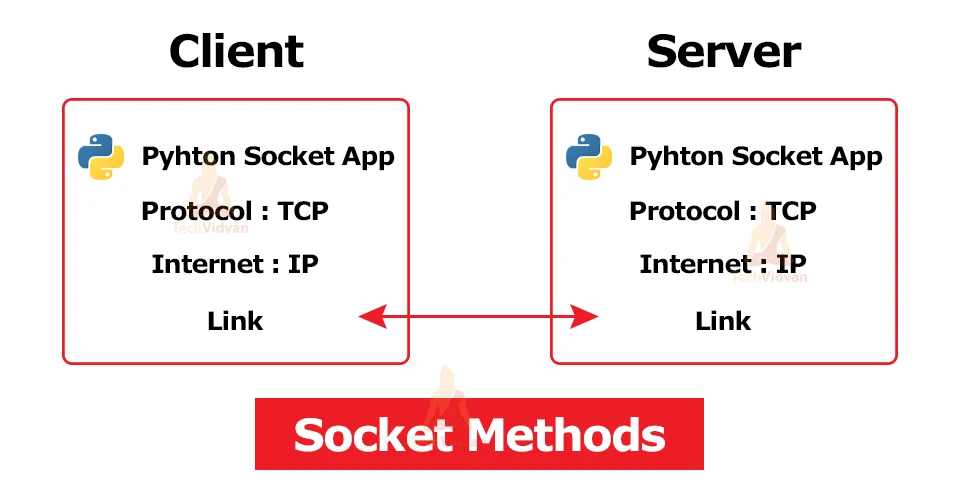
A server socket is a socket used to accept incoming client connections. It typically listens on a specific port on the server and waits for clients to initiate connections. Once a connection has been established, the server socket can exchange data with the client socket.
Several frequently used techniques for dealing with server sockets are available in the socket module in Python 3. Among the most important are the following:
1. bind(): This method associates a socket with a specific network address and port. The server socket typically does this before it starts listening for incoming connections. For example:
import socket
# Create a socket sock = socket.socket(socket.AF_INET, socket.SOCK_STREAM)
# Bind the socket to an address and port sock.bind(('0.0.0.0', 8080))
2. listen(): This method starts listening for incoming connections on a socket. It takes an integer argument that specifies the maximum number of queued connections to allow. For example:
# Start listening for incoming connections
sock.listen(5)
3. accept(): This method accepts an incoming connection from a client. It returns a new socket object that represents the connection to the client, as well as the address of the remote client. For example:
# Accept an incoming connection
client_sock, client_addr = sock.accept()
These are just some methods commonly used for working with server sockets in Python 3. In addition, the socket module provides many other methods and functions that can create and manage server sockets and other types of sockets.
Client socket methods
A client socket is a socket used to initiate connections to server sockets. It typically connects to a server socket on a specific address and port and then exchanges data with the server.
Several frequently used techniques for dealing with client sockets are available in the socket module in Python 3. Among the most important are the following:
1. connect(): This method establishes a connection to a server socket. It takes the address and port of the server as arguments and returns a boolean value indicating whether the connection was successful. For example:
import socket
# Create a socket sock = socket.socket(socket.AF_INET, socket.SOCK_STREAM)
# Connect to a server
if sock.connect(('www.TechVidvan.com', 80)): print('Connection successful!') else: print('Connection failed!')
2. send(): This method sends data over the network to the connected server. It takes a string argument specifying the data to be sent and returns the number of bytes sent. For example:
# Send data to the server
bytes_sent = sock.send('Hello, world!')
3. recv(): This method receives data from the connected server. It takes an integer argument specifying the maximum number of bytes to receive and returns a string containing the received data. For example:
# Receive data from the server
data = sock.recv(1024)
These are just some commonly used methods for working with client sockets in Python 3. In addition, the socket module provides many other methods and functions that can be used to create and manage client sockets and other types of sockets.
General socket methods
In Python 3, the socket module includes several ways of working with sockets, independent of whether they are used as clients or servers. Among the most important are the following:
1. bind(): This method associates a socket with a specific network address and port. The server socket typically does this before it starts listening for incoming connections. For example:
import socket
# Create a socket sock = socket.socket(socket.AF_INET, socket.SOCK_STREAM)
# Bind the socket to an address and port sock.bind(('0.0.0.0', 8080))
2. connect(): This method establishes a connection to a server socket. It takes the address and port of the server as arguments and returns a boolean value indicating whether the connection was successful. For example:
import socket
# Create a socket
sock = socket.socket(socket.AF_INET, socket.SOCK_STREAM)
# Connect to a server
if sock.connect(('www.example.com', 80)): print('Connection successful!') else: print('Connection failed!')
3. send(): This method sends data over the network to the connected server. It takes a string argument that specifies the data to be sent and returns the number of sent bytes. For example:
# Send data to the server
bytes_sent = sock.send('Hello, world!')
4. recv(): This method receives data from the connected server. It takes an integer argument that specifies the maximum number of bytes to receive and returns a string containing the received data. For example:
# Receive data from the server
data = sock.recv(1024)
These are just some methods commonly used for working with sockets in Python 3. In addition, the socket module provides many other methods and functions that can be used to create and manage sockets and other types of network communication endpoints.
Conclusion
As you have likely gathered from the information provided above, Python is a powerful and versatile language that offers a wide range of tools and libraries for working with networks. So whether you create a simple client-server application, make HTTP requests to a web server, or build a complex distributed system, Python has the tools and libraries you need to do the job.
Additionally, Python’s simple and easy-to-learn syntax makes it an excellent choice for beginners and experienced programmers. Python is an excellent choice for working with networks and will be a valuable asset in any programmer’s toolkit. Its support for sockets, asyncio, and other networking components makes it a popular choice for web development and network automation tasks.