
Android Job Portal – Jobs at Your Fingertips
Today we are going to see and learn to implement an Android Project which is a Job Portal Application in android studio. We’ll understand the complete project development in this article.
The Job Portal application will be helpful for both employers and job seekers. Employers will be able to publish jobs on this application, and users will be able to find jobs that fit their skill sets.
About Android Job Portal Application
It will be advantageous for beginners to learn about app development using kotlin and firebase by creating this project from scratch. You will become accustomed to using Android Studio and Firebase while the app is developed.
New jobs can only be generated and added to the database if the user who is now signed in is an admin; otherwise, users can only view the job details that are already saved in the database. Details about the user interface are as follows:
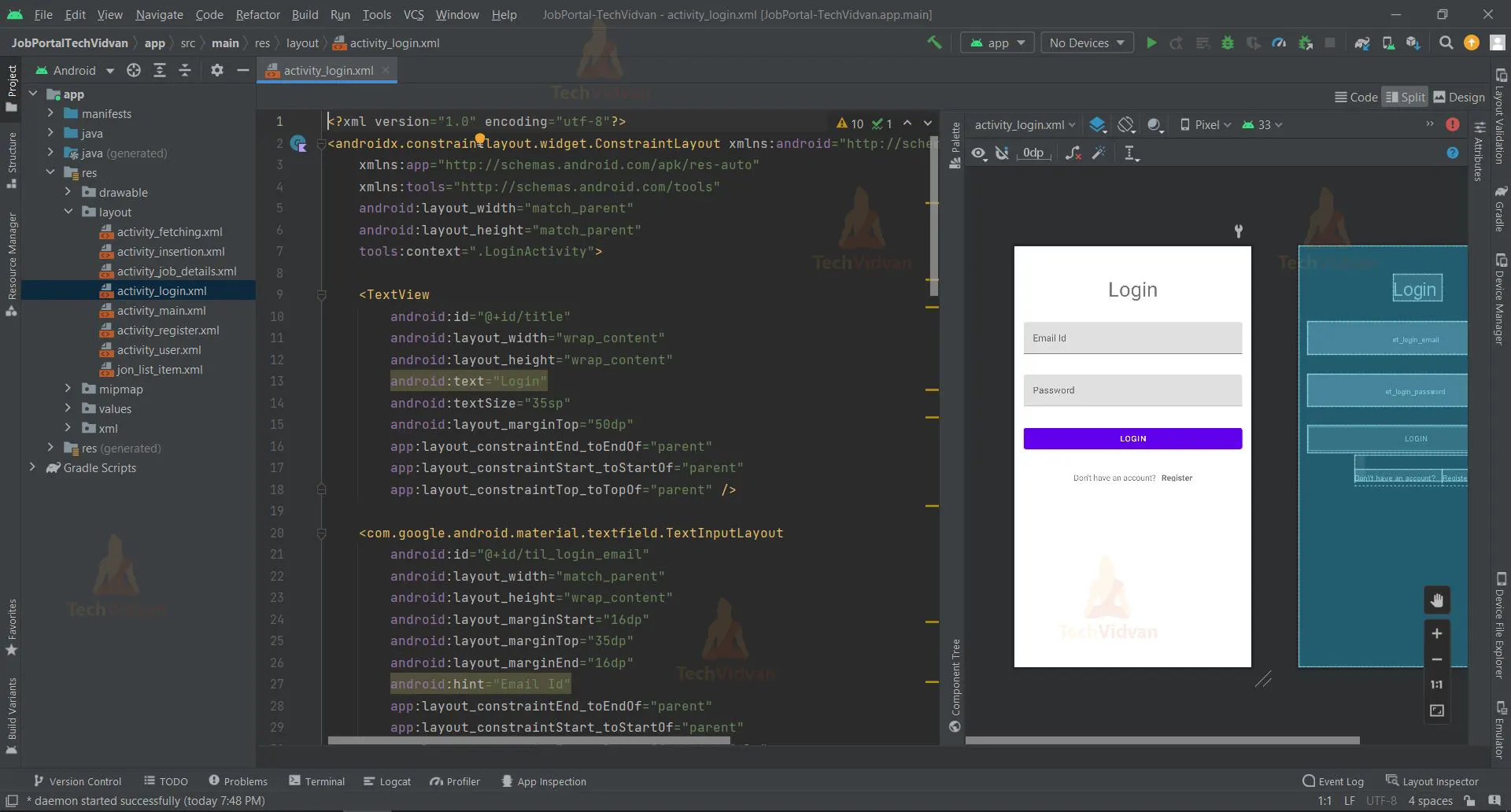
- The home page of the job portal application is a login page, where the user needs to enter his/her email and password in order to login.
- If at all the user doesn’t have a account, they can sign up by clicking on the ‘register’ textview below the ‘Login’ button.
- If an admin signs in, the UI will display two buttons ‘add new job’ and ‘logout’ respectively.
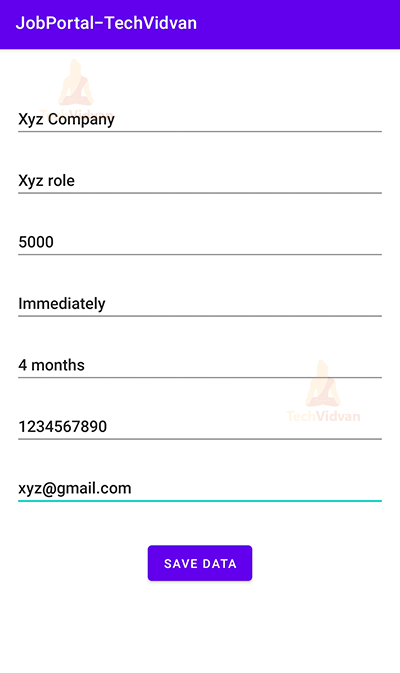
- If the admin clicks on the ‘add new job’ button, he/she will need to fill out the required details in order to save a new job opening in the database, new job details can be saved by clicking on the ‘Save Data’ button.
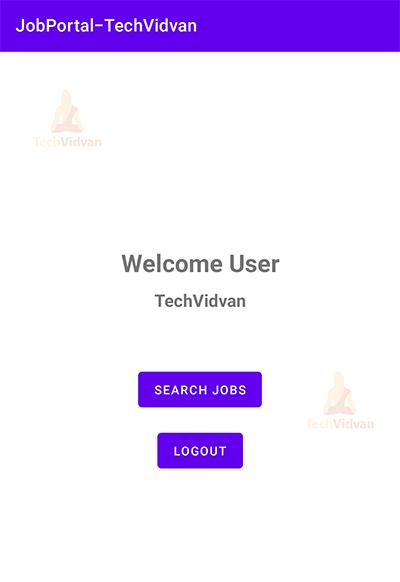
- If a user signs in, the UI will display two buttons ‘search jobs’ and ‘logout’ respectively.
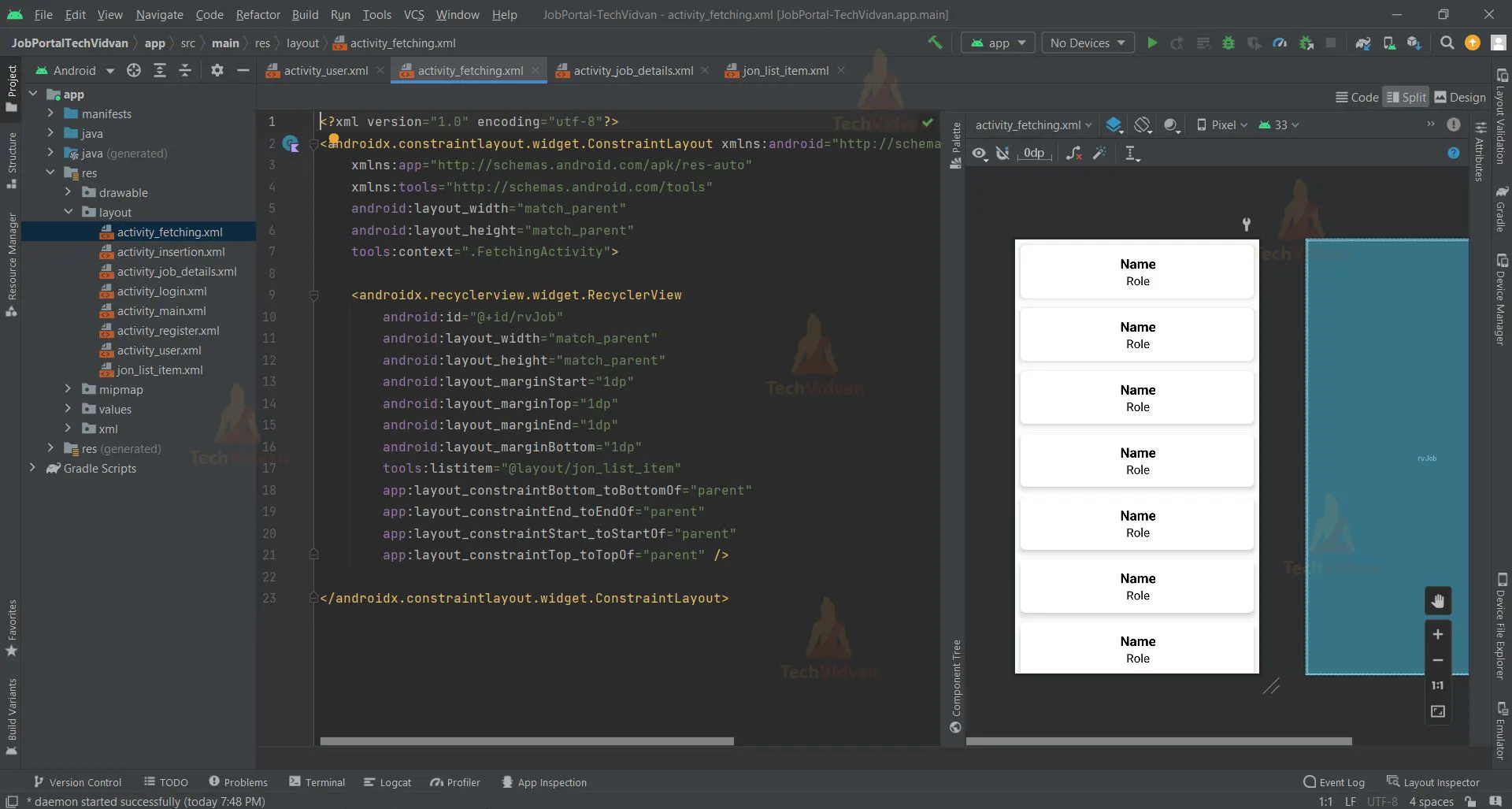
- When an user clicks “search jobs,” a list of open positions with the employer’s name and job title displays on the screen; to view more information about a particular position, the user need only click on that job.
Prerequisites for Job Portal using Android
To develop this Android application the requirements and prerequisites are as follows:
Kotlin: You need first be familiar with Kotlin programming. Given that we will write the app code in the programming language Kotlin, it is necessary.
XML: Another crucial component of our Android application is XML. It will be applied to the development of the application’s user interface.
Android Studio: The core of our application is Android Studio because that is how we will develop it. Also included with Android Studio is an Android virtual device that can be used to test the functionality of applications.
Download Android Job Portal Project
Please download the source code of Android Job Portal Project from the following link: Android Job Portal Project Code
Steps to Create Job Portal Project Using Android
We’ll now start working on developing a job portal application. Before putting the code into practice, we will learn about its purpose and function throughout this article. So let’s look at the files and functions needed to run the code:
You must complete a set of steps in order to create this Android car-pooling application. We are here to walk you through every stage of developing an app.
- Extract all the files from the downloaded zip file to the location of your choice.
- Open Android Studio.
- Click on File then Open.
- Find and select the folder you extracted earlier and click on OK.
You have successfully opened the job portal’s source code in android studio.

Let’s go through each file in this project one at a time as we comprehend how the application works.
1. The “activity_login” is a XML file which is responsible for creating the login page user interface.
<?xml version="1.0" encoding="utf-8"?>
<androidx.constraintlayout.widget.ConstraintLayout xmlns:android="http://schemas.android.com/apk/res/android"
    xmlns:app="http://schemas.android.com/apk/res-auto"
    xmlns:tools="http://schemas.android.com/tools"
    android:layout_width="match_parent"
    android:layout_height="match_parent"
    tools:context=".LoginActivity">

    <TextView
        android:id="@+id/title"
        android:layout_width="wrap_content"
        android:layout_height="wrap_content"
        android:text="Login"
        android:textSize="35sp"
        android:layout_marginTop="50dp"
        app:layout_constraintEnd_toEndOf="parent"
        app:layout_constraintStart_toStartOf="parent"
        app:layout_constraintTop_toTopOf="parent" />

    <com.google.android.material.textfield.TextInputLayout
        android:id="@+id/til_login_email"
        android:layout_width="match_parent"
        android:layout_height="wrap_content"
        android:layout_marginStart="16dp"
        android:layout_marginTop="35dp"
        android:layout_marginEnd="16dp"
        android:hint="Email Id"
        app:layout_constraintEnd_toEndOf="parent"
        app:layout_constraintStart_toStartOf="parent"
        app:layout_constraintTop_toBottomOf="@+id/title"
        >
        <EditText
            android:id="@+id/et_login_email"
            android:layout_width="match_parent"
            android:layout_height="wrap_content"
            android:inputType="textEmailAddress"
            />
    </com.google.android.material.textfield.TextInputLayout>

    <com.google.android.material.textfield.TextInputLayout
        android:id="@+id/til_login_password"
        android:layout_width="match_parent"
        android:layout_height="wrap_content"
        android:layout_marginStart="16dp"
        android:layout_marginTop="35dp"
        android:layout_marginEnd="16dp"
        android:hint="Password"
        app:layout_constraintEnd_toEndOf="parent"
        app:layout_constraintStart_toStartOf="parent"
        app:layout_constraintTop_toBottomOf="@+id/til_login_email"
        >
        <EditText
            android:id="@+id/et_login_password"
            android:layout_width="match_parent"
            android:layout_height="wrap_content"
            android:inputType="textPassword"
            android:text=""/>
    </com.google.android.material.textfield.TextInputLayout>

    <Button
        android:id="@+id/loginBtn"
        android:layout_width="match_parent"
        android:layout_height="wrap_content"
        android:gravity="center"
        android:layout_marginStart="16dp"
        android:layout_marginEnd="16dp"
        android:layout_marginTop="32dp"
        android:text="Login"
        app:layout_constraintEnd_toEndOf="parent"
        app:layout_constraintStart_toStartOf="parent"
        app:layout_constraintTop_toBottomOf="@+id/til_login_password"/>

    <LinearLayout
        android:layout_width="wrap_content"
        android:layout_height="wrap_content"
        android:layout_marginTop="5dp"
        android:orientation="horizontal"
        android:gravity="center_vertical"
        app:layout_constraintEnd_toEndOf="parent"
        app:layout_constraintStart_toStartOf="parent"
        app:layout_constraintTop_toBottomOf="@+id/loginBtn"
        >
        <TextView
            android:id="@+id/dont_have_an_account"
            android:layout_width="wrap_content"
            android:layout_height="wrap_content"
            android:layout_marginTop="16dp"
            android:padding="5dp"
            android:text="Don\'t have an account?"
            />

        <TextView
            android:id="@+id/register"
            android:layout_width="wrap_content"
            android:layout_height="wrap_content"
            android:layout_marginTop="16dp"
            android:foreground="?attr/selectableItemBackground"
            android:padding="5dp"
            android:textStyle="bold"
            android:text="Register"
            />

    </LinearLayout>

</androidx.constraintlayout.widget.ConstraintLayout>
2. The “activity_register” is a XML file which is responsible for creating the register page’s user interface.
<?xml version="1.0" encoding="utf-8"?>
<androidx.constraintlayout.widget.ConstraintLayout xmlns:android="http://schemas.android.com/apk/res/android"
    xmlns:app="http://schemas.android.com/apk/res-auto"
    xmlns:tools="http://schemas.android.com/tools"
    android:layout_width="match_parent"
    android:layout_height="match_parent"
    tools:context=".RegisterActivity">

    <TextView
        android:id="@+id/title"
        android:layout_width="wrap_content"
        android:layout_height="wrap_content"
        android:text="Register"
        android:textSize="35sp"
        android:layout_marginTop="50dp"
        app:layout_constraintEnd_toEndOf="parent"
        app:layout_constraintStart_toStartOf="parent"
        app:layout_constraintTop_toTopOf="parent" />

    <com.google.android.material.textfield.TextInputLayout
        android:id="@+id/til_register_email"
        android:layout_width="match_parent"
        android:layout_height="wrap_content"
        android:layout_marginStart="16dp"
        android:layout_marginTop="35dp"
        android:layout_marginEnd="16dp"
        android:hint="Email Id"
        app:layout_constraintEnd_toEndOf="parent"
        app:layout_constraintStart_toStartOf="parent"
        app:layout_constraintTop_toBottomOf="@+id/title"
        >
        <EditText
            android:id="@+id/et_register_email"
            android:layout_width="match_parent"
            android:layout_height="wrap_content"
            android:inputType="textEmailAddress"
            />
    </com.google.android.material.textfield.TextInputLayout>

    <com.google.android.material.textfield.TextInputLayout
        android:id="@+id/til_register_password"
        android:layout_width="match_parent"
        android:layout_height="wrap_content"
        android:layout_marginStart="16dp"
        android:layout_marginTop="35dp"
        android:layout_marginEnd="16dp"
        android:hint="Password"
        app:layout_constraintEnd_toEndOf="parent"
        app:layout_constraintStart_toStartOf="parent"
        app:layout_constraintTop_toBottomOf="@+id/til_register_email"
        >
        <EditText
            android:id="@+id/et_register_password"
            android:layout_width="match_parent"
            android:layout_height="wrap_content"
            android:inputType="textPassword"
            android:text=""/>
    </com.google.android.material.textfield.TextInputLayout>

    <Button
        android:id="@+id/registerBtn"
        android:layout_width="match_parent"
        android:layout_height="wrap_content"
        android:gravity="center"
        android:layout_marginStart="16dp"
        android:layout_marginEnd="16dp"
        android:layout_marginTop="32dp"
        android:text="Register"
        app:layout_constraintEnd_toEndOf="parent"
        app:layout_constraintStart_toStartOf="parent"
        app:layout_constraintTop_toBottomOf="@+id/til_register_password"/>

    <LinearLayout
        android:layout_width="wrap_content"
        android:layout_height="wrap_content"
        android:layout_marginTop="5dp"
        android:orientation="horizontal"
        android:gravity="center_vertical"
        app:layout_constraintEnd_toEndOf="parent"
        app:layout_constraintStart_toStartOf="parent"
        app:layout_constraintTop_toBottomOf="@+id/registerBtn"
        >
        <TextView
            android:id="@+id/have_an_account"
            android:layout_width="wrap_content"
            android:layout_height="wrap_content"
            android:layout_marginTop="16dp"
            android:padding="5dp"
            android:text="Have an account?"
            />

        <TextView
            android:id="@+id/login"
            android:layout_width="wrap_content"
            android:layout_height="wrap_content"
            android:layout_marginTop="16dp"
            android:foreground="?attr/selectableItemBackground"
            android:padding="5dp"
            android:textStyle="bold"
            android:text="Login"
            />

    </LinearLayout>

</androidx.constraintlayout.widget.ConstraintLayout>

3. The “activity_main” is a XML file responsible for creating the user interface that admin is redirected to when they sign in.
<?xml version="1.0" encoding="utf-8"?>
<androidx.constraintlayout.widget.ConstraintLayout xmlns:android="http://schemas.android.com/apk/res/android"
    xmlns:app="http://schemas.android.com/apk/res-auto"
    xmlns:tools="http://schemas.android.com/tools"
    android:layout_width="match_parent"
    android:layout_height="match_parent"
    tools:context=".MainActivity">

    <TextView
        android:id="@+id/textView"
        android:layout_width="wrap_content"
        android:layout_height="wrap_content"
        android:text="Welcome Admin"
        android:layout_marginTop="200dp"
        android:textSize="28sp"
        android:gravity="center"
        android:textStyle="bold"
        app:layout_constraintEnd_toEndOf="parent"
        app:layout_constraintStart_toStartOf="parent"
        app:layout_constraintTop_toTopOf="parent" />

    <TextView
        android:id="@+id/textView1"
        android:layout_width="wrap_content"
        android:layout_height="wrap_content"
        android:text="TechVidvan"
        android:layout_marginTop="10dp"
        android:textSize="20sp"
        android:gravity="center"
        android:textStyle="bold"
        app:layout_constraintEnd_toEndOf="parent"
        app:layout_constraintStart_toStartOf="parent"
        app:layout_constraintTop_toBottomOf="@+id/textView"/>

    <Button
        android:id="@+id/addNewJob"
        android:layout_width="wrap_content"
        android:layout_height="wrap_content"
        android:text="Add New Job"
        android:layout_marginTop="90dp"
        app:layout_constraintEnd_toEndOf="parent"
        app:layout_constraintStart_toStartOf="parent"
        app:layout_constraintTop_toBottomOf="@+id/textView" />

    <Button
        android:id="@+id/logoutBtn"
        android:layout_width="wrap_content"
        android:layout_height="wrap_content"
        android:text="Logout"
        android:layout_marginTop="15dp"
        android:layout_marginStart="10dp"
        android:layout_marginEnd="10dp"
        android:padding="5sp"
        app:layout_constraintStart_toStartOf="parent"
        app:layout_constraintEnd_toEndOf="parent"
        app:layout_constraintTop_toBottomOf="@+id/addNewJob"
        tools:ignore="MissingConstraints" />

</androidx.constraintlayout.widget.ConstraintLayout>

4. The “activity_insertion” is a XML file responsible for UI where the admin will be required to enter the details of the new job.
<?xml version="1.0" encoding="utf-8"?>
<androidx.constraintlayout.widget.ConstraintLayout xmlns:android="http://schemas.android.com/apk/res/android"
    xmlns:app="http://schemas.android.com/apk/res-auto"
    xmlns:tools="http://schemas.android.com/tools"
    android:layout_width="match_parent"
    android:layout_height="match_parent"
    tools:context=".InsertionActivity">

    <EditText
        android:id="@+id/etCompanyName"
        android:layout_width="0dp"
        android:layout_height="wrap_content"
        android:layout_marginTop="50dp"
        android:ems="10"
        android:inputType="textPersonName"
        android:hint="Company's Name"
        android:layout_marginStart="15dp"
        android:layout_marginEnd="15dp"
        app:layout_constraintEnd_toEndOf="parent"
        app:layout_constraintStart_toStartOf="parent"
        app:layout_constraintTop_toTopOf="parent" />

    <EditText
        android:id="@+id/etRole"
        android:layout_width="0dp"
        android:layout_height="wrap_content"
        android:layout_marginTop="20dp"
        android:ems="10"
        android:inputType="textPersonName"
        android:hint="Job Role"
        android:layout_marginStart="15dp"
        android:layout_marginEnd="15dp"
        app:layout_constraintEnd_toEndOf="parent"
        app:layout_constraintStart_toStartOf="parent"
        app:layout_constraintTop_toBottomOf="@+id/etCompanyName"/>

    <EditText
        android:id="@+id/etSalary"
        android:layout_width="0dp"
        android:layout_height="wrap_content"
        android:layout_marginTop="20dp"
        android:ems="10"
        android:inputType="textPersonName"
        android:hint="Salary"
        android:layout_marginStart="15dp"
        android:layout_marginEnd="15dp"
        app:layout_constraintEnd_toEndOf="parent"
        app:layout_constraintStart_toStartOf="parent"
        app:layout_constraintTop_toBottomOf="@+id/etRole" />

    <EditText
        android:id="@+id/etStartDate"
        android:layout_width="0dp"
        android:layout_height="wrap_content"
        android:layout_marginTop="20dp"
        android:ems="10"
        android:inputType="textPersonName"
        android:hint="Start Date (DD-MM-YY)"
        android:layout_marginStart="15dp"
        android:layout_marginEnd="15dp"
        app:layout_constraintEnd_toEndOf="parent"
        app:layout_constraintStart_toStartOf="parent"
        app:layout_constraintTop_toBottomOf="@+id/etSalary" />

    <EditText
        android:id="@+id/etDuration"
        android:layout_width="0dp"
        android:layout_height="wrap_content"
        android:layout_marginTop="20dp"
        android:ems="10"
        android:inputType="textPersonName"
        android:hint="Duration"
        android:layout_marginStart="15dp"
        android:layout_marginEnd="15dp"
        app:layout_constraintEnd_toEndOf="parent"
        app:layout_constraintStart_toStartOf="parent"
        app:layout_constraintTop_toBottomOf="@+id/etStartDate" />

    <EditText
        android:id="@+id/etContact"
        android:layout_width="0dp"
        android:layout_height="wrap_content"
        android:layout_marginTop="20dp"
        android:ems="10"
        android:inputType="textPersonName"
        android:hint="Contact No."
        android:layout_marginStart="15dp"
        android:layout_marginEnd="15dp"
        app:layout_constraintEnd_toEndOf="parent"
        app:layout_constraintStart_toStartOf="parent"
        app:layout_constraintTop_toBottomOf="@+id/etDuration" />

    <EditText
        android:id="@+id/etEmail"
        android:layout_width="0dp"
        android:layout_height="wrap_content"
        android:layout_marginTop="20dp"
        android:ems="10"
        android:inputType="textPersonName"
        android:hint="Email Id"
        android:layout_marginStart="15dp"
        android:layout_marginEnd="15dp"
        app:layout_constraintEnd_toEndOf="parent"
        app:layout_constraintStart_toStartOf="parent"
        app:layout_constraintTop_toBottomOf="@+id/etContact" />


    <Button
        android:id="@+id/btnSave"
        android:layout_width="wrap_content"
        android:layout_height="wrap_content"
        android:layout_marginTop="32dp"
        android:text="Save Data"
        app:layout_constraintEnd_toEndOf="parent"
        app:layout_constraintStart_toStartOf="parent"
        app:layout_constraintTop_toBottomOf="@+id/etEmail" />

</androidx.constraintlayout.widget.ConstraintLayout>

5. The “activity_user” is a XML file which is responsible for creating UI for the page where the user is redirected after signing in.
<?xml version="1.0" encoding="utf-8"?>
<androidx.constraintlayout.widget.ConstraintLayout xmlns:android="http://schemas.android.com/apk/res/android"
    xmlns:app="http://schemas.android.com/apk/res-auto"
    xmlns:tools="http://schemas.android.com/tools"
    android:layout_width="match_parent"
    android:layout_height="match_parent"
    tools:context=".UserActivity">

    <TextView
        android:id="@+id/textView"
        android:layout_width="wrap_content"
        android:layout_height="wrap_content"
        android:text="Welcome User"
        android:layout_marginTop="200dp"
        android:textSize="28sp"
        android:gravity="center"
        android:textStyle="bold"
        app:layout_constraintEnd_toEndOf="parent"
        app:layout_constraintStart_toStartOf="parent"
        app:layout_constraintTop_toTopOf="parent" />

    <TextView
        android:id="@+id/textView1"
        android:layout_width="wrap_content"
        android:layout_height="wrap_content"
        android:text="TechVidvan"
        android:layout_marginTop="10dp"
        android:textSize="20sp"
        android:gravity="center"
        android:textStyle="bold"
        app:layout_constraintEnd_toEndOf="parent"
        app:layout_constraintStart_toStartOf="parent"
        app:layout_constraintTop_toBottomOf="@+id/textView"/>

    <Button
        android:id="@+id/search"
        android:layout_width="wrap_content"
        android:layout_height="wrap_content"
        android:text="Search Jobs"
        android:layout_marginTop="90dp"
        app:layout_constraintEnd_toEndOf="parent"
        app:layout_constraintStart_toStartOf="parent"
        app:layout_constraintTop_toBottomOf="@+id/textView" />

    <Button
        android:id="@+id/logoutBtn"
        android:layout_width="wrap_content"
        android:layout_height="wrap_content"
        android:text="Logout"
        android:layout_marginTop="15dp"
        android:layout_marginStart="10dp"
        android:layout_marginEnd="10dp"
        android:padding="5sp"
        app:layout_constraintStart_toStartOf="parent"
        app:layout_constraintEnd_toEndOf="parent"
        app:layout_constraintTop_toBottomOf="@+id/search"
        tools:ignore="MissingConstraints" />

</androidx.constraintlayout.widget.ConstraintLayout>

6. ‘activity_fetching’ is an XML file responsible for creating the UI of the activity which will display a list of job opportunities saved in the database.
<?xml version="1.0" encoding="utf-8"?>
<androidx.constraintlayout.widget.ConstraintLayout xmlns:android="http://schemas.android.com/apk/res/android"
    xmlns:app="http://schemas.android.com/apk/res-auto"
    xmlns:tools="http://schemas.android.com/tools"
    android:layout_width="match_parent"
    android:layout_height="match_parent"
    tools:context=".FetchingActivity">

    <androidx.recyclerview.widget.RecyclerView
        android:id="@+id/rvJob"
        android:layout_width="match_parent"
        android:layout_height="match_parent"
        android:layout_marginStart="1dp"
        android:layout_marginTop="1dp"
        android:layout_marginEnd="1dp"
        android:layout_marginBottom="1dp"
        tools:listitem="@layout/jon_list_item"
        app:layout_constraintBottom_toBottomOf="parent"
        app:layout_constraintEnd_toEndOf="parent"
        app:layout_constraintStart_toStartOf="parent"
        app:layout_constraintTop_toTopOf="parent" />

</androidx.constraintlayout.widget.ConstraintLayout>
7. ‘activity_job_details’ is the XML file responsible creating the UI of the activity that displays the details about a particular job.
<?xml version="1.0" encoding="utf-8"?>
<androidx.constraintlayout.widget.ConstraintLayout xmlns:android="http://schemas.android.com/apk/res/android"
    xmlns:app="http://schemas.android.com/apk/res-auto"
    xmlns:tools="http://schemas.android.com/tools"
    android:layout_width="match_parent"
    android:layout_height="match_parent"
    tools:context=".JobDetailsActivity">

    <LinearLayout
        android:id="@+id/linearLayout"
        android:layout_width="match_parent"
        android:layout_height="wrap_content"
        app:layout_constraintStart_toStartOf="parent"
        app:layout_constraintTop_toTopOf="parent"
        app:layout_constraintEnd_toEndOf="parent"
        android:orientation="vertical">


        <LinearLayout
            android:id="@+id/id_lin"
            android:layout_width="match_parent"
            android:layout_height="30dp"
            android:layout_marginLeft="10dp"
            android:layout_marginTop="20dp"
            android:layout_marginRight="10dp"
            android:orientation="horizontal"
            android:weightSum="2">

            <LinearLayout
                android:layout_width="0dp"
                android:layout_height="match_parent"
                android:layout_weight="0.6"
                android:background="@color/white1">

                <TextView
                    android:layout_width="match_parent"
                    android:layout_height="wrap_content"
                    android:layout_gravity="center"
                    android:gravity="center"
                    android:text="Company's Name"
                    android:textColor="@color/black"
                    android:textSize="15sp" />

            </LinearLayout>

            <LinearLayout
                android:layout_width="0dp"
                android:layout_height="match_parent"
                android:layout_weight="1.4">

                <TextView
                    android:id="@+id/tvName"
                    android:layout_width="match_parent"
                    android:layout_height="wrap_content"
                    android:layout_gravity="center"
                    android:gravity="center"
                    android:text=""
                    android:textColor="@color/black"
                    android:textSize="20sp"

                    />

            </LinearLayout>


        </LinearLayout>


        <LinearLayout
            android:id="@+id/contact_lin"
            android:layout_width="match_parent"
            android:layout_height="40dp"
            android:layout_marginLeft="10dp"
            android:layout_marginRight="10dp"
            android:orientation="horizontal"
            android:weightSum="2">

            <LinearLayout
                android:layout_width="0dp"
                android:layout_height="match_parent"
                android:layout_weight="0.6"
                android:background="@color/white1">

                <TextView
                    android:layout_width="match_parent"
                    android:layout_height="wrap_content"
                    android:layout_gravity="center"
                    android:gravity="center"
                    android:text="Job Role"
                    android:textColor="@color/black"
                    android:textSize="15sp" />

            </LinearLayout>

            <LinearLayout
                android:layout_width="0dp"
                android:layout_height="match_parent"
                android:layout_weight="1.4">

                <TextView
                    android:id="@+id/tvRole"
                    android:layout_width="match_parent"
                    android:layout_height="wrap_content"
                    android:layout_gravity="center"
                    android:gravity="center"
                    android:text=""
                    android:textColor="@color/black"
                    android:textSize="20sp"

                    />

            </LinearLayout>


        </LinearLayout>

        <LinearLayout

            android:layout_width="match_parent"
            android:layout_height="40dp"
            android:layout_marginLeft="10dp"
            android:layout_marginRight="10dp"
            android:orientation="horizontal"
            android:weightSum="2"

            >

            <LinearLayout
                android:layout_width="0dp"
                android:layout_height="match_parent"
                android:layout_weight="0.6"
                android:background="@color/white1">

                <TextView
                    android:layout_width="match_parent"
                    android:layout_height="wrap_content"
                    android:layout_gravity="center"
                    android:gravity="center"
                    android:text="Salary"
                    android:textColor="@color/black"
                    android:textSize="15sp"


                    />

            </LinearLayout>

            <LinearLayout
                android:layout_width="0dp"
                android:layout_height="match_parent"
                android:layout_weight="1.4">

                <TextView
                    android:id="@+id/tvSalary"
                    android:layout_width="match_parent"
                    android:layout_height="wrap_content"
                    android:layout_gravity="center"
                    android:gravity="center"
                    android:text=""
                    android:textColor="@color/black"
                    android:textSize="20sp"

                    />

            </LinearLayout>


        </LinearLayout>


        <LinearLayout

            android:layout_width="match_parent"
            android:layout_height="40dp"
            android:layout_marginLeft="10dp"
            android:layout_marginRight="10dp"
            android:orientation="horizontal"
            android:weightSum="2"

            >

            <LinearLayout
                android:layout_width="0dp"
                android:layout_height="match_parent"
                android:layout_weight="0.6"
                android:background="@color/white1">

                <TextView
                    android:layout_width="match_parent"
                    android:layout_height="wrap_content"
                    android:layout_gravity="center"

                    android:gravity="center"
                    android:text="Start Date"
                    android:textColor="@color/black"
                    android:textSize="15sp"


                    />

            </LinearLayout>

            <LinearLayout
                android:layout_width="0dp"
                android:layout_height="match_parent"
                android:layout_weight="1.4">

                <TextView
                    android:id="@+id/tvStartDate"
                    android:layout_width="match_parent"
                    android:layout_height="wrap_content"
                    android:layout_gravity="center"
                    android:gravity="center"
                    android:text=""
                    android:textColor="@color/black"
                    android:textSize="20sp"

                    />

            </LinearLayout>


        </LinearLayout>

        <LinearLayout

            android:layout_width="match_parent"
            android:layout_height="40dp"
            android:layout_marginLeft="10dp"
            android:layout_marginRight="10dp"
            android:orientation="horizontal"
            android:weightSum="2"

            >

            <LinearLayout
                android:layout_width="0dp"
                android:layout_height="match_parent"
                android:layout_weight="0.6"
                android:background="@color/white1">

                <TextView
                    android:layout_width="match_parent"
                    android:layout_height="wrap_content"
                    android:layout_gravity="center"

                    android:gravity="center"
                    android:text="Duration"
                    android:textColor="@color/black"
                    android:textSize="15sp"


                    />

            </LinearLayout>

            <LinearLayout
                android:layout_width="0dp"
                android:layout_height="match_parent"
                android:layout_weight="1.4">

                <TextView
                    android:id="@+id/tvDuration"
                    android:layout_width="match_parent"
                    android:layout_height="wrap_content"
                    android:layout_gravity="center"
                    android:gravity="center"
                    android:text=""
                    android:textColor="@color/black"
                    android:textSize="20sp"

                    />

            </LinearLayout>


        </LinearLayout>

        <LinearLayout

            android:layout_width="match_parent"
            android:layout_height="40dp"
            android:layout_marginLeft="10dp"
            android:layout_marginRight="10dp"
            android:orientation="horizontal"
            android:weightSum="2"

            >

            <LinearLayout
                android:layout_width="0dp"
                android:layout_height="match_parent"
                android:layout_weight="0.6"
                android:background="@color/white1">

                <TextView
                    android:layout_width="match_parent"
                    android:layout_height="wrap_content"
                    android:layout_gravity="center"

                    android:gravity="center"
                    android:text="Contact"
                    android:textColor="@color/black"
                    android:textSize="15sp"


                    />

            </LinearLayout>

            <LinearLayout
                android:layout_width="0dp"
                android:layout_height="match_parent"
                android:layout_weight="1.4">

                <TextView
                    android:id="@+id/tvContact"
                    android:layout_width="match_parent"
                    android:layout_height="wrap_content"
                    android:layout_gravity="center"
                    android:gravity="center"
                    android:text=""
                    android:textColor="@color/black"
                    android:textSize="20sp"

                    />

            </LinearLayout>

        </LinearLayout>

        <LinearLayout

            android:layout_width="match_parent"
            android:layout_height="40dp"
            android:layout_marginLeft="10dp"
            android:layout_marginRight="10dp"
            android:orientation="horizontal"
            android:weightSum="2"

            >

            <LinearLayout
                android:layout_width="0dp"
                android:layout_height="match_parent"
                android:layout_weight="0.6"
                android:background="@color/white1">

                <TextView
                    android:layout_width="match_parent"
                    android:layout_height="wrap_content"
                    android:layout_gravity="center"

                    android:gravity="center"
                    android:text="Mail Resume at :"
                    android:textColor="@color/black"
                    android:textSize="15sp"


                    />

            </LinearLayout>

            <LinearLayout
                android:layout_width="0dp"
                android:layout_height="match_parent"
                android:layout_weight="1.4">

                <TextView
                    android:id="@+id/tvEmail"
                    android:layout_width="match_parent"
                    android:layout_height="wrap_content"
                    android:layout_gravity="center"
                    android:gravity="center"
                    android:text=""
                    android:textColor="@color/black"
                    android:textSize="20sp"

                    />

            </LinearLayout>

        </LinearLayout>

        <Button
            android:id="@+id/btnBack"
            android:layout_width="wrap_content"
            android:layout_height="wrap_content"
            android:layout_marginTop="32dp"
            android:text="back"
            android:layout_gravity="center"
            app:layout_constraintEnd_toEndOf="parent"
            app:layout_constraintStart_toStartOf="parent"

            app:layout_constraintTop_toBottomOf="@+id/tvEmail" />

    </LinearLayout>

</androidx.constraintlayout.widget.ConstraintLayout>

Let’s now go through the files that are responsible for the working and functionality of the application.
1. ‘LoginActivity.kt’ is a kotlin file which is responsible for enabling the user to sign in using their credentials.
class LoginActivity : AppCompatActivity() {
    private lateinit var register: TextView
    private lateinit var loginBtn: Button
    private lateinit var et_login_email: EditText
    private lateinit var et_login_password: EditText
    override fun onCreate(savedInstanceState: Bundle?) {
        super.onCreate(savedInstanceState)
        setContentView(R.layout.activity_login)

        register = findViewById(R.id.register)
        loginBtn = findViewById(R.id.loginBtn)
        et_login_email = findViewById(R.id.et_login_email)
        et_login_password = findViewById(R.id.et_login_password)

        register.setOnClickListener{
            val intent = Intent(this@LoginActivity, RegisterActivity::class.java)
            startActivity(intent)
            finish()
        }

        loginBtn.setOnClickListener {
            when{
                TextUtils.isEmpty(et_login_email.text.toString().trim{ it <= ' '}) -> {
                    Toast.makeText(this@LoginActivity,"Enter Email", Toast.LENGTH_SHORT).show()
                }

                TextUtils.isEmpty(et_login_password.text.toString().trim{ it <= ' '}) -> {
                    Toast.makeText(this@LoginActivity,"Enter Password", Toast.LENGTH_SHORT).show()
                }

                else ->{
                    val email:String = et_login_email.text.toString().trim{it <= ' '}
                    val password:String = et_login_password.text.toString().trim{it <= ' '}
                    if(email!="[email protected]"){
                        Log.d("Tag", "$email"+" "+"$password")
                        FirebaseAuth.getInstance().signInWithEmailAndPassword(email, password)
                            .addOnCompleteListener { task ->
                                if (task.isSuccessful) {
                                    Toast.makeText(
                                        this,
                                        "Logged in Successfully",
                                        Toast.LENGTH_SHORT
                                    ).show()
                                    val intent =
                                        Intent(this@LoginActivity, UserActivity::class.java)
                                    intent.flags =
                                        Intent.FLAG_ACTIVITY_NEW_TASK or Intent.FLAG_ACTIVITY_CLEAR_TASK
                                    startActivity(intent)
                                    finish()
                                } else {
                                    Toast.makeText(
                                        this,
                                        task.exception!!.message.toString(),
                                        Toast.LENGTH_SHORT
                                    ).show()
                                }
                            }
                    }else{
                        FirebaseAuth.getInstance().signInWithEmailAndPassword(email, password)
                            .addOnCompleteListener { task ->
                                if (task.isSuccessful) {
                                    val intent =
                                        Intent(this@LoginActivity, MainActivity::class.java)
                                    startActivity(intent)
                                    finish()
                                } else {
                                    Toast.makeText(
                                        this,
                                        task.exception!!.message.toString(),
                                        Toast.LENGTH_SHORT
                                    ).show()
                                }
                            }
                    }
                }
            }
        }
    }
}

2. ‘RegisterActivity.kt’ is a class that enables a new user to register themselves using email and password.
class RegisterActivity : AppCompatActivity() {
    private lateinit var registerBtn: Button
    private lateinit var et_register_email: EditText
    private lateinit var et_register_password: EditText
    private lateinit var login: TextView
    override fun onCreate(savedInstanceState: Bundle?) {
        super.onCreate(savedInstanceState)
        setContentView(R.layout.activity_register)

        registerBtn = findViewById(R.id.registerBtn)
        et_register_email = findViewById(R.id.et_register_email)
        et_register_password = findViewById(R.id.et_register_password)
        login = findViewById(R.id.login)
        registerBtn.setOnClickListener {
            when{
                TextUtils.isEmpty(et_register_email.text.toString().trim{ it <= ' '}) -> {
                    Toast.makeText(this@RegisterActivity,"Enter Email", Toast.LENGTH_SHORT).show()
                }

                TextUtils.isEmpty(et_register_password.text.toString().trim{ it <= ' '}) -> {
                    Toast.makeText(this@RegisterActivity,"Enter Password", Toast.LENGTH_SHORT).show()
                }

                else ->{
                    val email:String = et_register_email.text.toString().trim{it <= ' '}
                    val password:String = et_register_password.text.toString().trim{it <= ' '}

                    FirebaseAuth.getInstance().createUserWithEmailAndPassword(email, password)
                        .addOnCompleteListener(
                            { task ->
                                if(task.isSuccessful){
                                    val firebaseUser: FirebaseUser = task.result!!.user!!
                                    Toast.makeText(this,"Registered Successfully", Toast.LENGTH_SHORT).show()
                                    val intent = Intent(this@RegisterActivity, UserActivity::class.java)
                                    intent.flags = Intent.FLAG_ACTIVITY_NEW_TASK or Intent.FLAG_ACTIVITY_CLEAR_TASK
                                    intent.putExtra("user_id",firebaseUser.uid)
                                    intent.putExtra("email_id",email)
                                    startActivity(intent)
                                    finish()
                                }else{
                                    Toast.makeText(this,task.exception!!.message.toString(), Toast.LENGTH_SHORT).show()
                                }
                            })
                }
            }
        }

        login.setOnClickListener {
            val intent = Intent(this@RegisterActivity, LoginActivity::class.java)
            startActivity(intent)
            finish()
        }
    }
}

3. “MainActivity” is a class which is responsible for the functioning of the activity which the admin is redirected after signing in.
class MainActivity : AppCompatActivity() {
    private lateinit var logoutBtn: Button
    private lateinit var addNewJob:Button
    override fun onCreate(savedInstanceState: Bundle?) {
        super.onCreate(savedInstanceState)
        setContentView(R.layout.activity_main)
        logoutBtn = findViewById(R.id.logoutBtn)
        addNewJob = findViewById(R.id.addNewJob)

        addNewJob.setOnClickListener {
            startActivity(Intent(this@MainActivity, InsertionActivity::class.java))
        }

        logoutBtn.setOnClickListener {
            FirebaseAuth.getInstance().signOut()
            startActivity(Intent(this@MainActivity, LoginActivity::class.java))
            finish()
        }
    }
}

4. “InsertionActivity” is a class which is responsible for the functioning of the activity which takes input from the admin about the new job and saves onto the database.
class InsertionActivity : AppCompatActivity() {
    private lateinit var etcompanyName: EditText
    private lateinit var etrole: EditText
    private lateinit var etsalary: EditText
    private lateinit var etstartDate: EditText
    private lateinit var etDuration: EditText
    private lateinit var etcontact: EditText
    private lateinit var etemail: EditText
    private lateinit var btnSave:Button
    private lateinit var dbRef: DatabaseReference
    override fun onCreate(savedInstanceState: Bundle?) {
        super.onCreate(savedInstanceState)
        setContentView(R.layout.activity_insertion)

        etcompanyName = findViewById(R.id.etCompanyName)
        etrole = findViewById(R.id.etRole)
        etsalary = findViewById(R.id.etSalary)
        etstartDate = findViewById(R.id.etStartDate)
        etDuration = findViewById(R.id.etDuration)
        etcontact = findViewById(R.id.etContact)
        etemail = findViewById(R.id.etEmail)
        btnSave = findViewById(R.id.btnSave)

        dbRef = FirebaseDatabase.getInstance().getReference("Jobs")
        btnSave.setOnClickListener {
            saveData()
        }
    }

    private fun saveData() {
        val name = etcompanyName.text.toString()
        val role = etrole.text.toString()
        val salary = etsalary.text.toString()
        val startDate = etstartDate.text.toString()
        val duration = etDuration.text.toString()
        val contact = etcontact.text.toString()
        val email = etemail.text.toString()
        val id = dbRef.push().key!!

        if(name.isEmpty() || role.isEmpty() || salary.isEmpty() || startDate.isEmpty() || duration.isEmpty() || contact.isEmpty() || email.isEmpty()){
            Toast.makeText(this, "Enter details", Toast.LENGTH_SHORT).show()
        }else{
            val jobModel = JobModel(id,name, role, salary, startDate, duration, contact, email)
            dbRef.child(id).setValue(jobModel)
                .addOnCompleteListener {
                    Toast.makeText(this, "Job data saved successfully", Toast.LENGTH_SHORT).show()
                    etcompanyName.text.clear()
                    etrole.text.clear()
                    etsalary.text.clear()
                    etstartDate.text.clear()
                    etDuration.text.clear()
                    etcontact.text.clear()
                    etemail.text.clear()

            startActivity(Intent(this@InsertionActivity, MainActivity::class.java))
                }
        }

    }
}

5. ‘UserActivity.kt’ is a class which is responsible for the functioning of the activity which the user is redirected after signing in.
class UserActivity : AppCompatActivity() {
    private lateinit var logoutBtn: Button
    private lateinit var search: Button
    override fun onCreate(savedInstanceState: Bundle?) {
        super.onCreate(savedInstanceState)
        setContentView(R.layout.activity_user)

        logoutBtn = findViewById(R.id.logoutBtn)
        search = findViewById(R.id.search)

        search.setOnClickListener {
            startActivity(Intent(this@UserActivity, FetchingActivity::class.java))
        }
        logoutBtn.setOnClickListener {
            FirebaseAuth.getInstance().signOut()
            startActivity(Intent(this@UserActivity, LoginActivity::class.java))
            finish()
        }
    }
}

6. ‘FetchingActivity.kt’ is a class which displays the list of jobs saved in the database when the ‘Search Jobs’ button is clicked by user.
class FetchingActivity : AppCompatActivity() {
    private lateinit var jobRecyclerView: RecyclerView
    private lateinit var dbRef: DatabaseReference
    private lateinit var jobList: ArrayList<JobModel>
    override fun onCreate(savedInstanceState: Bundle?) {
        super.onCreate(savedInstanceState)
        setContentView(R.layout.activity_fetching)

        jobRecyclerView = findViewById(R.id.rvJob)
        jobRecyclerView.layoutManager = LinearLayoutManager(this)
        jobRecyclerView.hasFixedSize()

        jobList = arrayListOf<JobModel>()

        getJobData()
    }

    private fun getJobData() {
        dbRef = FirebaseDatabase.getInstance().getReference("Jobs")

        dbRef.addValueEventListener(object : ValueEventListener {
            override fun onDataChange(snapshot: DataSnapshot) {
                jobList.clear()
                if(snapshot.exists()){
                    for(jobSnap in snapshot.children){
                        val jobData =jobSnap.getValue(JobModel::class.java)
                        jobList.add(jobData!!)
                    }

                    val mAdapter =JobAdapter(jobList)
                    jobRecyclerView.adapter =mAdapter

                    mAdapter.setOnItemClickListener(object : JobAdapter.onItemClickListener{
                        override fun onItemClick(position: Int) {
                            val intent = Intent(this@FetchingActivity, JobDetailsActivity::class.java)
                            intent.putExtra("name",jobList[position].name)
                            intent.putExtra("role",jobList[position].role)
                            intent.putExtra("salary",jobList[position].salary)
                            intent.putExtra("startDate",jobList[position].startDate)
                            intent.putExtra("duration",jobList[position].duration)
                            intent.putExtra("contact",jobList[position].contact)
                            intent.putExtra("email",jobList[position].email)
                            startActivity(intent)
                        }

                    })
                }
            }

            override fun onCancelled(error: DatabaseError) {

            }

        })
    }
}

7. ‘JobAdapter.kt’ is an adapter class which is necessary to set and initialize the recycler view in FetchingActivity.kt file.
class JobAdapter(private val jobList: ArrayList<JobModel>): RecyclerView.Adapter<JobAdapter.ViewHolder>() {
    private lateinit var mListener: onItemClickListener
    interface onItemClickListener{
        fun onItemClick(position: Int)
    }

    fun setOnItemClickListener(clickListener: onItemClickListener) {
        mListener = clickListener
    }
    override fun onCreateViewHolder(parent: ViewGroup, viewType: Int):JobAdapter.ViewHolder {
        val itemView =
            LayoutInflater.from(parent.context).inflate(R.layout.jon_list_item,parent,false)
        return ViewHolder(itemView, mListener)
    }

    override fun onBindViewHolder(holder: JobAdapter.ViewHolder, position: Int) {
        val currentJob = jobList[position]
        holder.tvName.text =currentJob.name
        holder.tvRole.text=currentJob.role
    }

    override fun getItemCount(): Int {
        return jobList.size
    }

    class ViewHolder(itemView: View,clickListener:onItemClickListener): RecyclerView.ViewHolder(itemView) {
        val tvName: TextView = itemView.findViewById(R.id.tvName)
        val tvRole: TextView = itemView.findViewById(R.id.tvRole)
        init{
            itemView.setOnClickListener {
                clickListener.onItemClick(adapterPosition)
            }
        }
    }
}

8. ‘JobDetailsActivity.kt’ is a class which is responsible for displaying the job details to the user.
class JobDetailsActivity : AppCompatActivity() {
    private lateinit var name: TextView
    private lateinit var salary: TextView
    private lateinit var role: TextView
    private lateinit var startDate: TextView
    private lateinit var duration: TextView
    private lateinit var contact: TextView
    private lateinit var email: TextView
    private lateinit var btnBack: Button
    override fun onCreate(savedInstanceState: Bundle?) {
        super.onCreate(savedInstanceState)
        setContentView(R.layout.activity_job_details)

        name = findViewById(R.id.tvName)
        salary = findViewById(R.id.tvSalary)
        role = findViewById(R.id.tvRole)
        startDate = findViewById(R.id.tvStartDate)
        duration = findViewById(R.id.tvDuration)
        contact = findViewById(R.id.tvContact)
        email = findViewById(R.id.tvEmail)
        btnBack = findViewById(R.id.btnBack)

        name.text =intent.getStringExtra("name")
        salary.text =intent.getStringExtra("salary")
        role.text =intent.getStringExtra("role")
        startDate.text =intent.getStringExtra("startDate")
        duration.text =intent.getStringExtra("duration")
        contact.text =intent.getStringExtra("contact")
        email.text =intent.getStringExtra("email")

        btnBack.setOnClickListener {
            startActivity(Intent(this@JobDetailsActivity, FetchingActivity::class.java))
        }
    }
}

9. ‘JobModel.kt’ is a data class in which the details of the new job can be passed which can then be saved in the database.
package com.example.jobportal_techvidvan

data class JobModel (
    var id: String? =  null,
    var name: String? = null,
    var role: String? = null,
    var salary: String? = null,
    var startDate: String? = null,
    var duration: String? = null,
    var contact: String? = null,
    var email: String? = null,
        )

Android Job Portal App Output
1. Login Page:

2. Registration Page (new user signing up on their own):

3. New user successfully registered on the database:

4. Activity to which the admin is redirected after signing in:

5. Adding a new job to the database:

6. New job successfully stored onto the database:

7. Activity to which the admin is redirected after signing in:
8. List of jobs that are saved in the database getting displayed:

9. Job Details of the job selected by the user:

Summary
So in this project, we have learned how to create and develop a job portal app in android studio. This project is highly beneficial for beginners since it familiarizes users with utilizing XML to create user interfaces, switching between activities by clicking a button, using firebase as a database, especially when inserting data into the database or fetching data from it, user authentication using firebase. We sincerely hope you enjoyed it, and we are sure you will enjoy implementing it into reality.