
Python Django Project – Online Voting System
The Online Voting System is a web-based application developed using Django, a Python web framework. It aims to provide a secure and efficient platform for conducting electronic voting processes. This system allows registered users to vote for candidates and view real-time voting results.
About Python Django Online Voting System
The Online Voting System utilises Django’s capabilities to offer a robust solution for managing elections. It includes features such as user registration, candidate listing, voting, and result display.
Objectives of Python Django Online Voting System
- Develop a user-friendly interface for voter registration and voting.
- Implement secure authentication and authorization mechanisms.
- Enable real-time vote counting and result display.
- Ensure scalability and maintainability of the voting system.
Project Setup
Required Libraries
The project requires the following Python libraries:
- Django: Web framework and ORM.
- SQLite: Default database for data management.
Technology Stack
- Python
- Django
- SQLite (default database)
- HTML/CSS
- JavaScript
Prerequisites for Python Django Online Voting System
- Basic understanding of Python programming.
- Familiarity with the Django framework.
- Knowledge of HTML/CSS for template design.
Download the Python Django Online Voting System Project
Please download the source code of the Python Django Online Voting System Project: Python Django Online Voting System Project Code.
Step-by-Step Code Implementation of Python Django Online Voting System
1. Project Initialisation
- The first command initializes a new Django project named VotingSystem. The startproject command creates a new directory with the project name.
- The second command changes the directory to the project folder.
- The third command initializes a new Django app named vote in the same directory. It sets up the basic structure for the projects.
django-admin startproject VotingSystem
cd VotingSystem
python manage.py startapp vote
2. Setting Up Models
- user: It is a foreign key referencing the User model from django.contrib.auth.models. This represents the user who cast the vote.
- candidate: It’s referencing the Candidate model, which represents the candidate for whom the vote is cast.
- timestamp: It automatically sets the timestamp to the current date and time when a Vote object is created.
from django.db import models
from django.contrib.auth.models import User


class Candidate(models.Model):
   name = models.CharField(max_length=100)
   party = models.CharField(max_length=100)
   bio = models.TextField()


   def __str__(self):
       return self.name


class Vote(models.Model):
   user = models.ForeignKey(User, on_delete=models.CASCADE)
   candidate = models.ForeignKey(Candidate, on_delete=models.CASCADE)
   timestamp = models.DateTimeField(auto_now_add=True)


   def __str__(self):
       return f"{self.user.username} voted for {self.candidate.name}"
3. Making Migrations
- makemigrations: Makes migrations based on the changes detected in the models. Migrations are how Django stores changes to the models.
- migrate: This command applies the migrations to the database, creating the tables and columns.
python3 manage.py makemigrations
python3 manage.py migrate
4. Defining Views
- @login_required : This ensures that certain views (like vote and results) are only accessible to authenticated users.
- Forms (UserRegisterForm and VoteForm): These forms are used for handling user registration and voting, which are crucial for validating and processing user input.
- Models (Candidate and Vote): These models are imported from .models, suggesting they reside in the same app as these views.
from django.shortcuts import render, redirect
from django.contrib.auth import login, authenticate
from django.contrib.auth.decorators import login_required
from .forms import UserRegisterForm, VoteForm
from .models import Candidate, Vote


def home(request):
   return render(request, 'vote/home.html')


def register(request):
   if request.method == 'POST':
       form = UserRegisterForm(request.POST)
       if form.is_valid():
           form.save()
           username = form.cleaned_data.get('username')
           password = form.cleaned_data.get('password1')
           user = authenticate(username=username, password=password)
           login(request, user)
           return redirect('vote')
   else:
       form = UserRegisterForm()
   return render(request, 'vote/register.html', {'form': form})


@login_required
def vote(request):
   if request.method == 'POST':
       form = VoteForm(request.POST)
       if form.is_valid():
           vote = form.save(commit=False)
           vote.user = request.user
           vote.save()
           return redirect('results')
   else:
       form = VoteForm()
   candidates = Candidate.objects.all()
   return render(request, 'vote/vote.html', {'form': form, 'candidates': candidates})


def vote_list(request):
   candidates = Candidate.objects.all()
   return render(request, 'vote/vote_list.html', {'candidates': candidates})


@login_required
def results(request):
   candidates = Candidate.objects.all()
   votes = Vote.objects.all()
   vote_count = {candidate: votes.filter(candidate=candidate).count() for candidate in candidates}
   return render(request, 'vote/results.html', {'vote_count': vote_count})
5. Setting URLs
- The urlpatterns list contains URL pattern definitions.
- ‘ ‘ directs to the home view function.
- ‘register/’ is responsible for user registration as it renders the registration form register.html.
- ‘vote/’ manages the voting process by rendering the voting form vote.html.
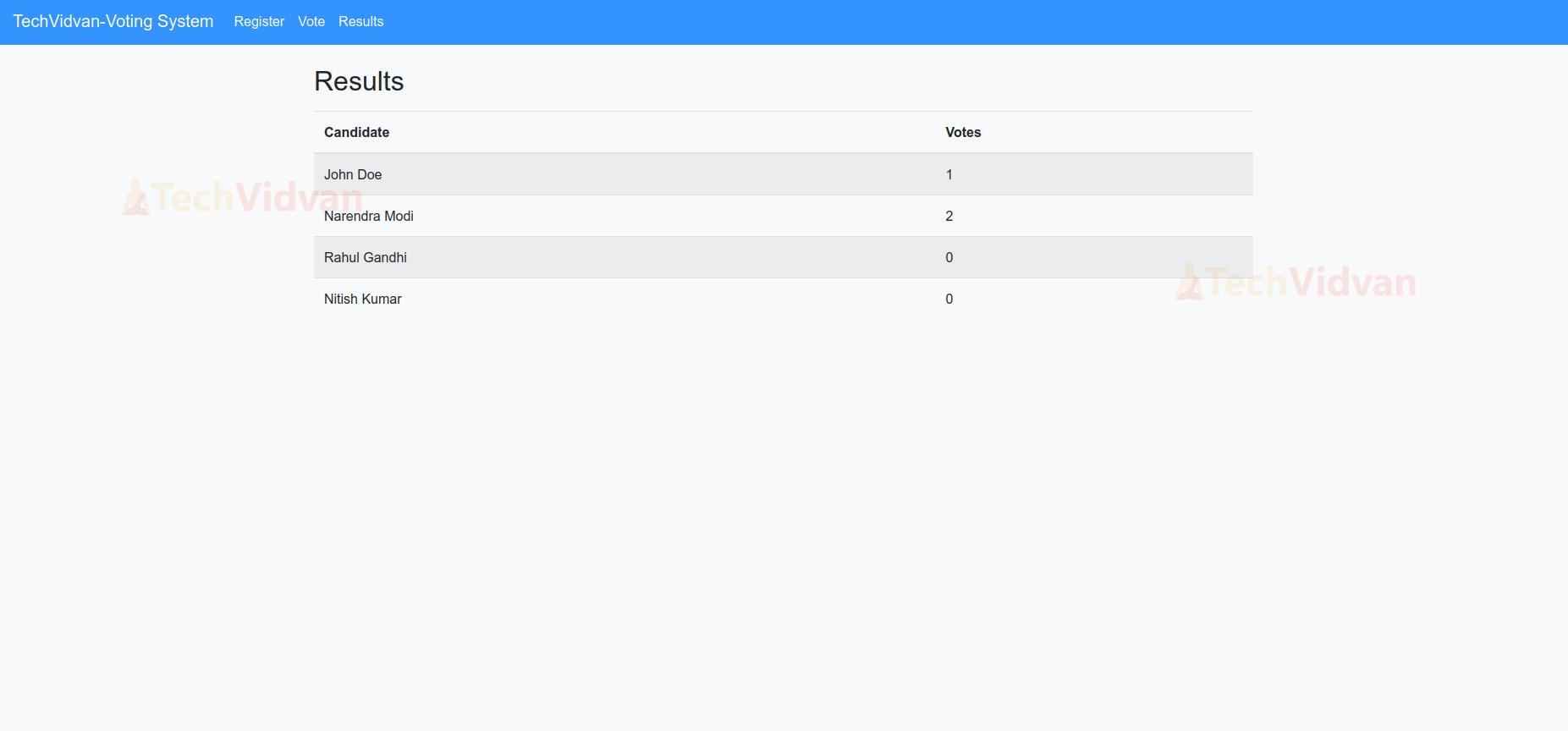
- ‘results/’ displays voting results.
from django.urls import path
from . import views


urlpatterns = [
   path('', views.home, name='home'),  # Home page view
   path('register/', views.register, name='register'),
   path('vote/', views.vote, name='vote'),
   path('results/', views.results, name='results'),
]
6. Creating Templates
base.html:-
- This template uses Django to create a dynamic web page for a voting system.
- A responsive navigation bar is provided with links to the home, register, vote, and results pages.
- URLs for these links are dynamically generated using Django’s {% url %} template tag.
- The main content and footer areas are defined using Django’s {% block %} tags.
- JavaScript libraries such as jQuery, Popper.js, and Bootstrap’s JS are included from CDNs to enable interactivity and responsive design.
<!DOCTYPE html>
<html>
<head>
   <title>{% block title %}Voting System{% endblock %}</title>
   {% load static %}
   <link href="https://stackpath.bootstrapcdn.com/bootstrap/4.5.2/css/bootstrap.min.css" rel="stylesheet">
   <link href="{% static 'vote/style.css' %}" rel="stylesheet">
</head>
<body>
   <nav class="navbar navbar-expand-lg navbar-custom fixed-top">
       <a class="navbar-brand" href="{% url 'home' %}">TechVidvan-Voting System</a>
       <button class="navbar-toggler" type="button" data-toggle="collapse" data-target="#navbarNav" aria-controls="navbarNav" aria-expanded="false" aria-label="Toggle navigation">
           <span class="navbar-toggler-icon"></span>
       </button>
       <div class="collapse navbar-collapse" id="navbarNav">
           <ul class="navbar-nav mr-auto">
               <li class="nav-item">
                   <a class="nav-link" href="{% url 'register' %}">Register</a>
               </li>
               <li class="nav-item">
                   <a class="nav-link" href="{% url 'vote' %}">Vote</a>
               </li>
               <li class="nav-item">
                   <a class="nav-link" href="{% url 'results' %}">Results</a>
               </li>
           </ul>
       </div>
   </nav>
   <div class="container">
       {% block content %}{% endblock %}
   </div>
   {% block footer %}{% endblock %}
   <script src="https://code.jquery.com/jquery-3.5.1.slim.min.js"></script>
   <script src="https://cdn.jsdelivr.net/npm/@popperjs/[email protected]/dist/umd/popper.min.js"></script>
   <script src="https://stackpath.bootstrapcdn.com/bootstrap/4.5.2/js/bootstrap.min.js"></script>
</body>
</html>
register.html:-
- {% extends “vote/base.html” %}, this block shows that it extends base.html.
- It includes external CSS for styling different pages of the Project.
- This template uses the Django template to dynamically generate a form for registering new users to vote.
<{% extends "vote/base.html" %}


{% block title %}Register - Online Voting System{% endblock %}


{% block content %}
<h2>Register</h2>
<form method="post" class="mt-3">
   {% csrf_token %}
   <div class="form-group">
       {{ form.as_p }}
   </div>
   <button type="submit" class="btn btn-success">Register</button>
</form>
{% endblock %}
vote_list.html:-
- The {% for candidate in candidates %} loop generates list items for each candidate, displaying their name and party.
- The {% empty %} tag provides a fallback message, “No candidates available,” if there are no candidates to display.
<!DOCTYPE html>
<html>
<head>
   <title>Voting List</title>
</head>
<body>
   <h1>Voting List</h1>
   <ul>
       {% for candidate in candidates %}
           <li>{{ candidate.name }} - {{ candidate.party }}</li>
       {% empty %}
           <li>No candidates available.</li>
       {% endfor %}
   </ul>
</body>
</html>
vote.html:-
- {% extends “vote/base.html” %} extends the base template, maintaining consistency across the pages
- {% block title %}Vote – Online Voting System{% endblock %} sets the page title to “Vote – Online Voting System”.
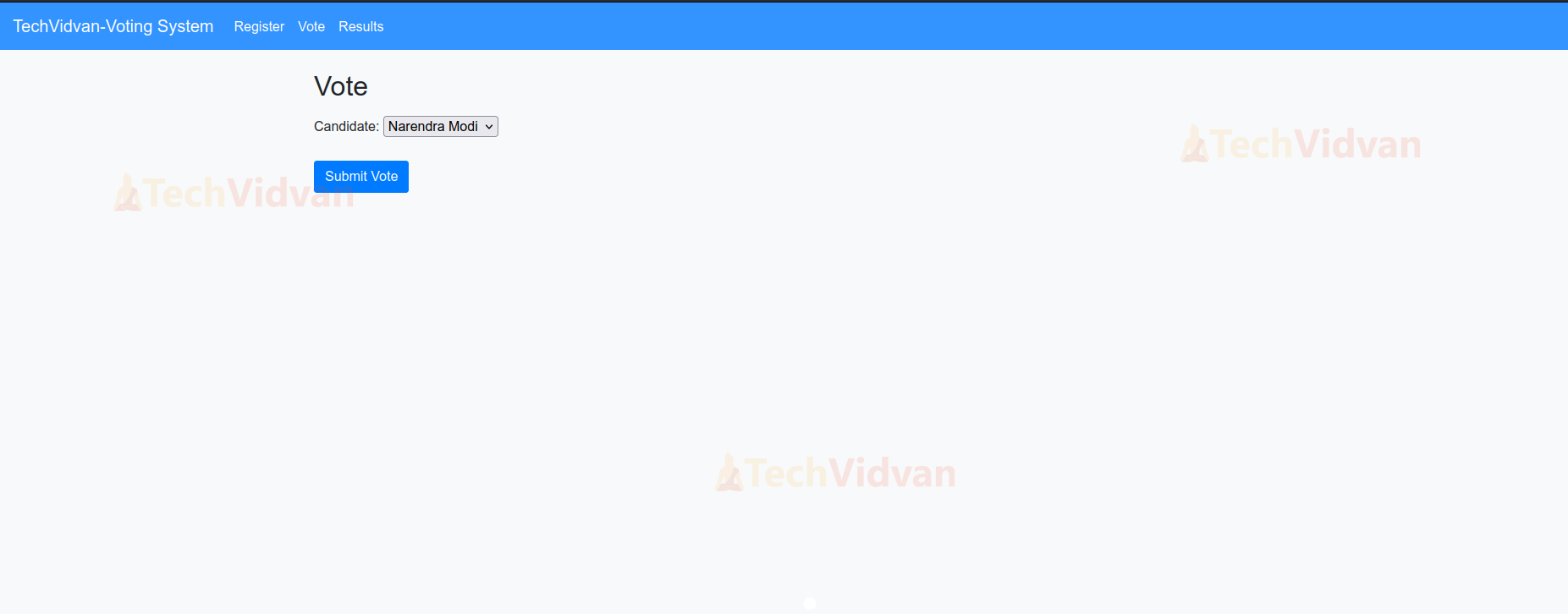
- The form, enclosed within <form> tags include a form-group div displaying the form fields with {{ form.as_p }}.
{% extends "vote/base.html" %}


{% block title %}Vote - Online Voting System{% endblock %}


{% block content %}
<h2>Vote</h2>
<form method="post" class="mt-3">
   {% csrf_token %}
   <div class="form-group">
       {{ form.as_p }}
   </div>
   <button type="submit" class="btn btn-primary">Submit Vote</button>
</form>
{% endblock %}
Python Django Online Voting System Output
1. Application Interface

2. Register

3. Voting Page

4. Candidate Selection
5. Results
Conclusion
The Online Voting System project demonstrates the effective use of Django for developing a secure and scalable voting platform. It provides a solid foundation for further enhancements, such as advanced result analytics, multi-level user roles, and improved security measures. This report outlines the key steps and components involved in creating a functional online voting system, making it suitable for deployment in various voting scenarios.